

Definition (developer‑friendly)
Cross‑site scripting (XSS) is a client‑side injection flaw where untrusted input is rendered in the browser without proper contextual output encoding or policy controls, allowing attacker‑supplied scripts to execute in a victim’s session. That execution can hijack sessions, alter DOM, exfiltrate data, or pivot to additional attacks.
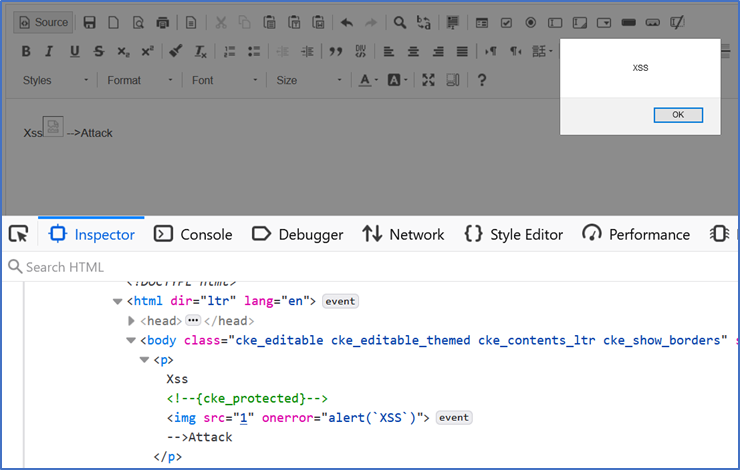
How XSS works (and why Devs still hit it)
IAt a high level, XSS happens when data from a request, database, message queue, template, or third‑party library reaches a dangerous sink (e.g., innerHTML, inline event handlers, document.write, JS string concatenation inside <script>, or URL/attribute contexts) without context‑appropriate encoding. Common XSS classes: Reflected (non‑persistent), Stored (persistent), and DOM‑based (client‑side routing/DOM manipulation).
Types of XSS (with quick developer cues)
Reflected XSS
Symptom: Unsanitized input reflected immediately in a response.
Where it hides: Search results, error messages, query‑param echoes.
Stored XSS
Symptom: Payload persists in data stores and is served later to other users.
Where it hides: Comments, user profiles, CMS fields, issue descriptions.
DOM‑based XSS
Symptom: Client‑side code reads untrusted data and injects it into the DOM or JS context at runtime (no server‑side template involvement).
Where it hides: SPA routers, client‑side templating, ad hoc DOM updates.
Harden with CSP and Trusted Types to break common DOM injection paths.
Preventing XSS (defense‑in‑depth)
1) Encode on output (by context).
Always apply context‑aware encoding for HTML body, attribute, URL, CSS, and JS contexts – ideally via your framework’s auto‑escaping. Avoid blacklist “filters.” Encode late (right before render).
2) Prefer safe DOM APIs.
Use textContent/setAttribute over innerHTML, avoid inline event handlers, and never concatenate untrusted data into <script> blocks. For rich HTML, use a vetted sanitizer and keep allowed tags minimal.
3) Enforce Content Security Policy (CSP).
Start with default-src 'self', forbid unsafe-inline by using nonces/hashes, and disable legacy features like object-src 'none'. CSP drastically reduces the blast radius of missed encodings and blocks many injected scripts.
4) Add Trusted Types for DOM XSS.
Trusted Types block assignments to risky sinks (e.g., innerHTML) unless values come from a registered policy. Combine with CSP’s require-trusted-types-for 'script' to stop entire classes of DOM‑based XSS.
5) Harden cookies & session handling.
Use HttpOnly, Secure, and SameSite cookies to limit token theft paths; pair with short‑lived tokens and strict authorization checks. (Best practice that complements CSP/encoding.)
6) Test continuously across SDLC.
- SAST finds server‑ and client‑side flows that route untrusted input to XSS sinks before runtime.
-
DAST exercises the running app to uncover exploitable XSS in real environments (including auth’d areas and APIs).
Combining both yields the best coverage.
Code snippets (pragmatic examples)
Safer DOM updates (browser)
// ❌ Avoid
node.innerHTML = userInput;

// ✅ Do
node.textContent = userInput; // encodes by design
CSP + Trusted Types headers (Node/Express with Helmet)
import helmet from "helmet";
import express from "express";
const app = express();

app.use(
  helmet({
    contentSecurityPolicy: {
      useDefaults: true,
      directives: {
        "default-src": ["'self'"],
        "script-src": ["'self'"],      // add nonces/hashes for inline scripts if needed
        "object-src": ["'none'"],
        "base-uri": ["'self'"],
        "frame-ancestors": ["'none'"],
        "require-trusted-types-for": ["'script'"],
        "trusted-types": ["app-policy"] // define policy in the client
      },
    },
  })
);
On the client, register a Trusted Types policy and ensure any HTML creation routes through it. Pair with CSP nonces/hashes to remove unsafe-inline.
How Checkmarx helps reduce XSS risk
See Cross Site Scripting (XSS) Cheat Sheet, Attack Examples & Protection at Vulnerability Knowledge Base.
- SAST (Static Application Security Testing) to catch XSS flows as code is written—across languages, frameworks, and templates. → See: Static Application Security Testing (SAST) (glossary) and Checkmarx SAST Engine.
- DAST (Dynamic Application Security Testing) to validate exploitability in staging or pre‑prod, including auth flows and APIs. → See: Checkmarx DAST (product) and docs.
- SCA to flag vulnerable JS/templating libraries that can re‑introduce XSS class bugs (e.g., DOM sanitizers, widgets). → See: Checkmarx SCA.
- Secrets Detection to prevent leaked tokens that magnify the impact of XSS session hijacking. → See: Secrets Detection.
- Codebashing developer training with hands‑on lessons covering XSS and secure patterns. → See: Codebashing.
- Checkmarx One unifies these in a single platform for shared policies, results, and governance. → See: Checkmarx One.
Quick XSS FAQ
Quick XSS FAQ
-
No. CSP reduces exploitability and provides telemetry, but you still need strict output encoding and safe DOM APIs. Combine CSP with Trusted Types for DOM‑based XSS.
-
Replace innerHTML with textContent (or a framework’s auto‑escaping render) and move any unavoidable HTML generation behind a Trusted Types policy.
-
Run SAST on every PR and scheduled full scans; run DAST against test/stage pre‑release; track open‑source exposure with SCA continuously.