Free Trial
Start Your Developer Assist Trial
Use your business email to request trial access. We’ll send your activation key and setup instructions once your trial is provisioned.
Thanks – Your Developer Assist trial request has been received
We’ll send your activation key and setup instructions to your business email once your trial is provisioned
What happens next
1. Check your email
Once your trial is provisioned, you’ll receive your personal Activation Key and setup instructions at the business email address you used to sign up.
2. Set up Developer Assist
Follow the instructions in your activation email to connect Developer Assist to your preferred supported environment, including IDEs such as VS Code, Visual Studio, JetBrains, Eclipse, Cursor, Windsurf, and Kiro, as well as supported terminal and AI coding workflows.
3. Activate and start evaluating
Enter your Activation Key, open a repository, and start using Developer Assist to identify and remediate security issues as you code.
4. Evaluate with your own workflow
Use the 30-day trial to validate Developer Assist with your code, development tools, and security requirements.
Validate Developer Assist
in Your Development Environment
See how Developer Assist detects, fixes, and verifies application security issues directly in the tools your developers use. The 30-day trial gives your team hands-on access to evaluate Developer Assist against your workflows and use cases.
Full Developer Assist experienceEvaluate Developer Assist capabilities across detection, remediation, safe refactoring, and verification.

Works where developers workValidate Developer Assist in supported IDEs, coding agents, CLI workflows, and MCP-connected tools.

Validate your use casesUse the trial to evaluate Developer Assist against your development workflows and technical requirements.

Guided setup and activationReceive activation instructions and configuration guidance to get Developer Assist running in a supported environment.

Secure Generated Code
in Real Time
Supported Development Environments
IDEs
Coding agents
CLI/terminal
Secure code as it’s created in agentic coding workflows, with real-time detection and remediation directly in the terminal
MCP-connected tools
Connect AI assistants to Checkmarx security intelligence for scanning, investigation, triage, and remediation through natural language.
Get Your Free Trial
in Three Steps
Request access
Submit your business email to start your Developer Assist trial.
Receive activation instructions
Once the trial is provisioned, we’ll send your activation key and setup instructions.
Connect Developer Assist
Install or connect Developer Assist in a supported development environment and activate your trial.
Trial scope & limits


Available on IDEs, Coding Agents, CLI and MCP-connected tools


or connectivity:Not required, but is supported.
Close the Loop
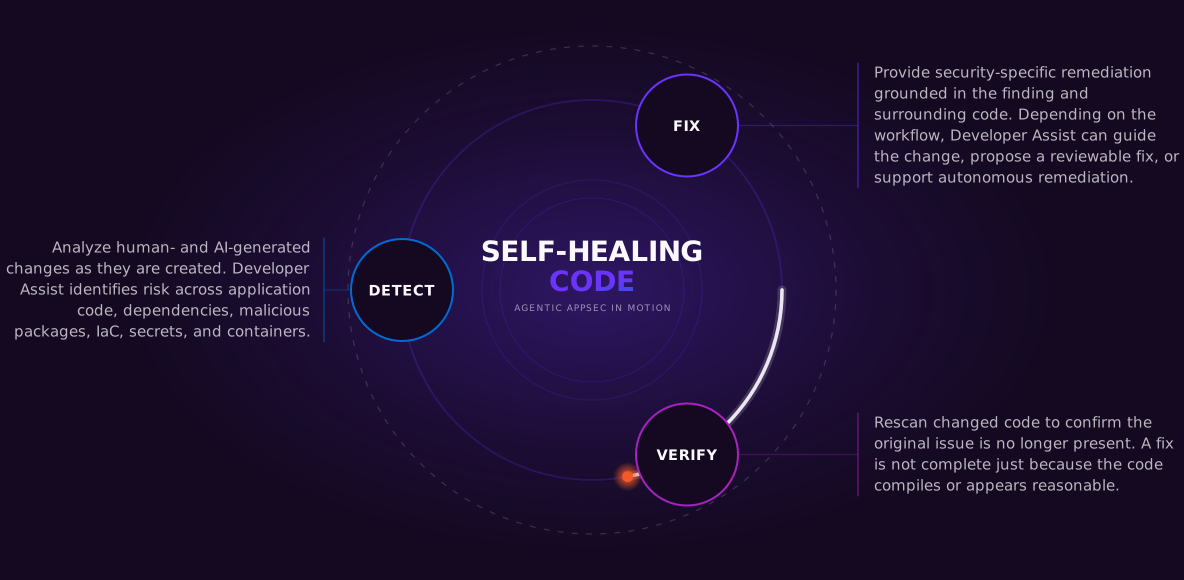
from Detection to Verified Remediation
Detect
Analyze human- and AI-generated changes as they are created. Developer Assist identifies risk across application code, dependencies, malicious packages, IaC, secrets, and containers.
Fix & Safe Refactor
Provide security-specific remediation grounded in the finding and surrounding code. Depending on the workflow, Developer Assist can guide the change, propose a reviewable fix, or support autonomous remediation.
Verify
Rescan changed code to confirm the original issue is no longer present. A fix is not complete just because the code compiles or appears reasonable.
Repeat
In supported autonomous workflows, Developer Assist can return the finding to the coding agent and retry remediation before risky work continues. In developer-led workflows, developers review and accept changes before verification.
FAQ
Start Your 30-Day Evaluation
Use your business email to request access. We’ll send your activation key once your trial is provisioned.
Thanks! Your Developer Assist trial request has been received
We’ll send your Activation Key and setup instructions to your business email once your trial is provisioned.
What happens next
1. Check your email
Once your trial is provisioned, you’ll receive your personal Activation Key and setup instructions at the business email address you used to sign up.
2. Set up Developer Assist
Follow the instructions in your activation email to connect Developer Assist to your preferred supported environment, including IDEs such as VS Code, Visual Studio, JetBrains, Eclipse, Cursor, Windsurf, and Kiro, as well as supported terminal and AI coding workflows.
3. Activate and start evaluating
Enter your Activation Key, open a repository, and start using Developer Assist to identify and remediate security issues as you code.
4. Evaluate with your own workflow
Use the 30-day trial to validate Developer Assist with your code, development tools, and security requirements.
Need help?
If you have questions during your evaluation, your Checkmarx representative can help with setup, technical validation, or next steps.
What to expect
Evaluate – No Strings Attached
No payment details, no auto-renewal
The trial ends after 30 days. There is no automatic charge and no conversion to a paid subscription.
Your Activation Key arrives by email
Once your trial is provisioned, your key and setup instructions are sent to the business email address you signed up with.
Full Developer Assist Experience
Detection, remediation, safe refactoring and verification, with no usage, scan or repository limits for the full 30 days.
No Checkmarx Product Required
Standalone Developer Assist runs in your development environment on its own. An existing Checkmarx One tenant is supported but not needed.