

AppSec teams have always faced a tradeoff – one that feels impossible to solve. Rules-based scanners are precise and consistent, but they only catch what they’ve been explicitly told to look for. AI-based scanners reason more broadly and catch things rules miss – but ask the same question twice and you can get two different answers.
Checkmarx’s hybrid model removes that tradeoff.
A deterministic detection engine and an AI reasoning engine analyze the code in parallel, and a third engine, the Findings Analysis Engine (FAE), reconciles their output into one verified result. It is precise, broad, and repeatable every time.
But the hybrid model is only the start.
Checkmarx Fusion, now in Early Access for SAST within Checkmarx One, adds a new layer on top of that hybrid foundation. Its Multi-Model AI Engine runs several curated frontier AI models on top of the FAE’s already-reconciled results, surfacing vulnerabilities with no known rule, CVE, or signature to catch them.
Here’s how it works – and how this model finds what other scanners were never built to see.
Why a New Model Is Needed
The limitations of traditional detection are becoming more consequential as AI changes both how software is built and how quickly it can be attacked.
AI assistants are generating more code, across more languages, faster than security teams can review it. Checkmarx’s latest Future of Application Security report found that organizations where AI generates 81–100% of production code ship known vulnerabilities at 3.4 times the rate of organizations that generate only 1–20% of code.
At the same time, attackers are moving faster. Anthropic research found that a working exploit could be generated within an hour of a patch being released. A vulnerability that goes undetected may become an active risk before security teams have time to respond.
But simply adding more AI is not enough. Standalone AI scanning can be inconsistent from one run to the next, while operating frontier models at enterprise scale can create high, unpredictable token costs.
Organizations need detection that can keep pace with AI-generated code without sacrificing precision, repeatability, or operational control.
How the Hybrid Model Works
The hybrid model provides that foundation. It is made up of three engines, each serving a distinct role:
Deterministic Engine: Rules-based analysis of known vulnerability classes. Precise, explainable, and consistent from scan to scan.
AI-Based Engine: Extends coverage to languages and patterns that rules alone cannot reach, including novel logic and AI-generated code.
Findings Analysis Engine (FAE): Reconciles the output of both engines into one clean result set. False positives removed, true positives kept.
This foundation transforms what a security scan can deliver – and it’s currently powering our Next Generation SAST. But Fusion takes it even further.
Fusion’s Multi-Model AI Engine applies several curated frontier models to the hybrid model’s verified findings. Each analyzes the code from a different perspective, allowing Fusion to uncover vulnerabilities that no single rule, signature, or AI model would be likely to identify alone – including issues with no known rule, prior CVE, or existing signature.
The advanced AI models are selected and validated by Checkmarx research, and customers can choose higher- or lower-cost options based on the needs of each project. This extends AI-driven coverage while keeping scan costs predictable.
Together, the hybrid model and Fusion deliver:
- Precision without sacrificing coverage: deterministic precision and AI coverage together, not a compromise between them.
- Consistent, repeatable results: scan it twice, get the same result, on any scan type running the hybrid model. Standalone AI scanning can’t promise that.
- Less noise for teams: the Findings Analysis Engine, part of the hybrid model, strips noise before it reaches your team. Every finding traces to a rule or a verifiable signal, the same standard across every scan type.
- One unified risk view: every scan’s findings land in Checkmarx One ASPM (Risk Orchestration) next to each other, scored against the same risk model, instead of a fragmented view across separate tools.
As Erik Brown, Business Information Security Officer and AppSec Leader at Nelnet, put it: “With AI generating unprecedented amounts of code, security has to be an enabler, not a bottleneck.” He added: “The industry finally has an approach built for what AI demands.”
The Data Backs It Up
The numbers show just how much this model changes security outcomes.
The F1 score measures both precision – how many reported findings are real – and recall – how many real vulnerabilities are found. A higher score means stronger detection – that is, finding more real vulnerabilities – without burying teams in false positives.
Traditional, query-based SAST averages roughly 0.20. Next-Gen SAST, run on the hybrid model, raises that score to 0.64, more than triples the baseline. Add a Fusion scan, and it reaches 0.74 – nearly four times the industry average – with 60–70% fewer false positives than standalone AI scanning.
Teams get broader coverage with a result set they can realistically manage. Fusion improves precision and recall even more, extending that coverage into novel vulnerabilities, unseen patterns, and flaws unique to AI-generated code.
| Approach | F1 Score |
|---|---|
| Query-based SAST (industry average) | 0.20 |
| Hybrid model alone (Next-Gen SAST) | 0.64 |
| Hybrid model + Fusion | 0.74 |
Mustapha Kebbeh, Chief Security Officer at UKG, put it this way: “The question I hear every day is no longer whether we have vulnerabilities, it’s whether we’ve discovered the ones that matter most and whether we’re fixing them fast enough. That’s exactly what Checkmarx Fusion is built to address.”
Efficient at Scale
That level of coverage only matters if it can be delivered efficiently, predictably, and securely at enterprise scale. Fusion uses a bounded, curated set of research-validated models rather than relying on open-ended frontier API calls. In practice that means:
- Predictable Cost: Higher- or lower-cost models, your choice, with no token bill that compounds across every commit.
- Model Optionality: Choose high- or low-cost models per project, without being locked to any single provider.
- Cost Optimization: Prompt, context, and harness tuning, combined with incremental scans, keep performance high and spend controlled as usage grows.
- Enterprise Scale: Incremental scanning re-scans only new and changed code, so performance improves as your codebase grows.
- Built-In Data Protection: Source code and customer data remain within your own cloud environment or tenant using Amazon Bedrock.
The hybrid model – now offered within Next-Gen SAST – remains part of standard Checkmarx licensing, while Fusion is offered as an optional, usage-based add-on that draws on Checkmarx credits.
How to Use Fusion
Here’s what running Fusion looks like inside Checkmarx One, start to finish.
1. Turn it on. Enable Checkmarx Fusion under Account Settings → AI Capabilities. From here, teams control the account-level switch, see which curated models are active, and track remaining token budget in real time.
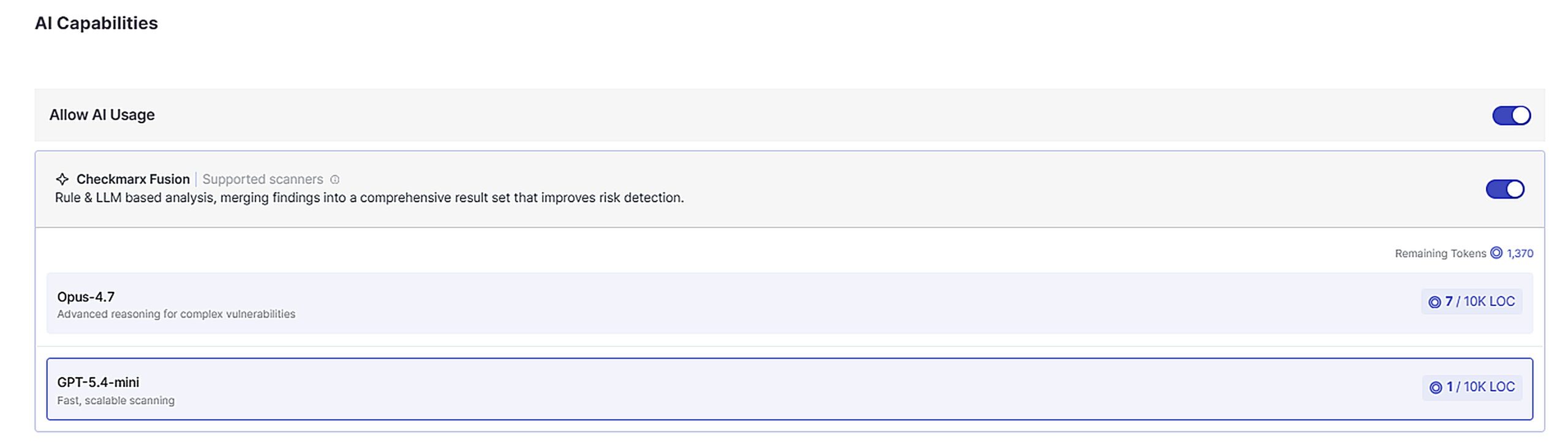
A note on the numbers in this screenshot: the token and per-model figures are illustrative. Treat any dollar or token figure here as a preview, not a rate card.
2. Start a scan and select Checkmarx Fusion. Point Checkmarx One at a repository, file, or SBOM, then choose which scanners run. Fusion sits alongside SAST, SCA, IaC, API Security, and the rest, so enabling it is a checkbox in the same flow, not a separate tool.
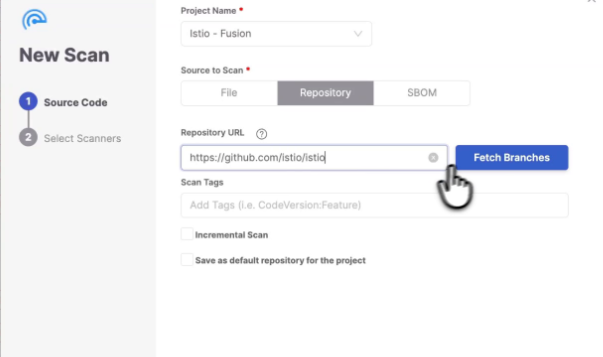
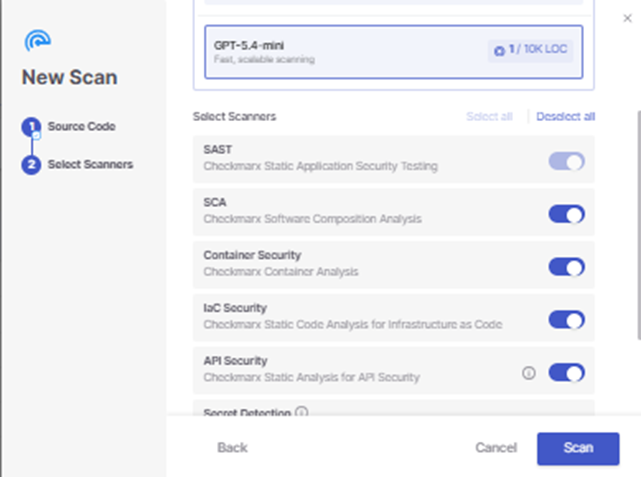
3. Review results at the portfolio level. Once scans complete, risk level and total vulnerabilities roll up per project. Scanner badges show which engines contributed to each result.
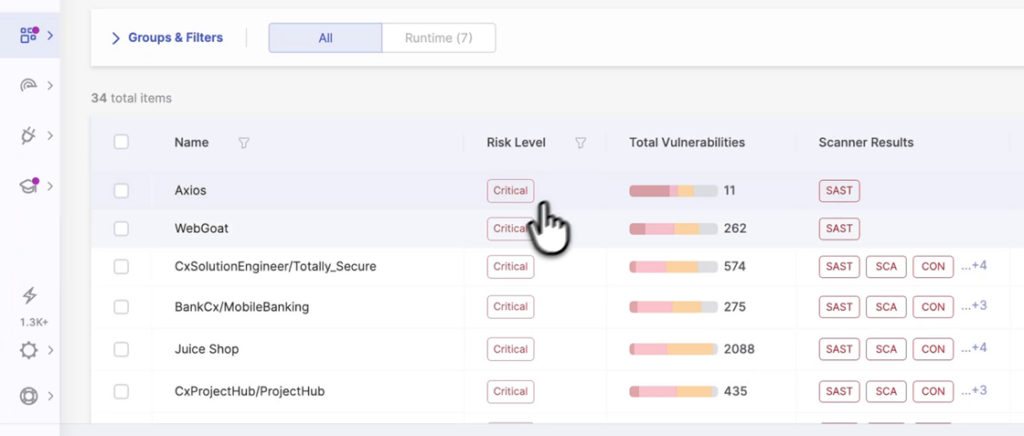
4. Drill into Risk Orchestration. Every finding lands in the same Risk Orchestration view, regardless of which engine produced it. Teams can filter for Checkmarx Fusion’s LLM-based results alongside every other scanner.
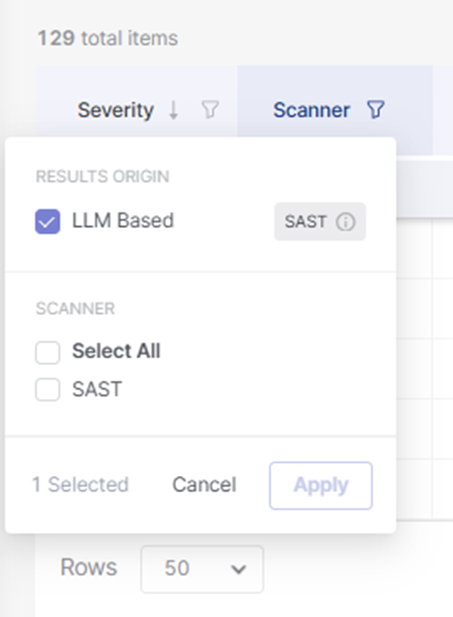
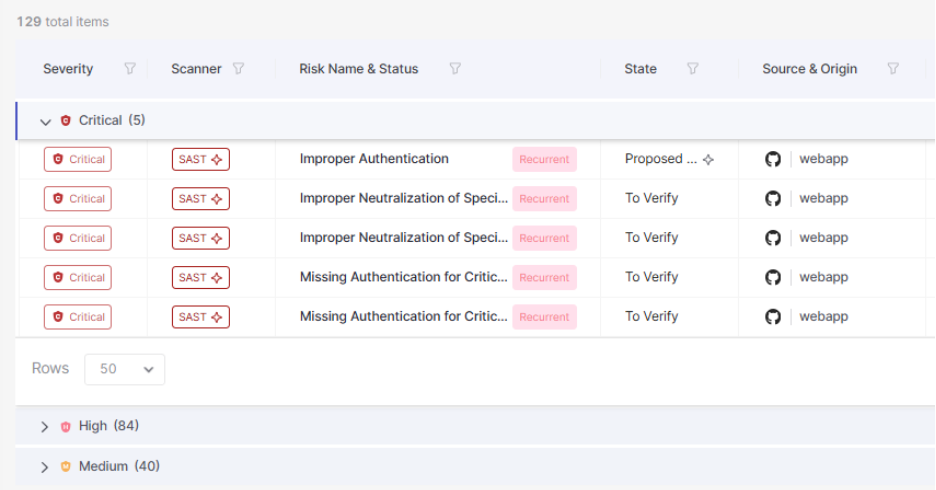
5. Know what’s AI-generated. The results table labels findings as “LLM Generated Result” when AI-based analysis produced them, so nothing is a black box.
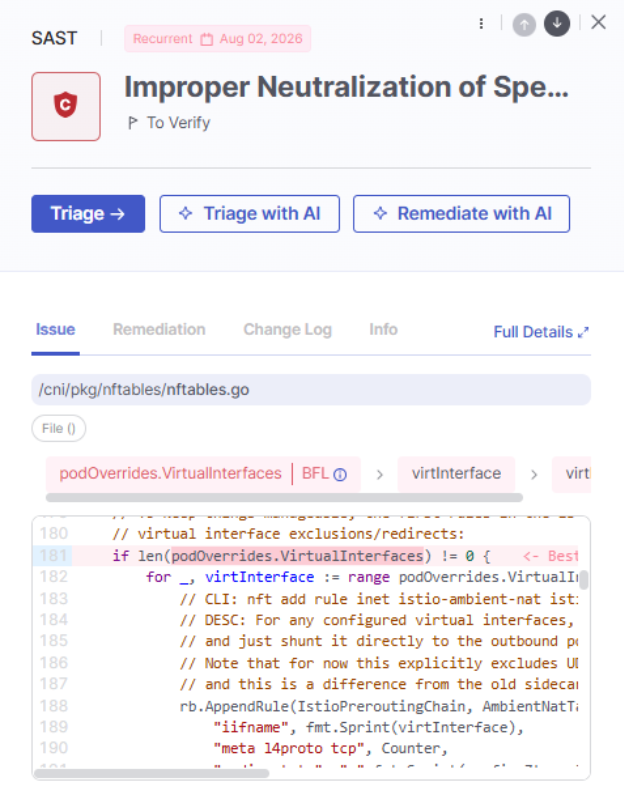
From here, findings flow into Triage Assist and Remediation Assist.
From Finding to Fix, All Within Checkmarx One
Fusion findings don’t land in a separate tool, queue, or workflow. They’re part of the unified risk picture in Checkmarx One’s Risk Orchestration, where they can be prioritized and acted on alongside findings from the rest of the platform. Fusion focuses on discovery, delivering a clean, high-fidelity finding on top of what our hybrid engines already found.
Triage and Remediation Assist takes from there. It carries eligible findings forward – from determining whether it presents a real application risk to preparing a fix. Together, this interconnected workflow can deliver:
Up to 95% faster MTTR: Attackability-based decisions and review-ready guidance cut the time from finding to fix.
65%+ fixed on the first attempt: context-aware remediation guidance gets it right without repeated back-and-forth.
Up to 60% lower operational cost: fewer handoffs and less rework between AppSec and development teams.
Governed, not autonomous: scoped rollout, eligibility criteria, and action-mode controls (diffs vs. PR) mean the agent proposes, and the developer disposes.
This is where Checkmarx Fusion’s higher fidelity pays off. Cleaner, more trustworthy findings give downstream prioritization and remediation a stronger foundation, reducing manual validation and helping teams move more risk toward resolution faster.
Zoom out and see that this handoff is part of a bigger picture of the connected security lifecycle within Checkmarx One:
- Prevent with the Assist family of agents – from Developer Assist, Triage Assist, and Remediation Assist. Developer Assist catches issues before code is even generated for a developer.
- Discover with Fusion and Next-Gen SAST, which find what got through, including zero-day and unknown-pattern vulnerabilities no rule or signature could catch alone.
- Remediate with Triage & Remediation Assist, which clears the backlog and resolves the exploitable risk that discovery surfaces, including the zero-day findings Fusion turns up.
Fusion makes sure that what gets handed off is real, so the resolution stage isn’t wasting time on noise.
See It in Your Application
Checkmarx Fusion is in Early Access, available within Checkmarx One for teams using credits. Schedule a demo to see how it works in your own environment or visit the Checkmarx Fusion solution page for more details.
Agentic AI
AI generated code
AI in Cybersecurity
Checkmarx One Assist
SAST