


Summary
Automated remediation tools turn scanner findings into proposed code changes developers can review and merge. Checkmarx One is best for governed triage and remediation across SAST and SCA, Snyk Code suits IDE and pull request auto-fixing, GitHub Code Security suits CodeQL-based fixes, and Pixee suits scanner-agnostic remediation.
Which Tools Provide Automated Vulnerability Fix Suggestions?
Dedicated automated remediation tools and platform-integrated scanners provide automated fix suggestions, supporting remediation for common application vulnerabilities. Instead of only reporting a vulnerability, these tools identify the affected code and recommend a specific remediation, such as upgrading a dependency, changing an insecure function, or adding validation.
Suggestions can range from a single-line patch to changes across several files. Some tools generate pull requests automatically, while others present patches for developer review. The goal is to reduce the work required to move from vulnerability detection to a tested fix without removing human oversight.
Key features to look for in automated vulnerability remediation tools:
- High-confidence vulnerability detection: Prioritize tools that verify exploitability with code, dependency, reachability, and context analysis.
- Language and framework coverage: Confirm the tool supports your actual languages, frameworks, package managers, build systems, and versions.
- Code-aware remediation: Look for fixes that account for surrounding code, data flow, types, dependencies, and framework conventions.
- Automated fix suggestions built into the platform: Ensure fixes are generated in-platform, tied to findings, reviewable as diffs, and validated where possible.
- Automated pull requests: Choose tools that create focused PRs with vulnerability context, validation results, and controls to prevent review noise.
- Multi-scanner support: Prefer tools that ingest, normalize, and deduplicate findings from SAST, SCA, container, secrets, and IaC scanners.
- Developer workflow integration: Make sure remediation fits into source control, CI/CD, issue tracking, IDEs, dashboards, and approval workflows.
This is part of a series of articles about vulnerability management
Top Automated Remediation Tools at a Glance
The table below summarizes the key differences between the tools covered in this section, including what each one is suited to and where its trade-offs lie. Each tool is then examined in more detail below, with its capabilities and reported limitations.
| Category | Solution | Best For | Key Strengths | Things to Consider |
| Platforms with built-in fix automation | Checkmarx One Triage & Remediation Assist | Governed triage and remediation on SAST and SCA findings | Attackability-based prioritization, review-ready fix PRs, audit trail | Scans on large codebases can take time to complete |
| Platforms with built-in fix automation | Snyk Code | Auto-fixing code issues inside the IDE and pull requests | Pre-screened fixes, real-time scanning, broad SCM integration | Custom rules and policies are limited in SAST and IaC |
| Platforms with built-in fix automation | Veracode Fix | Batch remediation of common flaws across a project | CLI batch mode, IDE integration, quality-gated suggestions | Interface and reporting feel dated to some users |
| Platforms with built-in fix automation | GitHub Code Security | Teams standardized on GitHub and CodeQL | Autofix on CodeQL alerts, security campaigns, dependency review | Per-developer pricing scales quickly on large teams |
| Platforms with built-in fix automation | SonarQube AI CodeFix | Fixing quality and security issues found by Sonar analysis | Transparent diffs, choice of LLM, IDE and PR delivery | Does not open remediation pull requests on its own |
| Dedicated remediation tools | Mobb | Bulk fixing of recurring findings from existing SAST tools | Deterministic hybrid-AI fixes, 100+ issue types, bulk PRs | Fix coverage is tied to a defined list of issue types |
| Dedicated remediation tools | Pixee | Scanner-agnostic remediation across an existing security stack | Ingests findings from 11+ tools, triage, three validation layers | Language coverage is narrower than general-purpose scanners |
| Dedicated remediation tools | Corgea | Finding and fixing business logic flaws alongside standard scans | AI SAST, PR fixes, reachability from public routes | Younger product with fewer enterprise governance features |
Related content: Read our article about vulnerability management tools
How Do Automated Vulnerability Remediation Tools Work?
Vulnerability Detection
The process starts by scanning source code, dependencies, container images, infrastructure definitions, or configuration files. Tools may use static application security testing, software composition analysis, secret scanning, or other techniques depending on the target.
Detected issues are matched against vulnerability databases, security rules, or known insecure code patterns. The tool records information such as the affected component, vulnerable code path, severity, and available remediation data. These findings become the input for later fix generation.
Context and Root-Cause Analysis
Before proposing a change, the tool needs to determine why the vulnerability exists and where a fix should be applied. For a vulnerable dependency, this can mean tracing direct and transitive dependencies. For an application flaw, it can mean examining data flow, function calls, and nearby code.
More advanced tools also inspect repository context, such as framework versions, package manifests, tests, and related functions. This helps distinguish the vulnerable behavior from code that merely appears similar and reduces the chance of generating a patch that conflicts with the application’s existing design.
Fix Generation
The tool then creates one or more candidate changes. Rule-based systems can apply predefined transformations, such as replacing an unsafe API or updating a package to a non-vulnerable version. Other systems use code analysis or generative models to produce patches based on the vulnerability and surrounding code.
A useful fix should address the security issue while minimizing unrelated changes. For example, a dependency fix should select a compatible secure version rather than automatically upgrading to the newest release. A code-level fix should preserve existing interfaces and behavior where possible.
Validation
Generated fixes must be checked before they are accepted. Tools can rescan the patched code to verify that the original vulnerability is no longer detected. They may also compile the project and run unit, integration, security, or regression tests.
Validation also helps identify fixes that introduce new problems. A patch may remove the vulnerable pattern but break an API contract, change application behavior, or create another security weakness. Automated checks reduce this risk, but they cannot prove that every generated fix is correct.
Developer Review and Deployment
Validated fixes are typically presented as patches, commits, or pull requests rather than deployed directly. Developers can inspect the proposed changes, review test results, and confirm that the remediation fits the application’s security and functional requirements.
After approval, the fix follows the project’s normal merge and deployment process. Keeping developers in this loop is important because automated tools may lack business context, production constraints, or knowledge of intended behavior. Human review provides the final check before a security change reaches production.
Related content: Read our guide to the vulnerability remediation process
What Key Types of Application Vulnerabilities Can These Tools Fix?
Injection Vulnerabilities
Automated fix tools can address injection flaws where untrusted input is passed into SQL queries, shell commands, or other interpreters. Typical fixes replace string concatenation with parameterized queries, prepared statements, or safer APIs that separate data from executable instructions.
For example, a tool may detect user input embedded directly in a SQL statement and rewrite the query to use bound parameters. More complex injection flaws may still require manual review because the correct fix depends on how the application constructs and uses the command.
Cross-Site Scripting (XSS)
XSS vulnerabilities occur when untrusted data reaches an HTML, JavaScript, URL, or other browser context without appropriate handling. Automated tools can trace these data flows and suggest context-specific output encoding, sanitization, or safer rendering APIs.
The correct remediation depends on where the value is inserted. HTML escaping alone, for example, may not protect data placed inside JavaScript. Effective tools therefore use information about the output context rather than applying the same sanitization function everywhere.
Insecure Data Flows and Input Validation Issues
Some vulnerabilities arise when attacker-controlled data reaches sensitive operations without sufficient validation. Examples include unvalidated file paths, redirects, URLs, object properties, and parameters used for security-sensitive decisions.
Automated fixes can add allowlist validation, type or range checks, canonicalization, or safer APIs at appropriate points in the data flow. However, tools may not know the application’s intended business rules, so developers should verify that generated validation accepts legitimate inputs while rejecting unsafe ones.
Cryptographic and Sensitive Data Handling Issues
Security scanners can identify weak algorithms, insecure cipher modes, predictable random number generators, and unsafe handling of passwords or other sensitive values. Suggested fixes may replace deprecated cryptographic APIs with supported algorithms and secure library functions.
For password storage, for example, a tool may recommend a dedicated password hashing function instead of a general-purpose hash. Cryptographic changes require careful review because parameters, key management, compatibility, and existing stored data can affect whether a technically secure replacement works correctly.
Hardcoded Secrets and Credentials
Automated tools can detect API keys, passwords, access tokens, private keys, and other credentials embedded in source code or configuration files. A common fix removes the value from the repository and changes the application to retrieve it from an environment variable or secrets management system.
Removing the secret from code is only part of the remediation. If the credential was committed or exposed, it should generally be revoked and rotated because repository history, build logs, caches, or previous deployments may still contain the original value.
Vulnerable Open Source Dependencies
Software composition analysis tools identify dependencies associated with known vulnerabilities. They can often suggest or automatically apply an upgrade to the nearest version containing the upstream security fix.
Dependency remediation can also involve transitive packages that the application does not declare directly. Tools may update lockfiles, adjust version constraints, or upgrade a parent dependency to resolve them. Tests remain important because even security-focused version changes can introduce compatibility or behavior changes.
Container and Base Image Vulnerabilities
Container scanners can identify vulnerable operating system packages, language packages, and components inherited from a base image. Automated remediation may update affected packages, replace the base image with a patched release, or rebuild the image from a newer digest.
A successful fix must also ensure that the vulnerable component is absent from the final image. Rebuilding from an updated base image is often necessary because changing the Dockerfile reference alone does not update already-built images stored in registries or running in deployed environments.
Infrastructure-as-Code Misconfigurations
Automated tools can detect insecure settings in Terraform, CloudFormation, Kubernetes manifests, and other infrastructure-as-code files. Common findings include public storage, unrestricted network access, excessive permissions, missing encryption, and containers running with unnecessary privileges.
Fix suggestions modify the relevant resource definitions, such as narrowing a firewall rule, enabling encryption, or adding a restrictive security context. Infrastructure changes need review against deployment requirements because a secure-looking configuration can disrupt required connectivity, permissions, or service behavior.
Key Features to Look for in Automated Vulnerability Remediation Tools
High-Confidence Vulnerability Detection
Remediation quality depends on accurate detection. Look for tools that combine vulnerability signatures with data-flow, control-flow, reachability, or dependency analysis to distinguish exploitable issues from patterns that only appear unsafe.
The tool should provide evidence for each finding, including the affected file, vulnerable code path, severity, and relevant source and sink where applicable. For dependency vulnerabilities, it should show whether the vulnerable package is actually reachable from application code rather than relying only on package version matching.
False positives can quickly reduce developer trust in automated remediation. Tools should therefore support confidence scoring, suppression of verified non-issues, and prioritization based on exploitability and application context. Higher-quality findings lead to fewer unnecessary patches and shorter review cycles.
Language and Framework Coverage
A remediation tool should support the languages, frameworks, package managers, and build systems used across the application portfolio. Detection alone is insufficient if the tool cannot generate appropriate fixes for the affected technology.
Check coverage at a detailed level. Support for a language does not necessarily mean support for every framework, library, or vulnerability class within it. A tool that supports Java, for example, may provide stronger remediation for Spring applications than for less common frameworks.
Teams should also verify support for the versions they currently run. Older frameworks, legacy build systems, and uncommon package managers may have limited remediation coverage. Broad and current coverage is especially important for organizations maintaining applications across several technology stacks.
Code-Aware Remediation
Effective remediation should account for surrounding code rather than replacing isolated patterns mechanically. The tool should understand relevant functions, types, data flows, dependencies, and framework conventions before proposing a patch.
Code awareness helps produce smaller changes that preserve existing behavior. It is particularly important when multiple technically valid fixes exist, because the best option often depends on how the application uses the affected component.
For example, replacing an unsafe API may require changing argument types, error handling, or nearby validation logic. A code-aware tool can account for these relationships instead of generating a patch that removes the security warning but causes compilation failures or changes application behavior.
Automated Fix Suggestions Built Into the Platform
Automated fix suggestions should be available alongside vulnerability findings so developers do not need to move between separate tools. The platform should show the proposed code or configuration change, explain what it modifies, and connect the patch to the specific vulnerability it addresses. Make sure the platform provides its own automated fix suggestions rather than rely on third party tooling.
Look for fixes that use repository and application context rather than generic remediation guidance. Depending on the finding, the tool may generate a source-code patch, update a dependency version, modify a configuration value, or replace an insecure API. Developers should be able to review the exact diff before applying it.
The platform should also validate suggested fixes where possible. This can include rescanning the changed code, checking that it compiles, and running relevant tests. Providing validation results with the suggestion helps developers distinguish a usable patch from a change that only removes the scanner finding.
Automated Pull Requests
Tools that create pull requests can move remediation directly into existing review workflows. A useful pull request should contain a focused patch along with vulnerability details, affected components, severity, and validation results.
Look for controls over when pull requests are created and how changes are grouped. Excessive automated pull requests can create review noise, while combining unrelated security fixes can make testing, approval, and rollback more difficult.
Good tools also keep pull requests up to date when branches change or newer fixes become available. They may rerun tests, resolve simple merge conflicts, or close obsolete remediation requests. These capabilities reduce maintenance work while keeping developers in control of whether a change is merged.
Multi-Scanner Support
Organizations often detect vulnerabilities through several sources, including static analysis, software composition analysis, container scanning, secrets detection, and infrastructure-as-code scanning. Remediation tools should be able to consume findings from the scanners relevant to the development environment.
Multi-scanner support also helps normalize and deduplicate overlapping findings. This allows developers to work from a more consistent remediation queue instead of reviewing separate reports for the same underlying problem.
Look for support for common formats, APIs, and security platforms rather than integrations limited to a single scanner. The remediation system should preserve important metadata such as severity, CWE or CVE identifiers, affected locations, and scanner evidence when importing findings.
Developer Workflow Integration
Remediation should fit into the tools developers already use. Useful integrations include source control platforms, CI/CD pipelines, issue trackers, integrated development environments, and security dashboards.
The tool should support appropriate approval gates rather than bypassing normal development controls. Features such as status checks, configurable policies, notifications, and audit trails help teams automate routine remediation while retaining review and deployment controls.
IDE integrations can surface fixes while developers are working on the affected code, while CI/CD integrations can prevent unresolved high-severity issues from progressing toward deployment. Source control integrations can assign reviewers, create branches, and attach remediation evidence directly to pull requests.
Notable Tools Offering Automated Remediation for Common Application Vulnerabilities
How we selected these tools: We shortlisted tools offering automated fix suggestions based on their ability to detect application vulnerabilities, analyze the surrounding code context, generate code-level or dependency-level changes, validate those changes, and deliver them into existing developer review workflows.
Application Security Platforms with Built-In Vulnerability Remediation
Application security platforms with built-in vulnerability remediation combine vulnerability detection and fix generation in the same product. They use findings from their own SAST, SCA, or other scanning engines to generate code changes, dependency updates, or remediation guidance.
1. Checkmarx One Triage & Remediation Assist

Best for: Governed triage and remediation on SAST and SCA findings
Strengths: Attackability-based prioritization and review-ready fix PRs
Things to consider: Requires findings generated by Checkmarx One platform
Checkmarx One Triage & Remediation Assist is a pair of agentic AI capabilities that sit on top of scan results produced by the Checkmarx One platform. Triage Assist evaluates eligible SAST and SCA findings and classifies them, while Remediation Assist converts prioritized risks into remediation guidance and, where supported, code changes.
The capabilities operate at both the repository and pull request stage. Findings are enriched with code, policy, and AI-generated context, so security teams can review triage results, update risk state, and keep the decision rationale recorded in Checkmarx One rather than in a separate system.
Delivery is deliberately review-based. Remediation guidance appears in Checkmarx One across supported project types, and supported GitHub Code Repository Integration projects can additionally receive remediation pull requests. Nothing merges automatically, so developers remain accountable for the final change.
Key features include:
- Attackability-driven prioritization: Findings are classified as False Positive, Acceptable Risk, or Action Required using reachability, exploitability, policy, and code context. Automated triage rules and a configurable cadence keep eligible backlog risks current.
- Review-ready remediation: Prioritized pull request and backlog risks are turned into remediation guidance inside Checkmarx One, and fix pull requests are generated for review and merge on supported GitHub code repository projects.
- Dual-mode execution: The capabilities support both pre-release and post-commit workflows. On supported GitHub projects, triage verdicts and remediation options surface directly in the pull request before merge.
- Scan output analysis across SAST and SCA: Both scan types feed the same triage and remediation pipeline, so code-level flaws and open source dependency issues are handled through one workflow.
- Governance controls: Administrators can configure remediation delivery mode, usage limits, eligibility criteria, and scoped rollout, with auditability across the process and no automatic merging.
- AI Assist usage analytics: Reporting covers adoption, developer time saved, pull request usage, recommendation engagement, suspected false positives, and remediation activity across projects and time ranges.
- Source control coverage: Checkmarx One integrates with GitHub, GitLab, Azure DevOps, and Bitbucket, with the pull request-native triage and remediation workflow currently available for supported GitHub integrations.
Limitations (as reported by users on TrustRadius):
- Scan duration on large codebases: Reviewers note that scans of large repositories can take longer than expected, which can affect how quickly results reach development workflows.
- Initial learning curve: Some users describe the interface as taking time to learn, with navigation and setup presenting a hurdle for people new to the platform.
- Manual validation of some findings: Reviewers report that a portion of results require manual checking before they are acted on.
Agentic Triage & Remediation
Resolve Risk as Fast as AI Delivers It
Prioritize attackable risk, keep backlog current in Checkmarx One, and deliver review-ready suggested fixes with governed AI triage
See it in Action2. Snyk Code
Best for: Auto-fixing code issues inside the IDE and pull requests
Strengths: Pre-screened fixes with real-time scanning as code is written
Things to consider: Custom rules and policies are limited in some modules
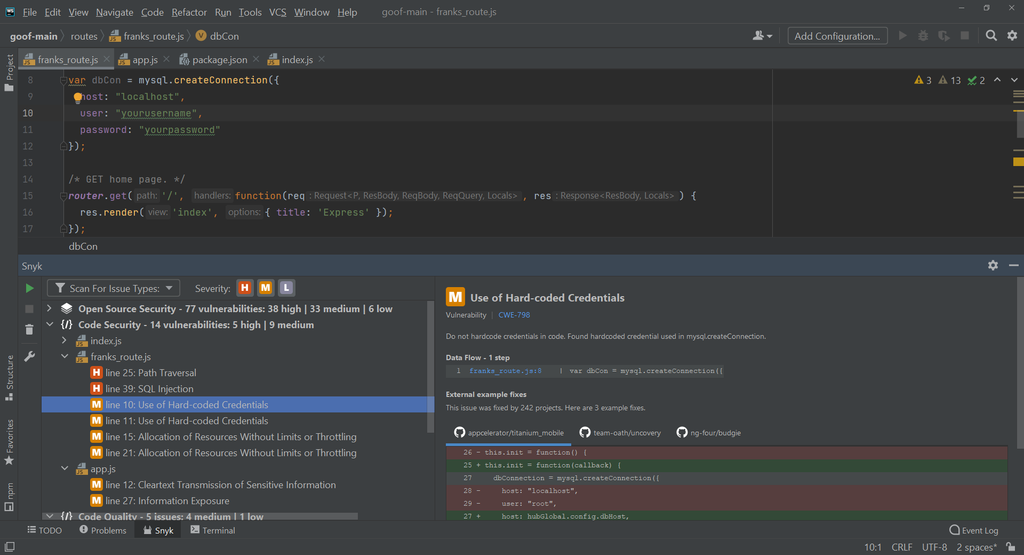
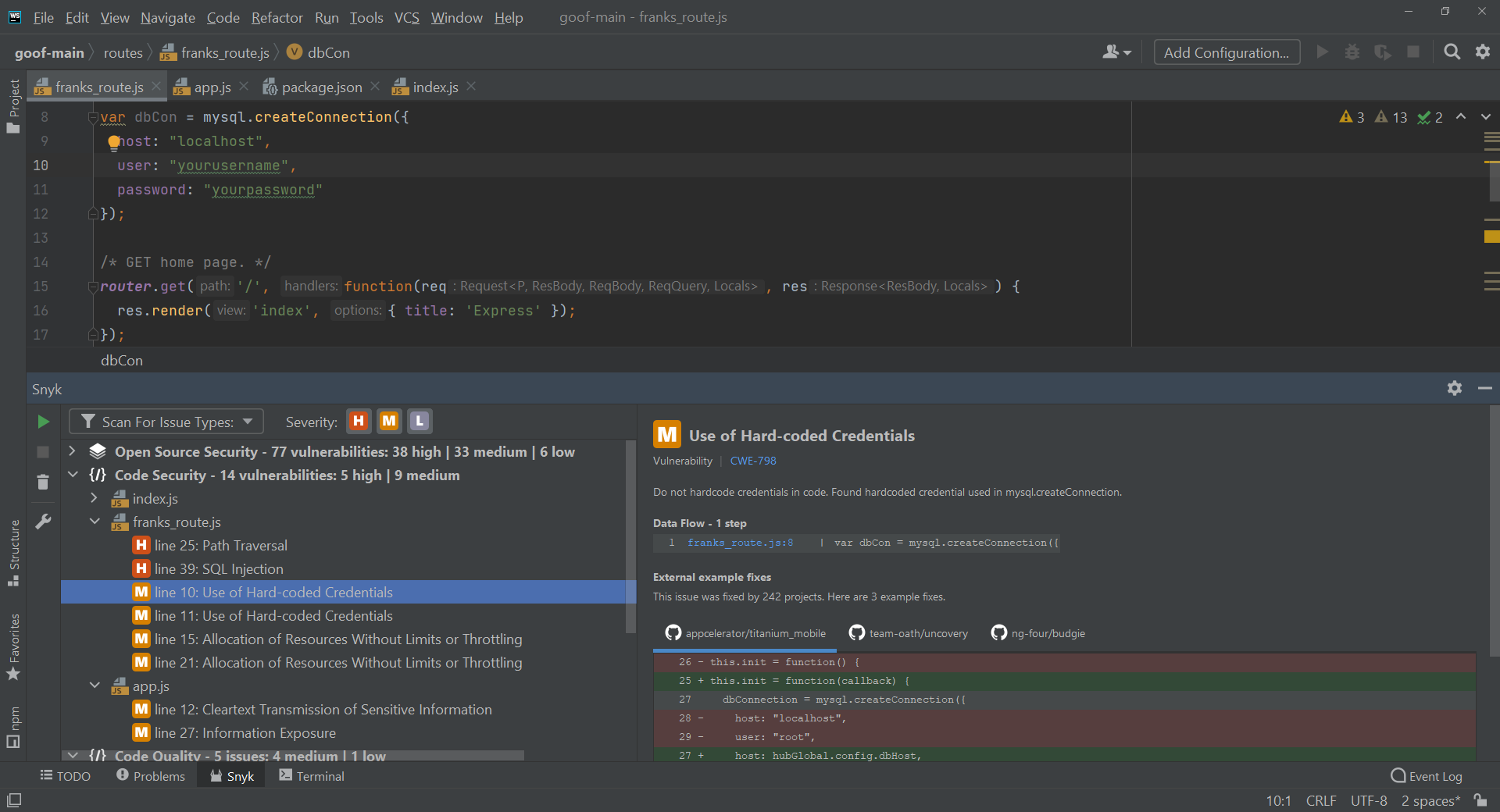
Snyk Code is a static application security testing product that pairs scanning with Snyk Agent Fix, an auto-remediation agent that generates and validates code fixes. The two work together so that issues can be found and resolved without leaving the developer’s normal workflow.
Scanning runs as code is being written, flagging vulnerabilities inline in the IDE rather than waiting for a build. Snyk Agent Fix then produces fix candidates for eligible findings, which developers apply with a click after reviewing the proposed change.
The fix engine uses an agentic architecture that combines frontier AI models with Snyk’s own security intelligence. Fixes are pre-screened before a developer sees them, and the same auto-fixing behavior is available in pull requests as well as the IDE.
Key features include:
- Snyk Agent Fix auto-remediation: The agent autonomously generates and validates code fixes for issues detected by Snyk Code, presenting pre-screened candidates for the developer to apply.
- Scanning at inception: Code is scanned in real time while it is being written, so vulnerabilities in both human-written and AI-generated code are flagged inline before a build runs.
- Agentic fix architecture: Fix generation fuses frontier AI models with Snyk’s proprietary security intelligence rather than relying on a standalone model.
- IDE and pull request delivery: In-line remediation recommendations are available in the IDE and in pull requests, with the feature toggled on through Snyk settings.
- Plan-level controls: Automated fixes are available across Free, Team, and Enterprise plans, with Enterprise adding reports, an API, custom user roles, security policy management, and prioritization through Snyk Essentials.
- Workflow integrations: Snyk Code connects with source control management systems and issue tracking, including a Jira integration from the Team plan upward.
Limitations (as reported by users on TrustRadius):
- Noise in results: Reviewers report that scanning can still surface false positives or low-priority issues that add to the developer review queue.
- Limited rule customization: Users note the difficulty of defining custom security policies or scanning rules, particularly in the SAST and IaC modules.
- Setup complexity: Some reviewers describe initial configuration as involved, and say results degrade when setup is incomplete.
- Coverage for older codebases: Users maintaining legacy or mixed-language code report running a second tool in parallel to cover gaps.
- Cost at scale: Enterprise pricing is described as expensive for teams scanning large numbers of repositories or containers.
Source: Snyk
3. Veracode Fix

Best for: Batch remediation of common flaws across a whole project
Strengths: CLI batch mode, IDE integration, and quality-gated suggestions
Things to consider: Coverage centers on ten supported languages
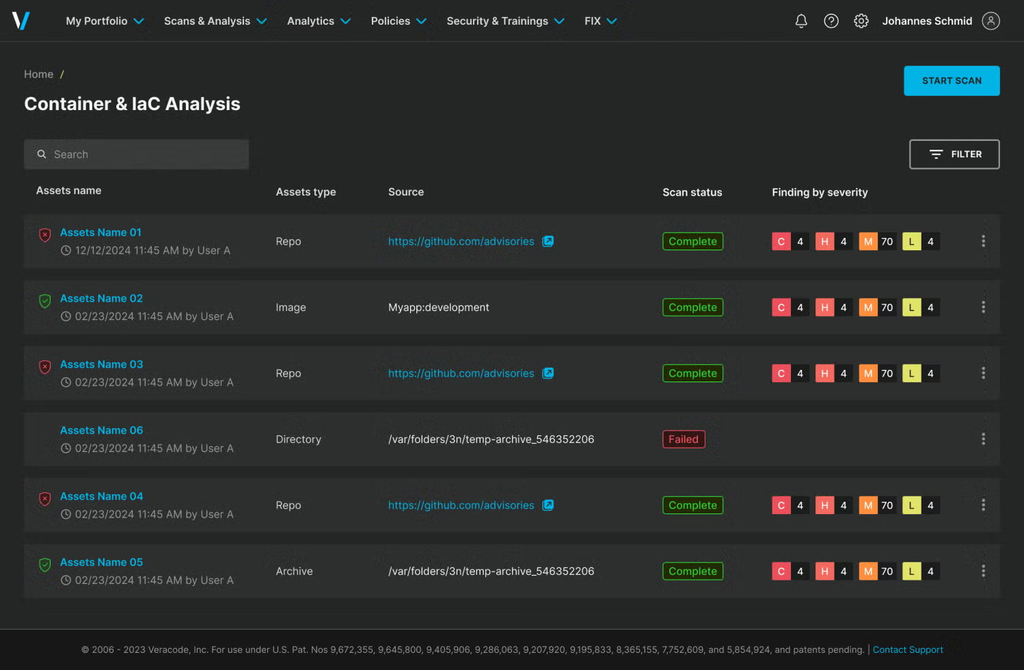
Veracode Fix is an AI code remediation product that generates suggested fixes for security flaws found by Veracode’s analysis. It is built around three delivery modes: the IDE, the command line, and the CI/CD pipeline, with both interactive and batch operation.
Coverage spans ten supported languages, with the vendor stating that Fix addresses over 70% of detected flaws on average within those languages. Solutions are constructed from patterns designed by security experts rather than generated freely, and the architecture does not retain customer code.
All suggestions pass through quality gates before they are presented. In batch mode, the CLI can apply top suggestions automatically to a single source file or across an entire project, which suits teams working through an accumulated backlog.
Key features include:
- IDE integration: Veracode Fix combines with Veracode Static inside the developer’s IDE, so code can be scanned and fixed during development.
- CLI and batch mode: A command line interface automates flaw fixing, with the ability to auto-apply the top suggestions to a source file or an entire project.
- Pipeline integration: A configurable GitHub action scans and suggests fixes on pull and merge events within CI/CD workflows.
- Language and flaw coverage: The product covers over 70% of detected flaws on average across ten supported languages.
- Built-in quality gates: Every generated suggestion passes defined quality checks before it reaches a developer.
- Responsible-by-design architecture: Solutions are derived from expert-designed patterns and produce repeatable results without retaining customer code.
Limitations (as reported by users on TrustRadius):
- Dated interface: Reviewers describe the web experience as feeling older than comparable tools.
- Integration flexibility: Users report a limited set of API and webhook integrations relative to newer entrants, and say connecting to SecOps tooling can be restrictive.
- Reporting customization: Several reviewers note that reporting and analytics are difficult to tailor, and that the authorization model for dashboards and reports is limiting.
- Filtering usability: Users say finding specific results through the filtering options can involve trial and error.
- Cost for smaller teams: Reviewers from smaller organizations describe the platform as difficult to justify on budget grounds.
4. GitHub Code Security
Best for: Teams standardized on GitHub and CodeQL analysis
Strengths: Autofix on CodeQL alerts plus campaigns for backlog reduction
Things to consider: Fix generation depends on CodeQL alert coverage
GitHub Code Security combines static analysis with AI-generated remediation inside the GitHub workflow. CodeQL performs the detection, tracing data flows throughout an application, and Copilot Autofix generates suggested fixes for the alerts it produces.
When a vulnerability is detected, Copilot Autofix analyzes the surrounding code context and the underlying security issue, then generates a fix along with a contextual explanation. Developers review and apply the suggestion within their existing workflow rather than accepting it automatically.
Alongside per-alert fixing, the product includes structures for working through accumulated issues. Security campaigns group related vulnerabilities across repositories and teams, assign ownership, and track progress against a backlog.
Key features include:
- CodeQL static analysis: Security issues are identified in real time through analysis that traces data flows throughout the application.
- Copilot Autofix: AI-powered code suggestions are generated for CodeQL-detected alerts, using the code context and the analysis output to produce a contextually appropriate change with an explanation.
- Broad alert coverage: GitHub states that 90% of alert types include AI-powered code suggestions, and reports three times faster remediation on average with Copilot Autofix.
- Security campaigns: Related vulnerabilities can be grouped and prioritized across multiple repositories and teams, with ownership assigned and progress tracked through a unified dashboard.
- Dependency review: Pull requests are scanned for vulnerable dependencies before they enter the codebase, comparing base and head branches to show added, removed, and updated packages alongside known vulnerabilities.
- EPSS-scored Dependabot alerts: Alerts include Exploit Prediction Scoring System data indicating the likelihood of exploitation in the next 30 days, with a percentile ranking against other vulnerabilities.
- Risk assessment tool: A free assessment analyzes repositories to identify code-level vulnerabilities and leaked secrets exposure.
Limitations (as reported by users on PeerSpot):
- Centralized visibility: Reviewers report the absence of a single dashboard giving a clear overview across projects.
- Reporting depth: Users describe reporting as needing enhancement, including PDF export and management-level statistics on vulnerability counts.
- Integration effort: Connecting the product to existing tooling is described as difficult, and implementation is said to require expertise.
- Language and customization scope: Reviewers ask for wider programming language support and more customization options.
- Per-developer cost: Users describe pricing tied to developers committing to a repository as escalating quickly on larger teams.
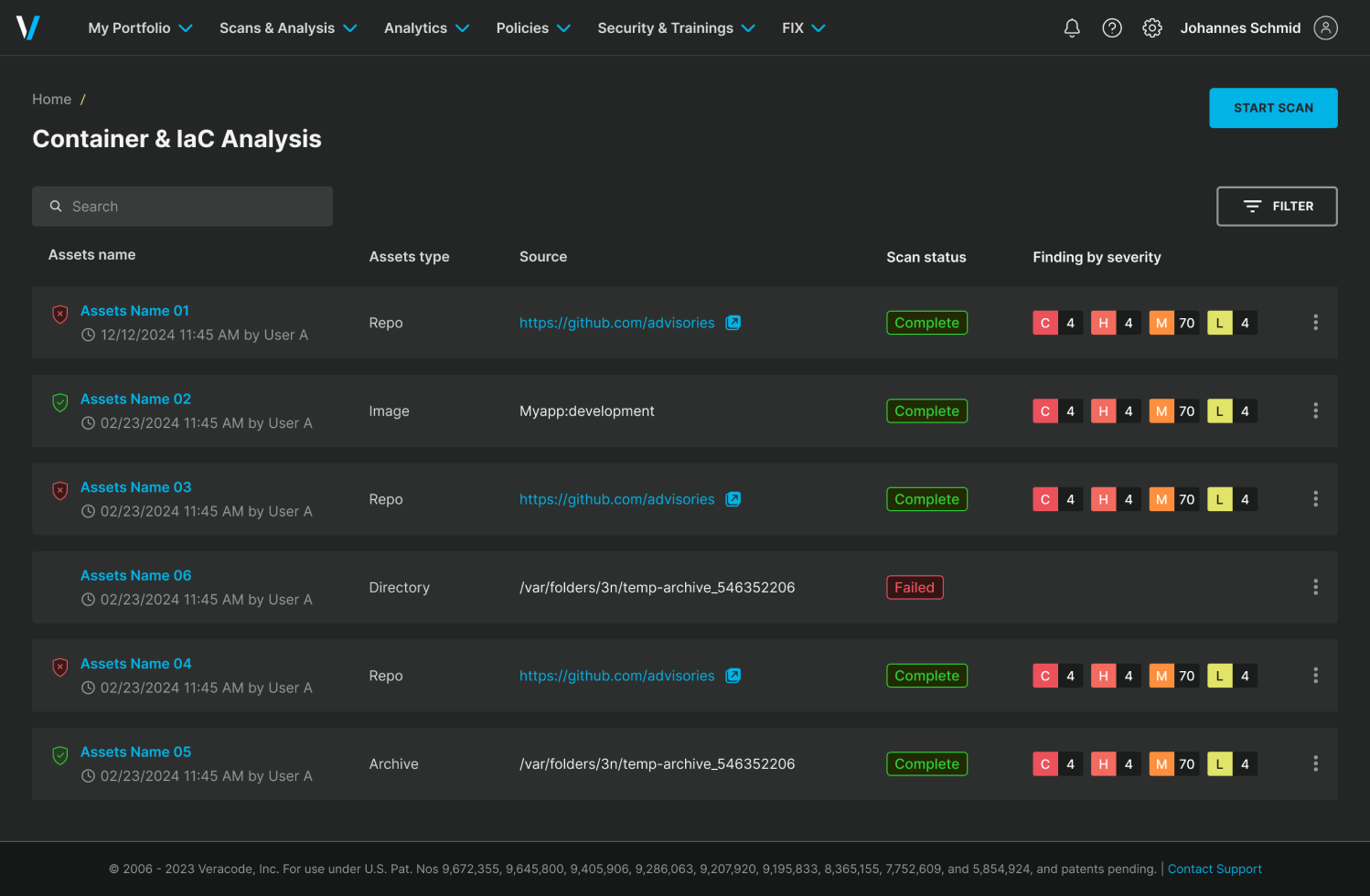
Source: Veracode
5. SonarQube AI CodeFix

Best for: Fixing quality and security issues found by Sonar analysis
Strengths: Transparent diffs, choice of LLM, and IDE or PR delivery
Things to consider: Applies only to issues Sonar’s own analysis detects
SonarQube AI CodeFix generates fix suggestions for issues discovered by SonarQube Server and SonarQube Cloud static analysis. It sits at the resolution end of Sonar’s workflow, turning an identified issue into a proposed edit that resolves the problem.
Suggestions are produced with a single action and presented as diffs with explanations, so reviewers can validate the impact of a change before applying it. Teams apply only the suggestions that meet their standards, keeping the analysis engine and the fix decision separate.
Coverage extends beyond security to code quality. AI CodeFix addresses syntax errors, bugs, defects, vulnerabilities, and code smells, and provides contextual guidance for security hotspots, which are flagged as needing human review rather than automatic change.
Key features include:
- One-click fix generation: Fix suggestions are generated for issues discovered by SonarQube Server and SonarQube Cloud analysis, minimizing manual debugging on common coding problems.
- Vulnerability remediation: Secure coding fixes are recommended for identified security vulnerabilities based on established practices, with developers reviewing and applying the change.
- Security hotspot guidance: Sensitive code flagged as a hotspot receives contextual guidance and suggested remediation rather than an automatic edit, keeping human review in the loop.
- Transparent diffs: Every suggestion is presented as a reviewable diff with an explanation, so teams can validate impact and apply only what fits their standards.
- Workflow delivery points: Explainable suggestions appear in IDEs, pull requests, and CI/CD pipeline checks, and can be opened in the IDE through SonarQube for IDE.
- Choice of LLM and project policies: Tech leads can select the model and set project-level policies governing where and how suggestions are generated, with reporting on impact.
- Integration and language breadth: The platform connects with GitHub, GitLab, Azure DevOps, Bitbucket, Jira, and Slack, and supports over 35 languages and frameworks including Java, Python, JavaScript, TypeScript, C#, C++, Go, PHP, Terraform, Kubernetes, and Docker.
Limitations (as reported by users on TrustRadius):
- No automatic fix pull requests: Reviewers note that the tool does not open pull requests containing fixes on its own.
- Dependency insight gaps: Users report that the platform does not provide information about the libraries a project depends on.
- Administration complexity: Managing users, groups, and permissions is described as complex, and the administration interface is said to need simplification.
- Setup and learning curve: Reviewers describe initial setup as complicated and the learning curve as steep, with a dedicated team recommended to run an instance.
- Uneven language depth: Some users report stronger results for Java than for other languages such as Python.
- Report generation time: Producing reports is described as time consuming.
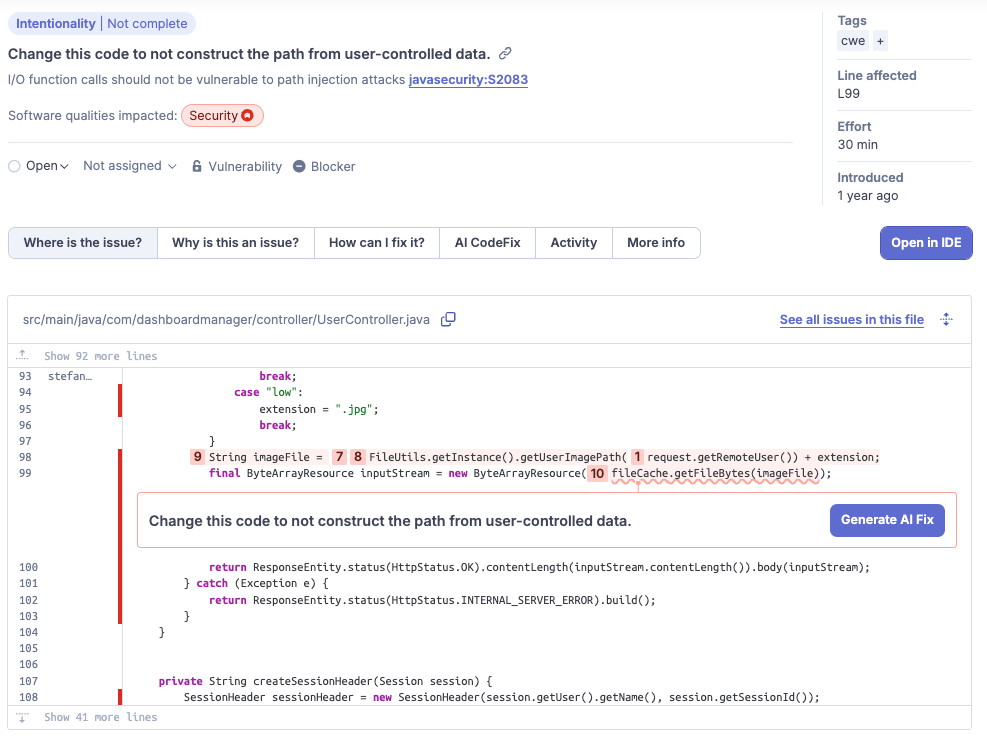
Source: SonarQube

Dedicated Vulnerability Remediation Tools
Dedicated vulnerability remediation tools focus primarily on turning security findings into actionable code changes rather than providing the primary scanner. They typically ingest findings from existing SAST, SCA, or other security tools, analyze the affected code, and generate patches or pull requests.
6. Mobb
Best for: Bulk fixing of recurring findings from existing SAST tools
Strengths: Deterministic hybrid-AI fixes across 100+ scanner issue types
Things to consider: Fix coverage is tied to a defined list of issue types
Mobb is a remediation tool that generates fixes for vulnerabilities detected by scanners already in use, rather than replacing them. It integrates into an existing tech stack and turns findings into pull requests developers can review and merge.
The fix engine combines deterministic algorithms with AI, an approach the vendor describes as hybrid AI. This is intended to produce consistent, repeatable changes for known vulnerability classes rather than varying output between runs on the same input.
Mobb’s coverage spans more than 100 issue types commonly reported by scanners, including command injection, cross-site scripting, path traversal, server-side request forgery, XXE, zip slip, insecure randomness, open redirect, hardcoded passwords, unprotected cookies, log forging, and trust boundary violations.
Key features include:
- One-click bulk fix: Multiple related issues are resolved together through contextual pull requests, removing repeated manual triage on recurring findings, with SLAs assignable to the work.
- Continuous commit monitoring: New commits are monitored on an ongoing basis and fixes are provided immediately, so newly introduced issues do not accumulate into backlog.
- Broad issue type coverage: Mobb Fixer supports more than 100 issue types commonly reported by various scanners.
- Deterministic hybrid-AI fixes: The fix engine pairs deterministic algorithms with AI to produce consistent code changes for supported vulnerability classes.
- Ready-to-merge pull requests: Fixes are delivered as actionable pull requests rather than tickets, which removes the ticketing step between finding and change.
- Stack integration: Mobb integrates into an organization’s current toolchain without replacing the scanners already in place, with published coverage and language documentation.
Limitations (based on publicly available sources):
- Coverage tied to a fix catalog: The vendor publishes a defined list of supported fixes, so issue types outside that catalog do not receive automated remediation.
- Dependency on upstream scanners: Mobb generates fixes from findings produced by third-party SAST tools, so remediation coverage is bounded by what those scanners detect.
- Language scope: Published material shows support built out language by language, starting with Java and expanding to JavaScript and TypeScript, so coverage varies by stack.
- Context prompts during fixing: When a scan report lacks the data points needed for an accurate fix, developers are prompted to supply the missing context before remediation completes.
7. Pixee

Best for: Scanner-agnostic remediation across an existing security stack
Strengths: Ingests findings from 11+ tools with triage and fix validation
Things to consider: Language coverage is narrower than general scanners
Pixee is a remediation platform that does not perform its own primary scanning. It ingests findings from the security tools an organization already runs, normalizes the data, triages what is genuinely exploitable, and generates fixes for what remains.
Triage comes first in the workflow. A reachability analysis traces code execution paths to separate exploitable vulnerabilities from theoretical ones, which the vendor reports removes over 98% of false positives before any fix work begins.
Fix generation runs through three validation layers covering syntax, tests, and policy compliance. A context system learns a team’s codebase patterns, architectural constraints, policies, and preferences, so generated changes reflect how that team writes code.
Key features include:
- Scanner-agnostic ingestion: Findings are consumed from Black Duck, Checkmarx, Datadog, GitHub Advanced Security, GitLab, JFrog Xray, Semgrep, Snyk, SonarQube, Sonatype, and Veracode, then normalized into one queue.
- Intelligent triage engine: Reachability analysis traces execution paths to identify which findings are exploitable, cutting the volume that reaches remediation.
- Three-layer fix validation: Generated code is checked for syntax, run against the team’s tests, and assessed for policy compliance before it is presented.
- The Pixee Context System: Codebase patterns, architectural constraints, team policies, and merge and reject history inform how each fix is written.
- SAST and SCA coverage: The platform handles code-level findings such as SQL injection, cross-site scripting, and secrets detection, alongside dependency vulnerabilities including CVE remediation and dependency updates.
- DAST and pen test intake: Security design reviews, DAST findings, pen testing reports, and bug bounty submissions are ingested, with parsers for major DAST tools under development.
- Deployment options: Cloud, self-hosted, and air-gapped deployments are available, with SOC 2 and ISO 27001 compliance and single-tenant SaaS infrastructure.
Limitations (based on publicly available sources):
- Language coverage: Independent reviews identify language support as the most significant constraint, noting that several widely used ecosystems fall outside the core supported set.
- Rule coverage still expanding: Pixee’s own documentation states that support for a code scanner is claimed at significant rule coverage and continues to mature, so depth varies by tool.
- No IDE presence: The vendor states it deliberately does not operate inside the IDE, so fixes surface in source control rather than while a developer is writing the affected code.
- Dependent on upstream detection: Because the platform does not scan, anything the existing tools miss is not surfaced for remediation.
- Some findings remain unresolved: Documentation describes cases where the agentic investigation cannot resolve a finding, which then falls back to manual handling.
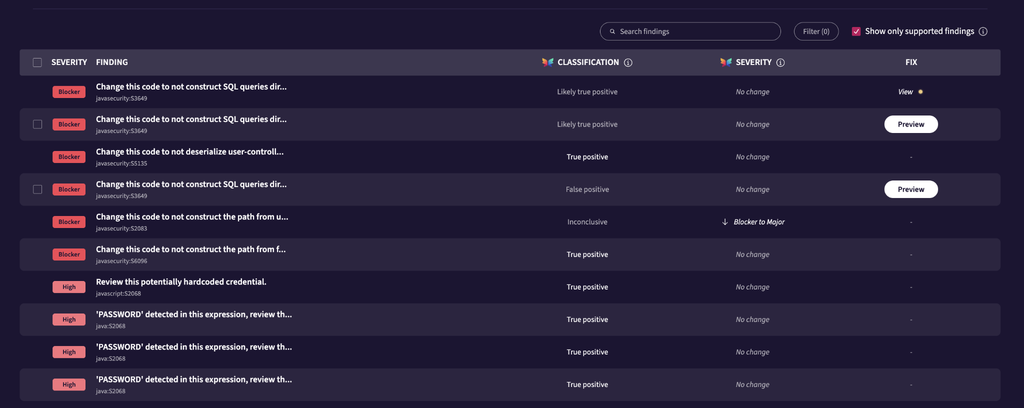
Source: Pixee

8. Corgea

Best for: Finding and fixing business logic flaws alongside standard scans
Strengths: AI SAST with review-ready fixes in pull requests and IDEs
Things to consider: A younger platform with fewer governance features
Corgea is an AI-native application security platform that both detects and remediates. Its scanning engine, BLAST, analyzes code, business logic, and infrastructure to identify issues, and the platform then delivers fixes into pull requests and IDEs.
The detection focus differs from conventional pattern matching. Corgea targets business logic flaws that rule-based scanners tend to miss, including broken authentication, missing authorization checks, and authorization gaps hidden inside real application flows.
Coverage extends across code and infrastructure in one control plane: AI SAST, dependency scanning, IaC scanning, container scanning, secrets scanning, and code quality scanning, alongside attack surface mapping that traces reachable paths.
Key features include:
- AI SAST with review-ready fixes: The scanner identifies risky code paths and produces precise fixes formatted for review, delivered as pull request suggestions with the proposed diff.
- Business logic flaw detection: Broken authentication, missing authorization checks, and authorization gaps in application flows are detected, categories that traditional scanners commonly miss.
- Reachability-based prioritization: From public routes such as a login endpoint, Corgea traces runtime paths to deep risk, connecting converging routes to the same weak point and mapping impact to both vulnerable code and vulnerable packages.
- Coverage across the stack: Dependency scanning prioritizes exploitable packages with upgrade guidance, container scanning surfaces image risk with targeted remediation, IaC scanning catches cloud misconfigurations before merge, and secrets scanning detects exposed credentials.
- Source control integrations: The platform connects with GitHub, GitLab, Azure DevOps, Bitbucket, and Harness.
- IDE and agent integrations: Corgea works inside Visual Studio Code, Cursor, Visual Studio 2022, and IntelliJ, and integrates with coding agents.
- Broad CWE coverage: Documentation describes scanning, false positive detection, and auto-fixing across multiple languages and frameworks, covering approximately 900 Common Weakness Enumerations.
Limitations (based on publicly available sources):
- Fixes require careful review: Independent reviews caution that AI-generated changes in security-critical code warrant scrutiny, and that merging without review carries risk.
- Narrower coverage than established rule sets: Reviewers note that language and framework coverage is less extensive than long-standing community rule libraries.
- Fewer enterprise governance features: Larger organizations are reported to find less governance and reporting functionality than incumbent platforms provide.
- Product maturity: The platform is comparatively young, with several capabilities documented as recently launched or still expanding.
- Language support varies by stage: Documentation indicates some languages are enabled for false positive detection and auto-fixing ahead of full scanning support.

Source: Corgea
Conclusion
Automated remediation tools are essential for modern software security, enabling teams to bridge the gap between vulnerability detection and effective patching. By prioritizing actionable code changes and integrating directly into development workflows, these solutions help reduce manual effort and accelerate the secure delivery of software. Investing in the right remediation strategy empowers developers to address critical flaws efficiently while maintaining high standards of application integrity.

Stop triaging manually
Checkmarx Triage & Remediation Assist Agent
See attackability-based prioritization and review-ready fix pull requests on your own SAST and SCA findings.