
Summary
The Model Context Protocol (MCP) allows AI applications to connect to external tools, APIs, databases, files, and workflows through standardized MCP servers. While this makes AI systems more capable, it also introduces security risks including prompt injection, tool poisoning, credential misuse, unauthorized actions, and data exfiltration.
What Is MCP Security?
MCP (Model Context Protocol) security involves safeguarding AI applications that use MCP servers to connect LLMs to external tools, data, and APIs. MCP security protects the interactions among MCP hosts, clients, servers, tokens, tools, and external resources so that AI systems can use connected tools without unauthorized actions, data leakage, or compromised trust boundaries.
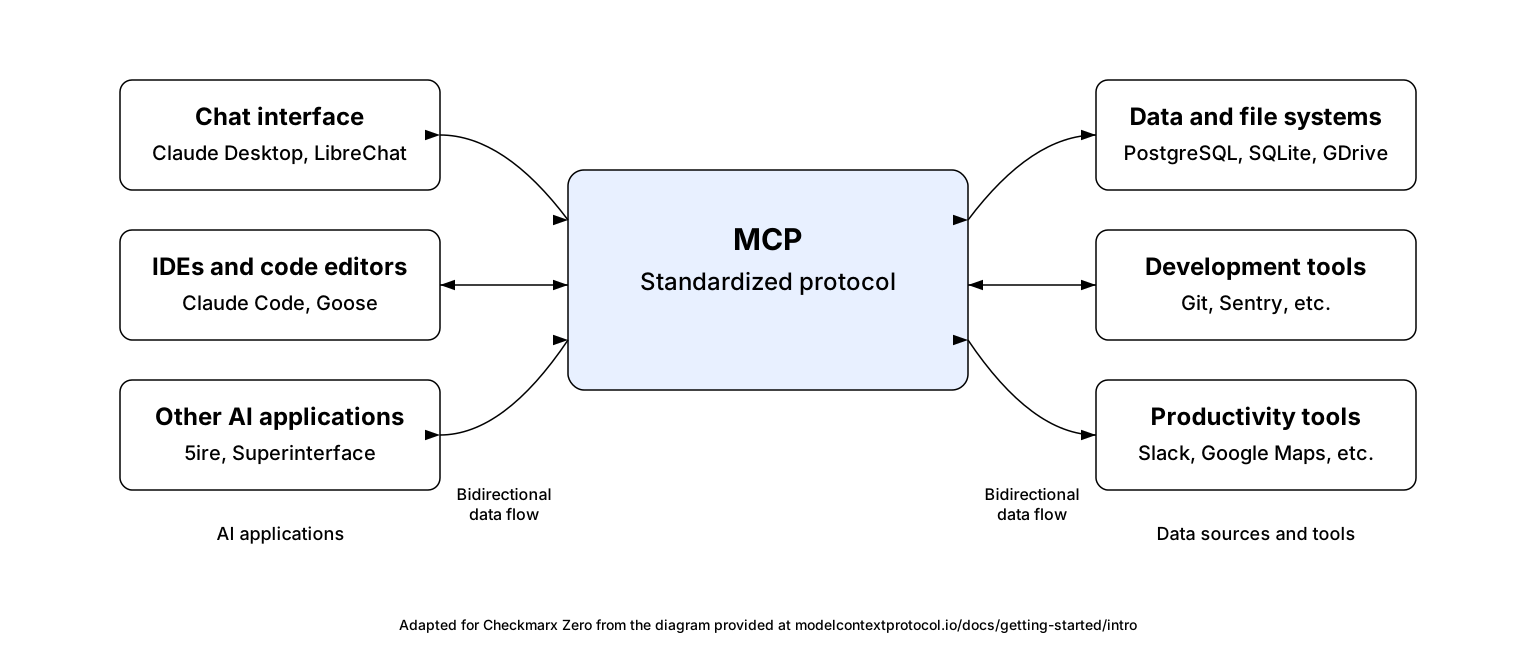
MCP changes the security model for AI applications because it turns an LLM from a passive text generator into an actor that can discover tools, call APIs, read resources, trigger workflows, and operate across multiple systems. In the MCP architecture, an AI host connects to one or more MCP servers through dedicated MCP clients, and those servers expose tools, prompts, and resources to the model-driven application.
As a result, MCP security goes beyond API security or OAuth security. It must account for the full chain of delegation: who the user is, which MCP client is acting, which MCP server is being called, what token is being used, what resource is being accessed, and whether the requested tool action is authorized for that context.
Key MCP security risks include:
- Prompt injection and tool poisoning: Malicious instructions hidden in data sources (e.g., tickets, files) can manipulate AI behavior.
- Lateral movement and data exfiltration: Compromised MCP servers can act as bridges to sensitive databases or internal tools, bypassing traditional security
- Insecure credential handling: Weak configuration can expose API keys or credentials stored in server configs, resulting in account takeovers.
- Unintended automated actions: AI agents may take harmful actions without human confirmation if tools lack proper guardrails.
How Do MCP Servers Work?
MCP servers expose external capabilities and context to AI applications through the Model Context Protocol (MCP). They act as intermediaries between the AI host application and external systems such as APIs, databases, files, or workflows.
MCP uses a host-client-server architecture. The host is the AI application the user interacts with, such as an IDE, chatbot, or desktop assistant. The host creates MCP clients, and each client maintains a separate connection to a specific MCP server. This allows a single AI application to connect to multiple MCP servers at the same time.
Core MCP Components
MCP servers expose three main types of capabilities:
- Tools are executable functions that allow the AI application to perform actions or retrieve data. Examples include querying databases, calling APIs, writing files, or triggering workflows.
- Resources provide structured context such as documents, repository content, logs, schemas, or application data.
- Prompts are reusable templates or predefined interaction workflows that users can invoke.
These capabilities are discovered dynamically by the client, allowing AI applications to understand what each server can provide without hardcoding integrations.
Communication and Workflow
MCP clients and servers communicate using JSON-RPC 2.0, a structured messaging protocol for requests and responses. MCP supports both local and remote communication:
- Local MCP servers typically run on the user’s machine and communicate through standard input/output (stdio).
- Remote MCP servers communicate over HTTP and commonly use OAuth for authentication and authorization.
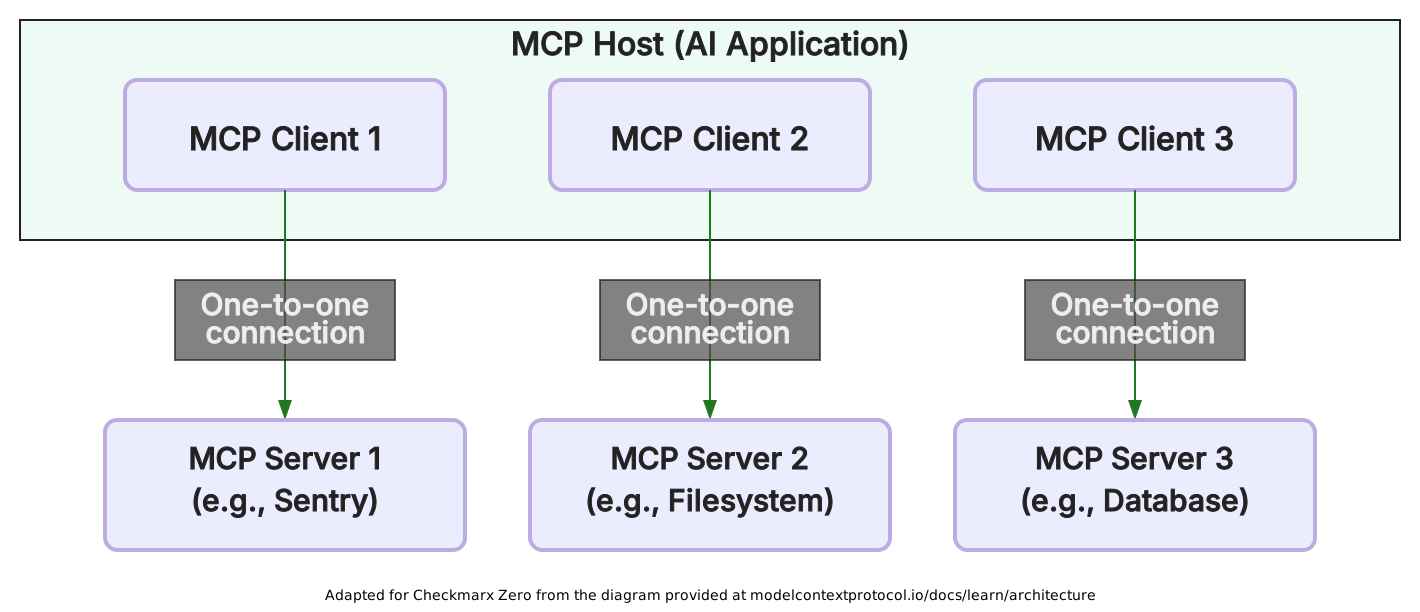
A typical workflow looks like this:
- The user interacts with an AI application.
- The host connects to an MCP server through an MCP client.
- The client and server negotiate supported capabilities.
- The client discovers available tools, resources, and prompts.
- The model may request a tool call or access contextual resources.
- The server validates the request, executes the operation, and returns the result.
This standardized approach allows AI applications to integrate external systems in a consistent way.
Security and Authorization
Because MCP servers can access external systems and execute actions, they introduce important security considerations. MCP servers may handle credentials, sensitive data, file access, or API operations, making authorization and validation critical.
Remote MCP servers commonly use OAuth-based authorization. Servers validate access tokens and ensure requests are properly scoped to the correct user and resource. Security best practices include least-privilege access, user confirmation for sensitive actions, input validation, logging, and restricting tool permissions.
These controls help reduce risks such as prompt injection, unauthorized actions, data leakage, and misuse of connected systems.
Why MCP Security Matters
MCP matters because it changes an AI system from a text-only interface into an action-capable system connected to tools, files, APIs, databases, and enterprise workflows. This has three key aspects:
1. MCP dramatically expands the attack surface
A model is no longer only generating responses, but may also be selecting tools, passing arguments, retrieving sensitive data, or triggering external side effects. MCP’s own security guidance frames this as an implementation-level security problem across clients, servers, tools, and authorization flows, not just a protocol design concern.
2. MCP introduces new trust and authorization boundaries
The user, AI host, MCP client, MCP server, exposed tools, and downstream systems may all operate with different assumptions about identity, consent, permissions, and intent. If those boundaries are blurred, a seemingly harmless prompt or retrieved document can influence the model into invoking a tool, accessing data, or performing an action the user did not explicitly authorize. OWASP highlights this convergence of prompt injection, supply-chain risk, and confused-deputy-style failures as a core MCP security concern.
3. MCP converts prompt-level influence into real execution
Tool descriptions, retrieved content, server metadata, or external data can become part of the model’s operating context; if poisoned or manipulated, they may steer the model toward unsafe tool calls or unauthorized data access. Microsoft and Elastic have both described risks such as indirect prompt injection, tool poisoning, and orchestration attacks in MCP-style agent integrations.
Bottom line: MCP security depends on implementation, not protocol alone
MCP provides a standardized integration layer, but it does not by itself enforce the security principles needed for safe production use. Real MCP security comes from implementation choices:
- Least privilege
- Explicit user consent
- Strong authentication
- Scoped authorization
- Tool isolation
- Auditability
- Input validation
- Safe failure modes
In practice, the security of an MCP deployment depends heavily on how hosts, clients, servers, tools, and enterprise controls, especially security solutions, are deployed, configured, monitored, and updated.
Key MCP Security Issues and Risks
Quick Comparison Table
| Risk | Description | Mitigations |
| Prompt Injection and Tool Poisoning | Malicious prompts or compromised MCP tools can manipulate the model into executing unintended actions or exposing sensitive data. | Require user confirmation, restrict tool permissions, pin versions, verify integrity, and use trusted MCP servers only. |
| Lateral Movement and Data Exfiltration | Compromised MCP servers can move across connected systems or extract sensitive information from APIs and conversations. | Enforce least privilege, monitor activity, use centralized logging, and verify MCP component integrity. |
| Insecure Credential Handling | Weak authorization controls or confused-deputy scenarios can allow users to access resources with elevated server privileges. | Use user-level permissions, follow OAuth best practices, and minimize token scopes. |
| Unintended Automated Actions | Models may execute commands or workflows not explicitly requested, including unsafe command execution. | Sanitize inputs, restrict commands, sandbox servers, and require approval for sensitive actions. |
| Authorization and Identity Fragmentation | Multiple identity layers can create gaps where actions are executed without clear user authorization. | Propagate identity consistently, avoid shared accounts, and enforce least privilege across all layers. |
| Consent Failures / Over-Broad Client Trust | Users may unknowingly grant tools broad access that enables unintended future actions. | Provide transparent permission details, allow action review, and apply execution controls and rate limits. |
| OAuth Implementation Flaws | Incorrect OAuth implementations can expose tokens, enable replay attacks, or allow misuse of authorization flows. | Validate redirects and state, bind tokens to resources, minimize scopes, and keep components updated. |
These are the core MCP security risk classes.
The sections below explain how each one appears in real deployments and what teams should do to reduce exposure.
Prompt Injection and Tool Poisoning
Prompt injection occurs when a user (or attacker) provides input that causes the model to trigger unintended actions through the MCP server. Even without clear malicious intent, the model may decide to execute actions such as API calls or data access that were not explicitly requested. In adversarial cases, users may copy prompts crafted by third parties that include hidden instructions to leak sensitive data or perform extra operations.
Tool poisoning extends this risk to the MCP ecosystem itself. A malicious MCP server or tool can appear legitimate during installation but later change its behavior. For example, a tool described as harmless could be updated to collect confidential data or perform unauthorized actions. Attackers may also use misleading tool names to trick the model into selecting them.
How to mitigate:
- Require explicit user confirmation before executing actions triggered by the model, especially API calls or data access.
- Restrict which actions MCP servers are allowed to perform to reduce the impact of unintended behavior.
- Pin MCP server versions and notify users of any changes to code or tool behavior after installation.
- Use trusted MCP servers only, and verify integrity (e.g., signed components).
- Be cautious of deceptive tool names and validate tool behavior over time, not just at install.
Lateral Movement and Data Exfiltration
MCP servers can access multiple systems and APIs, which creates a pathway for lateral movement if compromised. A malicious prompt or tool can exploit this access to retrieve data from connected services and move across systems that trust the MCP server.
Data exfiltration can happen when prompts are designed to extract sensitive information from conversations, APIs, or connected tools. For example, an obfuscated prompt may perform a legitimate task while also sending private data to an attacker. Because MCP servers act as intermediaries, they can unintentionally expose data across boundaries if controls are weak.
How to mitigate:
- Enforce least-privilege access so MCP servers only reach required systems and APIs.
- Monitor and log MCP server activity to detect abnormal data access or movement across systems.
- Verify integrity of MCP components and dependencies to prevent compromise.
- Use centralized logging to investigate suspicious behavior or potential data leaks.
Insecure Credential Handling
MCP servers manage credentials for external systems, which introduces risks if authorization is not properly enforced. A key issue is the “confused deputy” problem, where the MCP server executes actions using its own privileges instead of the user’s. This can allow users to access resources they should not have permission to use.
Although MCP defines authorization using OAuth, current implementations may not align with enterprise security practices. If not handled carefully, credentials can be over-scoped or misused.
How to mitigate:
- Ensure MCP servers execute actions strictly with user-level permissions, avoiding elevated server privileges.
- Follow OAuth best practices and align implementations with enterprise security standards.
- Limit token scopes and access rights to only what is necessary.
- Regularly review and update authorization implementations as specifications evolve.
Unintended Automated Actions
MCP servers can execute commands and trigger workflows automatically, which increases the risk of unintended behavior. The model may decide to perform an action that the user did not explicitly request, especially when interpreting ambiguous prompts.
There is also a risk of command injection if input passed to the MCP server is not properly sanitized. This can lead to execution of arbitrary commands on the host system. To mitigate this, inputs must be validated, commands should be restricted, and sensitive actions should require explicit user confirmation.
How to mitigate:
- Validate and sanitize all inputs before passing them to command execution functions.
- Restrict which commands can be executed by MCP servers.
- Run local MCP servers in sandboxed environments to limit system access.
- Require user confirmation for sensitive or high-impact actions.
Authorization and Identity Fragmentation
MCP deployments often involve several separate identity layers: the end user, the AI host, the MCP client, the MCP server, and the downstream APIs or services being accessed. If identity is not propagated consistently across these layers, the system may lose track of who actually authorized an action. This creates authorization gaps where a server may rely on the client’s trust level, a shared service account, or cached credentials instead of enforcing the user’s real permissions.
This fragmentation also increases the risk of confused-deputy behavior. The MCP server may appear to be acting “for the user,” but in practice it may execute requests with broader server-side privileges.
How to mitigate:
- Ensure consistent identity propagation across all layers (user, client, server, downstream services).
- Enforce least-privilege access at every layer to prevent privilege escalation.
- Avoid shared service accounts where possible; tie actions to individual user identities.
- Continuously review authorization flows to prevent confused-deputy scenarios.
Consent Failures / Over-Broad Client Trust
MCP introduces consent challenges because users may approve a client, server, or tool without fully understanding what actions it can perform or what data it can access. A broad approval such as “connect this tool” can become risky if it implicitly authorizes many future actions, especially when those actions are selected by the model rather than explicitly chosen by the user each time.
Over-broad trust is especially dangerous when sensitive tools are exposed through natural-language prompts. A user may intend to ask a simple question, while the model interprets the request as permission to read files, call APIs, send data, or modify external systems.
How to mitigate:
- Provide clear visibility into what actions a tool or server can perform before user approval.
- Allow users to review, modify, or reject model-generated actions and completions.
- Implement controls for filtering or modifying tool requests before execution.
- Apply rate limits, timeouts, and cost controls to reduce unintended impact.
OAuth implementation flaws
OAuth can provide a strong foundation for MCP authorization, but only if implemented correctly. Weak OAuth implementations may introduce risks such as missing state validation, insecure redirect handling, token leakage, excessive scopes, long-lived tokens, or failure to bind tokens to the correct resource server. These flaws can allow attackers to reuse authorization flows, steal tokens, or trick a client into sending credentials to the wrong server.
MCP security guidance specifically points implementers toward OAuth 2.0 security best practices, and recent MCP authorization updates have focused on clarifying how servers and clients should handle authorization and resource indicators to prevent token misuse.
How to mitigate:
- Follow OAuth security best practices, including proper validation and secure redirect handling.
- Bind tokens to specific resource servers to prevent misuse.
- Avoid long-lived tokens and excessive scopes.
- Regularly update MCP components and dependencies as part of vulnerability management.
- Validate server identity (e.g., cryptographic verification) when using remote MCP services.

Checkmarx AI Supply Chain Security for Complete AI Risk Control
Turn AI Blind Spots into Actionable Insights
Shadow AI ends here. Checkmarx gives AppSec full visibility and governance across the ADLC, exposing AI assets such as LLMs, MCPs, Agents, AI SDKs and Libraries, to block risk before code ships.
See it in ActionLearn more in our detailed guide to MCP security issues
Real-World MCP Security Incidents and Common Risk Patterns
Anthropic Git MCP Server Vulnerabilities
In November 2025, Anthropic’s official Git MCP server was found to contain multiple critical vulnerabilities, including path validation bypass, argument injection, and unsafe repository initialization. This case illustrates how even trusted MCP components can introduce systemic risk when interconnected, and how complex agent ecosystems can create unexpected attack paths.
Security researchers demonstrated that when combined with other MCP servers (such as a filesystem server), these flaws could be chained to achieve remote code execution or unauthorized file modifications via prompt injection.
Lessons learned:
- Trust boundaries between MCP servers are weak, enabling cross-tool attack chains
- Seemingly isolated vulnerabilities can combine into full remote code execution
- Input validation failures in MCP tools can have system-wide impact
- Interconnected agents increase attack surface in non-obvious ways
- Even official or trusted MCP servers must be treated as untrusted components
WhatsApp Data Exfiltration Attack
In November 2025, researchers discovered a vulnerability in a WhatsApp MCP integration that allowed attackers to extract entire message histories. The attack relied on a malicious MCP server that poisoned tool descriptions, inserting hidden instructions that manipulated how the AI agent used the legitimate WhatsApp integration.
When a user issued a normal request, such as sending a message, the agent followed both the intended action and the hidden instructions, silently redirecting data to an attacker-controlled phone number. This enabled large-scale exfiltration of personal and business conversations without raising obvious alarms. The attack was particularly effective because it blended into normal system behavior.
Lessons learned:
- Tool descriptions are an untrusted input surface and can be weaponized
- Lack of isolation between MCP servers enables cross-tool manipulation
- AI agents follow embedded instructions without verifying intent
- Legitimate communication channels can be abused for stealthy exfiltration
- Visibility and monitoring of tool behavior are critical for detection
- Publisher trust and integrity cannot be assumed in MCP ecosystems
Malicious MCP Package Exfiltrating Emails
In September 2025, researchers uncovered the first known malicious MCP server in the wild: a compromised npm package called postmark-mcp. It appeared to be a legitimate email integration tool but had been modified with a hidden backdoor that automatically added a blind carbon copy (BCC) to every outgoing email, sending sensitive data to an attacker-controlled address.
This resulted in the exposure of password resets, invoices, internal communications, and customer data across affected organizations. The incident highlights how MCP servers can become supply chain attack vectors when malicious code is introduced into trusted dependencies.
Lessons learned:
- MCP servers introduce supply chain risk similar to traditional dependencies
- Hidden functionality can silently exfiltrate sensitive communications
- Outbound integrations (email, messaging) are high-risk exfiltration paths
- Code review alone may not detect subtle malicious logic
- Dependency trust must be continuously validated, not assumed
GitHub MCP Exploit
In May 2025, researchers demonstrated an exploit in GitHub’s MCP server that allowed attackers to extract private repository information through prompt injection. The attack involved creating a malicious issue in a public repository that contained instructions directing the AI agent to gather and publish additional information about the repository owner.
Because the MCP server had access to both public and private repositories, the agent followed these instructions and unknowingly included sensitive private data in a generated pull request. This attack combined three critical capabilities: access to private data, exposure to malicious instructions, and the ability to publish results externally. A simple user action, such as asking the agent to review repository issues, was enough to trigger the sequence.
Lessons learned:
- Combining data access and output capabilities creates high-risk systems
- Public content (e.g., issues) can act as a delivery vector for prompt injection
- AI agents cannot reliably distinguish malicious instructions from legitimate tasks
- Private data exposure can occur indirectly through generated outputs
- Minimizing tool permissions reduces the blast radius of attacks
Prompt Injection via External Content
In April 2025, researchers demonstrated that MCP-connected systems are highly susceptible to indirect prompt injection attacks delivered through external content such as emails, documents, or web pages. For example, a malicious email could contain hidden instructions that cause an AI agent to forward sensitive messages or retrieve confidential data using MCP-integrated tools.
In real-world scenarios, attackers have embedded obfuscated instructions in user-facing content, leading to unauthorized API calls and data exfiltration without explicit user intent. These attacks exploit the model’s tendency to treat external data as trusted input, making them difficult to detect without strict validation and isolation controls.
Lessons learned:
- External content must be treated as untrusted input
- AI agents will execute hidden instructions embedded in data sources
- Indirect prompt injection is difficult to detect with traditional defenses
- Data retrieval tools amplify the impact of injected instructions
- Strong isolation between data ingestion and tool execution is required
Asana’s AI Feature Data Leakage
In April 2025, Asana introduced an MCP-based integration that allowed AI tools to access and query enterprise project data. Shortly after launch, the company discovered a vulnerability that could have exposed information from one organization to other users of the MCP system. Although details of the bug were limited, the issue was serious enough that Asana took the feature offline for nearly two weeks while implementing fixes and resetting all user connections.
The incident highlighted risks associated with early-stage MCP deployments, particularly around multi-tenant data separation. Even without confirmed exploitation, the possibility of cross-organization data exposure demonstrated how integration flaws could lead to significant confidentiality breaches.
Lessons learned:
- Multi-tenant isolation is critical in MCP-enabled systems
- Early-stage MCP features may contain significant security gaps
- Data access boundaries must be strictly enforced and validated
- Temporary shutdowns may be required to contain MCP-related incidents
- Logging and monitoring are essential for detecting and investigating leaks
MCP Security Best Practices
1. Per-Client Consent Enforcement
MCP proxy servers must enforce consent at the client level before forwarding any authorization request. Each client_id must be explicitly approved by the user, and this approval must be checked every time the client initiates access to a third-party API. Without this step, attackers can reuse prior consent (via cookies) to bypass user awareness.
The consent flow should run before any interaction with the third-party authorization server. This ensures the MCP server, not the external provider, controls which clients are trusted. The consent screen must clearly show the client name, requested scopes, and redirect destination so users can make informed decisions.
Consent data must be stored securely and tied to both the user and the specific client_id. Storing a generic “user approved” flag is not sufficient. If cookies are used, they must be protected with strict attributes and bound to the client. This prevents attackers from abusing previously granted permissions through crafted authorization requests.
2. Avoid Token Passthrough
Token passthrough is a common anti-pattern where MCP servers accept tokens from clients and forward them to downstream APIs without proper checks. This must be avoided because it breaks the intended trust model of MCP. Tokens should always be issued for and validated by the MCP server itself.
If passthrough is allowed, clients can bypass important controls enforced by the MCP server, such as request validation, monitoring, or rate limiting. This weakens the server’s role as a security boundary and allows direct interaction with downstream services.
It also creates visibility problems. The MCP server cannot reliably attribute actions to specific clients, and logs from downstream systems may show misleading identities. This complicates auditing and incident response. Validating token claims, such as audience, scope, and privileges, ensures that only properly scoped and intended requests are executed.
3. Robust OAuth State Parameter Enforcement
The OAuth state parameter is critical for maintaining the integrity of the authorization flow. Each request must include a unique, cryptographically strong state value that is generated per request and stored securely on the server.
State values must only be created after the user has approved the consent screen. If created earlier, attackers can craft requests that bypass consent entirely. The stored state should be tied to the user session and only persisted for a short duration.
When the authorization server redirects back, the MCP server must verify that the returned state exactly matches the stored value. Any mismatch, missing value, or reuse of a state parameter should result in rejection. Enforcing single-use and expiration limits reduces the risk of replay and interception attacks.
4. Strict Redirect URI Validation
Redirect URI validation ensures that authorization codes and tokens are only sent to trusted locations. MCP servers must require an exact match between the redirect_uri in the request and the one registered during client setup.
Loose validation, such as prefix matching or wildcards, can be exploited by attackers to redirect responses to malicious endpoints. Even small deviations in the URI should cause the request to be rejected.
If a client needs to change its redirect URI, it must go through a re-registration and approval process. This ensures that any new endpoint is reviewed and explicitly trusted. Enforcing strict validation prevents authorization codes from being leaked to attacker-controlled systems.
5. SSRF Protection for OAuth Metadata
During OAuth flows, MCP clients often fetch metadata from URLs provided by servers. These URLs can be manipulated by attackers to trigger server-side request forgery. Without validation, the client may access internal systems or sensitive endpoints.
To reduce this risk, clients should enforce HTTPS for all requests and reject insecure schemes in production. They should also block requests to private IP ranges, localhost, and cloud metadata endpoints, which are common targets for credential theft.
Redirect handling must also be controlled. Clients should validate each redirect step and avoid blindly following chains that could lead to internal resources. Using egress proxies or network-level controls adds another layer of defense by restricting where outbound requests can go.
6. Secure Session and Identity Handling
MCP servers must not rely solely on session IDs for authentication. Every request should be validated using proper authorization mechanisms to ensure the caller is legitimate. Sessions can be used for state management, but not as the primary trust signal.
Session IDs must be generated using secure random values and should not be predictable. They should also be short-lived and rotated periodically to reduce the window of exposure. Predictable or long-lived session identifiers increase the risk of hijacking.
To further strengthen security, session data should be bound to user-specific attributes, such as combining user ID with the session ID. This ensures that even if a session identifier is exposed, it cannot be reused across users. Additional protections, such as expiration, rotation, and validation of every request, help prevent impersonation and unauthorized actions.
7. Least Privilege for Tool Access
MCP tools should be granted only the minimum permissions required to perform their specific function. Read-only tools should not have write permissions, tools that query one system should not be able to access unrelated systems, and high-risk actions should be split into narrow, operation-specific tools rather than bundled into broad “admin” tools. OWASP guidance specifically recommends narrow OAuth scopes, short-lived tokens, and careful tool-schema review to reduce MCP blast radius.
Tool design should separate read, write, delete, and execute capabilities. For example, a tool that searches documents should not also be able to delete files, and a tool that reads email should not automatically be able to send email. This makes model-selected actions easier to reason about and reduces the impact of prompt injection or tool misuse.
Permissions should also be evaluated per user, per client, and per tool call. A user’s access to a downstream system should not imply that every MCP client or every model workflow can use that access. Granular access policies, scoped tokens, and operation-level authorization help ensure that MCP expands capability without silently expanding privilege.
8. Explicit User Consent for Tool Invocation
Sensitive MCP tool calls should require explicit user confirmation before execution. This is especially important for actions that send messages, modify data, delete files, access confidential records, execute commands, or share information with external systems. Consent should happen at the point of action, not only when the MCP server is first connected.
The confirmation prompt should clearly show what tool will run, what data it will access, what operation it will perform, and what external system will receive the request. This helps prevent cases where a user asks a simple question but the model interprets the request as permission to perform a higher-impact action.
Consent should be risk-based. Low-risk read operations may be allowed with lightweight approval, while destructive, financial, administrative, or external-send actions should require stronger confirmation. Microsoft and MCP guidance both emphasize least privilege, explicit user control, and careful authorization design as important mitigations for MCP deployments.
9. Monitoring and Logging
MCP systems should log every security-relevant event, including tool discovery, authorization requests, consent decisions, tool invocations, downstream API calls, errors, denied actions, and unusual responses. Logs should capture the user, client, server, tool name, requested scope, parameters where safe, target system, timestamp, and result. This makes it possible to investigate whether an action came from the user, the model, a poisoned tool, or an external prompt injection.
Monitoring should look for suspicious patterns such as unexpected tool combinations, repeated failed authorization attempts, unusual data volume, sensitive tool use after processing untrusted content, or tool responses containing instruction-like text. OWASP specifically recommends alerting on tool responses that contain instruction-style language and treating tool schemas and responses as potential injection surfaces.
Logs must be protected from tampering and should avoid storing unnecessary sensitive content. Audit trails are only useful if they preserve enough context to reconstruct what happened while still respecting privacy and data-minimization requirements. Runtime observability, sandbox telemetry, and command-level logging are also recommended for detecting unauthorized execution and prompt-injection-driven misuse.
10. Server Hardening and Package Trust
MCP servers should be treated as privileged software components, not lightweight plugins. They should run with minimal operating-system privileges, limited network access, restricted filesystem access, and only the environment variables they actually need. Where possible, servers should be isolated in containers, sandboxes, or separate service accounts to prevent compromise from spreading to the host system.
Third-party MCP packages must be verified before use. Teams should check package provenance, publisher reputation, source code, dependency history, version changes, and whether the package name is impersonating a legitimate project. OWASP recommends inspecting tool descriptions, parameter names, types, and schemas before approval, and pinning tool definitions with cryptographic hashes to detect unexpected changes or “rug pulls.”
Production MCP servers should be version-pinned, patched regularly, and deployed through normal software supply-chain controls. Avoid installing unreviewed MCP servers directly into developer or production environments. If a tool requires broad filesystem, shell, email, or credential access, it should receive the same review as any other privileged integration.
11. Separation of Duties and Approval Boundaries
MCP workflows should separate who can install tools, approve tools, invoke tools, and grant access to sensitive systems. A developer who wants to add an MCP server should not automatically be able to approve it for organization-wide use, and a model should not be able to escalate from reading data to changing production systems without a separate approval path.
High-impact actions should require stronger approval boundaries. Examples include deleting repositories, sending external emails, modifying customer records, changing infrastructure, or accessing regulated data. These actions should require either explicit user confirmation, administrator approval, policy checks, or multi-step workflows depending on the risk.
Approval boundaries should also distinguish between client trust and tool trust. A trusted AI client should not imply that every connected MCP server is trusted, and an approved MCP server should not imply that all of its tools are safe for all users. Security-by-design MCP guidance recommends integrating identity, authorization, audit, and approval paths into the server architecture rather than layering them on afterward.
11. Limiting Downstream Blast Radius
MCP servers should be designed so that a compromise of one tool, client, or workflow does not expose every connected system. Downstream API access should use narrow scopes, short-lived credentials, resource-specific tokens, and per-user authorization wherever possible. A tool that only needs to read one mailbox, repository, folder, or database table should not receive broader tenant-wide access.
Network and data-flow controls should restrict where MCP servers can send requests. Servers should not have unrestricted outbound internet access unless required, and sensitive environments should use egress controls, allowlists, and monitoring to detect unexpected destinations. This reduces the risk that prompt injection or malicious tooling can exfiltrate data to attacker-controlled infrastructure.
Blast radius should also be limited through segmentation. Separate high-risk tools from low-risk tools, isolate development from production, and avoid combining powerful tools – such as shell, filesystem, browser, email, and source-code access – inside the same unconstrained workflow. Defense-in-depth guidance for MCP emphasizes sandboxing, authorization boundaries, tool integrity checks, and runtime monitoring as complementary controls.
When Teams Need Additional Security Controls for MCP Workflows?
Most MCP deployments need additional controls beyond protocol-level safeguards and local tool settings. Once MCP is used in production workflows, organizations need visibility, identity governance, policy enforcement, and runtime oversight to keep agentic tool use trustworthy at scale.
Visibility Into MCP Clients and Servers
Teams need additional MCP security controls when they cannot clearly see which MCP clients, servers, tools, prompts, and resources are active across their environment. MCP can be adopted quickly by developers, AI tools, IDEs, and automation platforms, which means servers may appear outside normal software inventory or vendor-risk processes.
Without visibility, security teams may not know which tools have access to files, repositories, email, databases, SaaS platforms, or internal APIs, and they cannot assess risk for components they have never seen.
Key controls:
- Comprehensive MCP inventory: Maintain a living record of MCP hosts, client applications, server endpoints, local server packages, remote server URLs, exposed tools, configured scopes, connected data sources, and owners, covering both approved and unapproved components.
- Server context and privilege mapping: For each server, document whether it runs locally or remotely, what privileges it holds, which credentials it uses, which users can access it, and whether it has been formally reviewed.
- Change detection on tools and servers: Monitor package updates, tool description edits, scope expansions, and new downstream API access, since a routine update can silently broaden what a server is allowed to do.
- High-risk capability flagging: Identify and flag servers that expose sensitive capabilities such as filesystem access, shell execution, email sending, browser automation, database writes, or production administration so they receive additional scrutiny.
- Discovery for shadow MCP usage: Detect new or modified MCP configurations on developer machines, CI systems, and AI tools to surface servers introduced outside standard software intake or vendor-risk processes.
Identity and Token Governance
Teams need stronger controls when MCP workflows involve multiple identities, delegated access, service accounts, OAuth tokens, or downstream API credentials. MCP introduces a chain of delegation between the user, host, client, server, authorization server, and resource server.
If token ownership, audience, scope, and lifetime are not governed carefully, a tool may act with more privilege than the user intended or reuse credentials outside their intended context, which can quietly expand the blast radius of any single compromise.
Key controls:
- Audience-bound, least-privilege tokens: Issue access tokens for a specific MCP server, bind them to the correct audience, and limit them to the minimum scopes required for the workflow rather than reusing broad, general-purpose credentials.
- Short-lived and revocable credentials: Use short token lifetimes, support revocation, and tie tokens to a specific user, client, server, and resource so that exposure is contained and access can be cut off quickly.
- Strict server-side token validation: Configure MCP servers to reject expired, misdirected, over-scoped, or unrecognized tokens, and to avoid forwarding tokens to downstream systems unless the architecture explicitly supports safe delegation.
- Local credential hygiene: Review how local MCP servers handle environment variables, configuration files, developer credentials, cloud CLIs, SSH keys, and browser sessions, since these can silently grant broad access to internal systems.
- Vaulting, scoping, and rotation: Apply credential vaulting, per-tool secrets, scoped service accounts, secret scanning, and rotation policies, and restrict which MCP servers are allowed to read sensitive environment variables or local files.
Monitoring and Policy Enforcement
Additional controls are needed when MCP tools can access sensitive data, perform write actions, or operate across business-critical systems. In these cases, teams should not rely only on model behavior or user judgment. They need enforceable policies that determine which clients can connect to which servers, which users can invoke which tools, what scopes are allowed, and which actions require human approval before execution.
Key controls:
- Pre-execution policy enforcement: Evaluate policies before tool execution rather than only at install time, so a policy engine can block, allow, or require approval based on the live request rather than the initial configuration.
- Context-aware policy decisions: Account for user role, data sensitivity, tool risk, destination system, requested operation, and the source of the prompt or context when deciding whether an action is permitted.
- Guardrails for high-risk patterns: Block sequences such as a model using an email-sending tool after reading untrusted external content, sending data to an unknown domain, deleting files without approval, or reaching production systems from an untrusted client.
- End-to-end MCP activity logging: Record who initiated a request, which client and server were involved, what tool was called, what scopes were used, what downstream system was accessed, whether the action was approved or denied, and what result was returned.
- Targeted alerting and SOC integration: Trigger alerts on unusual tool combinations, high-volume data access, newly introduced tools, sensitive operations following prompt-injection-like content, repeated authorization failures, or unexpected outbound destinations, and route them into existing security operations workflows.
Runtime Oversight for Agent/Tool Interactions
Teams need runtime oversight when MCP is used by autonomous or semi-autonomous agents that can decide when to call tools. Static approval at install time is not enough because the risk depends on the live context: the prompt, retrieved content, tool arguments, user intent, prior tool outputs, and downstream target. A tool that is safe in one workflow may become risky when combined with another tool or when invoked after reading untrusted content.
Key controls:
- Tool-call inspection before execution: Examine the requested tool, arguments, data being accessed, destination system, and expected side effects, and evaluate whether the action matches the user’s stated intent before it runs.
- Tiered approval for high-risk actions: Pause sensitive operations for explicit user confirmation or policy-based approval, while allowing lower-risk actions to proceed with logging and bounded permissions to avoid unnecessary friction.
- Sandboxed tool execution: Run tools that execute commands, access files, browse the web, send messages, or modify systems in restricted environments with limited filesystem, network, and credential access so a single misuse cannot escalate broadly.
- Execution constraints and output controls: Enforce timeouts, rate limits, command allowlists, output filtering, data-loss prevention checks, and response validation before results are returned to the model and incorporated into the next step.
- Reversibility and accountability by default: Design workflows so that each agent action remains authorized, explainable, and reversible where possible, preventing a model-driven workflow from turning into an unbounded execution environment.
How to Choose MCP Security Tools
Teams should choose MCP security tools that provide control across the full AI and agentic software supply chain, not just individual prompts or isolated MCP servers. A strong solution should help security teams discover MCP usage, govern identity and authorization, monitor tool activity, detect misuse, and enforce policies with clear audit trails.
Visibility and implementation review
- Discovery of MCP servers and clients: Identify where MCP servers, clients, agents, and coding assistants exist across repos and environments, including which are approved, what tools they expose, and what permissions they request.
- Secure implementation review: Inspect how servers and clients are built, including OAuth flows, redirect URI handling, token storage, input validation, command execution paths, and dependency trust.
Identity, consent, and authorization
- Identity and token controls: Validate token audience, scope, issuer, and expiration; prevent unsafe token passthrough; and detect over-scoped credentials tied to specific users and clients.
- Consent and authorization governance: Govern which clients connect to which servers and which users can invoke which tools, with action-level approval for sensitive operations like file modification or external API calls.
Runtime monitoring and enforcement
- Tool invocation monitoring: Log every tool call at runtime, capturing user, client, server, arguments, downstream system, and result, so teams can trace whether an action came from a user, model, or injection attempt.
- Prompt and tool misuse detection: Detect prompt injection, tool poisoning, malicious descriptions, and suspicious tool chaining across both the supply chain and live prompt/tool interactions.
- Policy enforcement and auditability: Block risky actions before they occur and preserve audit trails covering approved servers, permitted scopes, data-access limits, and high-impact approvals.
MCP Security with Checkmarx AI SSCS
MCP security should be treated as part of the broader AI software supply chain, not as an isolated protocol problem. Checkmarx AI Supply Chain Security helps organizations discover MCP servers, LLMs, agent frameworks, datasets, prompts, and related AI components across source code and configuration files, then govern them through a unified AppSec workflow.
This gives teams a stronger foundation for MCP security in four areas: visibility into AI-connected components, deterministic discovery of MCP-related assets, policy-driven governance for approved and unapproved AI components, and audit-ready reporting through AI-BOM workflows aligned to enterprise compliance needs. Instead of treating MCP as a hidden integration layer, organizations can bring it under the same governance model they already use for software supply chain security.
General capabilities of Checkmarx AI SSCS:
- See the AI in your software while controlling the risk: Gain complete visibility into all AI components across your software supply chain. By scanning source code and configuration files, teams can automatically discover LLMs, agent frameworks, MCP servers, datasets, embeddings, and prompts, creating a comprehensive inventory of every AI asset and where it resides.
- Achieve deterministic, code-based discovery: Achieve consistent, auditable detection using real signals directly from code and configuration files, not AI inference. This delivers trustworthy, replicable results essential for audits, reporting, and demonstrating confidence to leadership and regulators.
- Prevent risky AI from shipping: Enable earlier risk detection. Identify threats like model poisoning, unverified weights, dataset exposure, unsafe agents, and unpinned versions that traditional security tools cannot see, with clear actionable remediation guidance for developers. Automatically flag risks in code reviews and CI/CD, map findings to policies and fix guidance, and streamline approvals by whitelisting trusted AI assets or blocking known malicious or vulnerable components.
- Stay ahead of regulatory and compliance with AI-BOM: Accelerate compliance with audit-ready documentation aligned to regulatory standard needs. Generates standards-aligned AI‑BOMs (SPDX 3.0, CycloneDX 1.6) with origins, licenses, dependencies, risk metadata for simplified compliance, in one place.
- Integrated governance in Checkmarx One: Manage your unified AppSec and AI security posture from a single platform. Enforce AI policies, triage risks, orchestrate remediation, and generate compliance reports using the same ASPM workflows, dashboards, and pull‑request checks teams already rely on.
- Cross-portfolio visibility at enterprise scale: Centralize and analyze AI usage across repositories and applications with a unified asset catalog and AI‑BOMs. Track KPIs, trends, and risk posture across the entire organization to support strategic governance and planning.
Learn more about Checkmarx AI SSCS
Conclusion
MCP security is not just another version of prompt injection or API security. It is an execution-layer security challenge that appears when AI systems gain access to tools, data, workflows, and external systems through a standardized protocol. That makes identity, authorization, consent, tool isolation, monitoring, and blast-radius control essential to safe deployment. Organizations that treat MCP as part of the broader AI software supply chain – and secure it accordingly – will be in a much stronger position to adopt connected AI workflows without losing visibility or control.