
Summary
AI code generation uses large language models to create, refactor, and explain code from natural language prompts, helping developers work faster and automate repetitive programming tasks. While these tools can significantly improve productivity, organizations should combine them with security scanning, code review, testing, and governance.
What Is AI Code Generation?
AI code generation uses large language models (LLMs) to automatically write, debug, and optimize software from natural language prompts. These tools boost productivity by handling boilerplate code and providing real-time suggestions. They are used by developers as powerful coding assistants, and are gaining agentic AI capabilities which help them perform more complex tasks.
AI code generation is a subset of AI-assisted development. The focus is specifically on producing code artifacts, such as classes, methods, scripts, unit tests, or infrastructure definitions. AI-assisted development covers a broader range of activities across the software lifecycle, including code review, debugging, documentation, requirements analysis, architecture discussions, test planning, and developer support.
How AI code generation works:
- Large language models and training data: AI models learn programming languages, patterns, and best practices by training on large collections of source code, documentation, and technical content.
- Prompting and context: Generated code is guided by natural language prompts and surrounding project context, including existing code, comments, frameworks, and repository structure.
- Code suggestions, refactoring, and agentic coding: AI generates code completions, refactors existing code, and increasingly performs multi-step development tasks with limited autonomy.
- Human review and feedback loops: Developers validate AI-generated code for correctness and security, while user feedback helps improve future model performance.
Best practices for using AI code generation securely:
- Scan AI-generated code inside the IDE: Detect vulnerabilities and insecure coding patterns immediately after generation, before code is committed.
- Use SAST, SCA, secrets, and IaC scanning together: Combine multiple security scanning techniques to identify vulnerabilities across code, dependencies, credentials, and infrastructure.
- Put security gates in the pull request workflow: Require automated security and quality checks before AI-generated code can be merged into production.
- Prompt AI tools with secure coding requirements: Include security requirements in prompts to encourage safer implementations while still validating all generated output.
- Track and label AI-generated code when needed: Identify AI-assisted code to support governance, auditing, compliance, and organizational transparency.
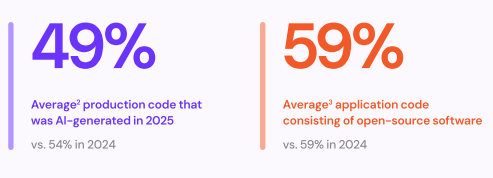
This shift is no longer emerging – it’s mainstream: Checkmarx’s 2026 Future of AppSec research found that AI-generated code now accounts for roughly 49% of production code at surveyed organizations, more than any other single source of new code.
This is part of a series of articles about ai in software development
How Does AI Code Generation Work?
Large Language Models and Training Data
AI code generation is driven by large language models (LLMs) such as Claude Opus, GPT-5, Codex, or similar architectures. These models are trained on vast datasets consisting of source code, documentation, and related natural language text collected from public repositories, forums, and educational sites. The training process enables the models to learn programming syntax, style, and logic across multiple languages, allowing them to generate code that is syntactically correct and contextually relevant.
The diversity and scale of training data are critical for the effectiveness of AI code generation. High-quality, diverse datasets help models learn best practices and adapt to various coding standards. However, the training data can also introduce biases, outdated patterns, or security vulnerabilities if not carefully curated.
Prompting and Context
Prompting is the process of providing an input, such as a natural language request or a partial code snippet, to guide the AI in generating code. Effective prompts include clear instructions, relevant details, and any necessary context, such as language or framework preferences. The model uses this information to produce code that aligns with the user’s intent, making it crucial for users to craft precise prompts for optimal results.
Contextual awareness is another key capability of modern AI code generators. By analyzing surrounding code, comments, documentation within a file or project, or even an entire repository, the AI can tailor its suggestions to match the existing style and architecture. This contextual understanding helps reduce integration errors and supports more seamless code generation, especially in complex or large-scale codebases.
Code Suggestions, Refactoring, and Agentic Coding
For several years, AI code generators have provided real-time code suggestions as developers type, essentially an advanced autocomplete. These suggestions range from completing lines of code to recommending entire functions or algorithms. AI can also refactor code by identifying areas for improvement, such as simplifying logic, renaming variables, or optimizing performance, all based on learned patterns and best practices.
Agentic coding takes AI assistance further by allowing the model to act autonomously within defined constraints. This means the AI can carry out higher-level tasks, such as implementing features, fixing bugs, or making architectural changes, based on natural language goals. While still evolving, agentic coding represents a significant step toward more automated and intelligent software development workflows.
Human Review and Feedback Loops
Despite advances in AI code generation, human review remains essential. Developers must validate that generated code is correct, secure, and fits project requirements. AI-generated code can contain errors, introduce vulnerabilities, or fail to meet specific coding standards, so thorough review and testing are necessary before integrating code into production environments.
Feedback loops are vital for improving AI code generation tools. When developers accept, reject, or modify AI suggestions, this feedback can be used to retrain and fine-tune models. Some platforms incorporate mechanisms for users to flag incorrect outputs or provide corrections, helping the AI learn from real-world usage and continuously improve its accuracy and relevance.
AI Code Generation vs. AI Coding Assistants
AI code generation is a capability, while an AI coding assistant is a broader category of development tool. Code generation focuses on producing source code from prompts or existing context, while a coding assistant combines code generation with additional capabilities such as explaining code, debugging, reviewing pull requests, answering technical questions, and helping developers work across the entire software development lifecycle.
What Overlaps?
AI code generation and AI coding assistants share many of the same underlying technologies. Both are typically powered by large language models that understand natural language, source code, and project context. They can generate functions, explain code, create tests, suggest fixes, and answer programming questions based on developer prompts.
In practice, most modern coding assistants include code generation capabilities as a core feature. Developers often use the terms interchangeably because the same tool may generate code, provide inline completions, explain errors, and assist with debugging.
What Is Different?
AI code generation refers specifically to the creation of code artifacts from prompts, specifications, examples, or existing code. The output is typically source code, tests, scripts, queries, or configuration files. The primary goal is to automate the process of writing code.
AI coding assistants have a broader scope. In addition to generating code, they support activities such as code review, debugging, documentation, architecture discussions, onboarding, requirements analysis, and workflow automation. A coding assistant acts as a development companion throughout the software lifecycle.
The distinction also affects how organizations measure productivity gains. Code generation is often evaluated by output speed and reduction of repetitive work. Coding assistants are typically evaluated across a wider range of outcomes, including developer efficiency, code quality, onboarding speed, knowledge sharing, and issue resolution.
Security and Governance Differences
There is a crucial operational difference between AI code generation and AI coding assistants. Code generation tools often require access only to the prompt and relevant code context needed to produce output. Coding assistants, especially agentic systems, may require broader access to repositories, documentation systems, issue trackers, build environments, or cloud resources. This creates additional security, privacy, and compliance considerations.
Organizations should apply different governance controls depending on the tool’s capabilities. Basic code generation may be allowed with standard code review processes, while agentic coding assistants often require permission controls, audit logging, approval workflows, and restrictions on automated actions. As AI systems become more autonomous, governance becomes increasingly important to ensure security, compliance, and operational reliability.
Common AI Code Generation Use Cases
AI code generation supports a wide range of software development tasks beyond writing new code. Modern AI tools can automate repetitive programming work, improve code quality, simplify maintenance, and reduce time spent on testing and documentation.
Although these capabilities can significantly increase developer productivity, the generated output should always be reviewed to ensure it meets project requirements, coding standards, and security expectations:
- Writing boilerplate code: Generates repetitive code such as class definitions, API endpoints, configuration files, and project scaffolding, reducing manual work while promoting consistency across codebases.
- Generating unit tests: Creates unit tests for existing code, covering common inputs, edge cases, and expected outputs to improve test coverage and reduce the effort required to build a testing suite.
- Refactoring existing code: Suggests improvements such as simplifying logic, renaming variables, splitting large functions, and removing redundant code to improve readability, maintainability, and long-term code quality.
- Debugging and error fixes: Analyzes error messages and code to identify likely causes of bugs, recommend fixes, and suggest alternative implementations that can speed up troubleshooting.
- Documentation and code comments: Produces docstrings, inline comments, and other documentation by analyzing code structure and functionality, helping keep projects understandable and easier to maintain.
Benefits of AI Code Generation
Using AI for code generation is becoming a standard part of modern software development because it helps developers work faster and focus on higher-value tasks. By automating repetitive coding activities and providing intelligent recommendations, these tools can improve productivity, code quality, and development efficiency:
- Increased developer productivity: AI automates repetitive coding tasks, reducing the time spent on routine work. It can generate code snippets, functions, and templates in seconds, allowing developers to focus on solving business problems rather than writing boilerplate code. This helps accelerate development cycles and shorten time to market.
- Faster learning and onboarding: AI code generation tools help developers understand unfamiliar languages, frameworks, and APIs by providing examples and implementation suggestions. They reduce the learning curve for new team members and make it easier to work with new technologies or codebases.
- Improved code quality: AI can recommend coding patterns, best practices, and refactoring opportunities based on what it has learned from large code repositories. It helps identify potential bugs, inefficiencies, and code smells, contributing to more consistent and maintainable code.
- Reduced development costs: By automating common development tasks, AI reduces the amount of manual effort required to build and maintain software. Teams can complete projects more efficiently, helping organizations deliver more value without proportionally increasing development resources.
- Better testing and maintenance: AI can generate unit tests, create documentation, and suggest code improvements, reducing the effort needed to maintain software over time. These capabilities help improve code coverage, simplify troubleshooting, and support long-term code quality.
- Enhanced developer experience: AI provides real-time assistance within development environments, helping developers overcome implementation challenges and reduce context switching. By handling repetitive tasks and surfacing useful suggestions, it makes the development process more efficient and less frustrating.
Limitations and Risks of AI Code Generation
Incorrect or Hallucinated Code
AI code generation models can produce code that appears correct but contains logical errors, uses nonexistent APIs, or fails to meet the requested requirements. Because these models predict likely code patterns rather than reason about program correctness, they can generate inaccurate or misleading output, particularly for complex business logic, edge cases, or unfamiliar frameworks. Human validation remains essential before generated code is deployed.
Mitigations:
- Review all AI-generated code before merging it into production.
- Validate functionality with automated unit, integration, and regression tests.
- Use static analysis and linting tools to detect implementation issues.
- Break complex requests into smaller prompts that are easier to verify.
- Treat AI-generated code as a first draft rather than production-ready output.
Key considerations for enterprises:
- Define mandatory review requirements for AI-generated code.
- Require testing standards before deployment regardless of code origin.
- Train developers to recognize common AI hallucinations and logic errors.
- Establish accountability so human reviewers remain responsible for code quality.
Security Vulnerabilities
AI-generated code may introduce vulnerabilities by reproducing insecure coding patterns or omitting important security controls. Common issues include insufficient input validation, insecure authentication, improper secrets handling, and injection vulnerabilities. Since the model optimizes for plausible output rather than secure implementation, organizations should assume generated code requires the same security validation as manually written code.
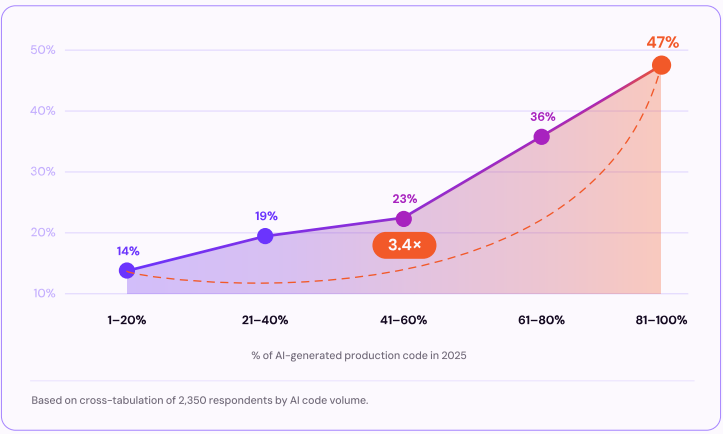
A direct correlation between AI code volume and security outcomes
This isn’t a theoretical concern. Checkmarx’s 2026 Future of Application Security research found that 70% of developers say AI code generation created more vulnerabilities in their code in 2025, and AI-generated code is now responsible for 25% of breaches – a top-four contributor alongside vulnerable APIs, open-source vulnerabilities, and supply chain attacks. The same research found that organizations where 81-100% of code is AI-generated ship vulnerable code at 3.4 times the rate of those at 1-20% adoption — risk scales directly with how much AI-generated code an organization ships.
Mitigations:
- Scan generated code using SAST, SCA, secrets, and IaC security tools.
- Validate input handling, authentication, authorization, and encryption logic.
- Include secure coding requirements directly in AI prompts.
- Review dependencies introduced by generated code.
- Perform manual security reviews before deployment.
Key considerations for enterprises:
- Apply existing secure SDLC practices to AI-generated code.
- Integrate automated security scanning into developer workflows.
- Define security policies for approved AI coding tools.
- Continuously monitor production applications for newly discovered vulnerabilities.
Code Quality and Maintainability
AI can generate working code quickly, but the output does not always align with project architecture, coding standards, or long-term maintenance goals. Generated code may include duplicated logic, inconsistent naming, unnecessary complexity, or patterns that increase technical debt. Without careful review, these issues can reduce code quality and make future maintenance more difficult.
Mitigations:
- Refactor generated code before committing it to production.
- Enforce coding standards through automated formatting and linting.
- Review architecture consistency during code reviews.
- Require adequate documentation and meaningful comments.
- Continuously measure maintainability using code quality tools.
Key considerations for enterprises:
- Maintain organization-wide coding standards for AI-generated code.
- Include maintainability metrics in quality gates.
- Encourage developers to understand generated code rather than simply accept it.
- Balance development speed with long-term software quality objectives.
Privacy and Data Leakage Concerns
Many AI code generation services process prompts, source code, and project context on external infrastructure. Submitting proprietary source code, customer information, credentials, or regulated data may expose sensitive information or conflict with organizational security and compliance requirements. The level of risk depends on how the AI provider stores, processes, and uses submitted data.
Mitigations:
- Avoid submitting confidential or regulated information in prompts.
- Use enterprise AI services that provide contractual privacy protections.
- Redact sensitive data before sharing code with AI tools.
- Review vendor policies for data retention and model training.
- Restrict AI tool usage according to data classification policies.
Key considerations for enterprises:
- Establish governance policies for approved AI services.
- Define which data types may be shared with AI-powered code generation tools.
- Evaluate vendors for regulatory and compliance requirements.
- Periodically audit AI usage to verify policy compliance.
Governance and Compliance Risks
AI-assisted development introduces governance challenges related to code provenance, licensing, auditability, and regulatory compliance. Organizations may need to demonstrate how software was developed, reviewed, tested, and approved, particularly in regulated industries. Without appropriate governance processes, AI-generated code can create gaps in documentation, accountability, and compliance reporting.
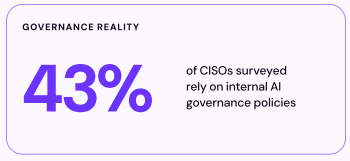
This gap is already widespread: Checkmarx’s 2026 research found that only 22% of organizations have a formal, policy-based governance process for AI use in development – leaving most teams to catch up only after AI adoption has already outpaced their oversight.
Mitigations:
- Document organizational policies for AI-assisted development.
- Track AI-generated contributions where required by policy.
- Maintain approval workflows for generated code.
- Record security reviews, testing, and validation activities.
- Regularly audit AI development practices for policy compliance.
Key considerations for enterprises:
- Define ownership and accountability for AI-generated code.
- Align AI development processes with regulatory requirements.
- Maintain sufficient audit trails for compliance reporting.
- Update governance policies as AI capabilities and regulations evolve.
Best Practices for Using AI Code Generation Securely
The following table summarizes AI code generation security best practices. We explore each of them in more detail below.
| Best Practice | Description | Why It Matters |
| Scan AI-Generated Code Inside the IDE | Use IDE-integrated security tools to scan generated code immediately for vulnerabilities, insecure patterns, and policy violations. | Detects issues early, reduces remediation costs, and helps developers fix problems before code is committed. |
| Use SAST, SCA, Secrets, and IaC Scanning Together | Combine static analysis, dependency scanning, secrets detection, and infrastructure-as-code scanning to evaluate generated code and related artifacts. | Provides broader security coverage and identifies risks that a single tool may miss. |
| Put Security Gates in the Pull Request Workflow | Require automated security scans, code quality checks, and policy validation before pull requests can be merged. | Prevents insecure code from reaching production and enforces consistent review standards across teams. |
| Prompt AI Tools With Secure Coding Requirements | Include explicit security requirements in prompts, such as input validation, secure authentication, parameterized queries, and approved libraries. | Improves the quality and security of generated code while reducing the likelihood of insecure recommendations. |
| Track and Label AI-Generated Code When Needed | Identify code that was generated or assisted by AI to support governance, auditing, and compliance processes. | Increases transparency, supports risk management, and helps meet regulatory or organizational requirements. |
1. Scan AI-Generated Code Inside the IDE
Security review should begin as early as possible in the development process. Many modern IDEs support security extensions that can scan AI-generated code in real time for vulnerabilities, insecure patterns, and policy violations. Running scans immediately after code generation helps developers identify issues before the code is committed or shared with the team.
Early feedback reduces remediation costs and encourages secure coding habits. Developers can quickly correct risky implementations, validate dependencies, and address security concerns while the generated code is still fresh in context. Integrating security scanning directly into the IDE helps make secure development a continuous part of the coding workflow.
2. Use SAST, SCA, Secrets, and IaC Scanning Together Correlate Findings
No single security tool can identify every type of risk in AI-generated code. Static application security testing (SAST) helps detect vulnerabilities in source code, while software composition analysis (SCA) identifies risks in open-source dependencies. Secrets scanning finds exposed credentials, API keys, and tokens, and infrastructure-as-code (IaC) scanning evaluates cloud and infrastructure configurations for security issues.
Using these tools together provides broader coverage across the software development lifecycle. AI-generated code often includes third-party libraries, configuration files, and deployment artifacts, making a layered security approach essential. Combining multiple scanning methods helps organizations detect a wider range of vulnerabilities before software reaches production.
3. Put Security Gates in the Pull Request Workflow
Pull request workflows provide an effective checkpoint for reviewing AI-generated code before it is merged. Security gates can automatically require vulnerability scans, code quality checks, and policy validation as part of the review process. If critical issues are detected, the pull request can be blocked until the problems are resolved.
Automated security gates help enforce consistent standards across development teams. They reduce the risk of insecure code reaching production and ensure that AI-generated contributions receive the same level of scrutiny as human-written code. This approach strengthens governance while allowing teams to benefit from faster development cycles.
Prompt AI Tools With Secure Coding Requirements
The quality and security of generated code often depend on the instructions provided to the AI. Developers should include explicit security requirements in their prompts, such as validating user input, using parameterized queries, implementing secure authentication, or following established security frameworks. Clear guidance helps the model generate code that aligns more closely with secure coding practices.
Prompting for security does not guarantee vulnerability-free output, but it can significantly improve the quality of generated code. Providing context about compliance requirements, approved libraries, and organizational standards can further reduce the likelihood of insecure recommendations. Developers should still validate the output through review and testing.
Track and Label AI-Generated Code When Needed
Some organizations choose to track AI-generated code to support governance, compliance, and auditing requirements. Labeling code that was partially or fully generated by AI can help teams identify where additional review may be necessary and provide visibility into how AI tools are being used within the development process.
Tracking does not imply that AI-generated code is inherently less trustworthy than human-written code. Instead, it creates transparency and supports risk management efforts. In regulated environments, maintaining records of AI-assisted development may also help demonstrate compliance with internal policies or external regulatory requirements.
Related content: Read our guide to AI code security
Types of AI Code Generation Tools
AI-powered code generation tools fall into several categories depending on the problems they solve. Some help developers automate coding tasks across existing projects, others generate complete applications from natural language prompts, and some focus on validating the security and quality of AI-generated code before deployment.
- Agentic AI coding tools: Go beyond generating code by analyzing requirements, planning implementations, editing multiple files, running tests, and executing commands. They combine LLMs with development environments and external tools to automate larger parts of the software development workflow while still requiring human oversight.
- AI app builders: Generate complete applications from natural language descriptions, including user interfaces, databases, APIs, authentication, and deployment configurations. They target both developers and non-developers, allowing applications to be refined through conversational prompts or visual editors before production.
- Security and code review tools: Validate AI-generated code using the same review standards as human-written code. They combine manual review with automated testing, static application security testing (SAST), software composition analysis (SCA), dependency scanning, and other quality checks to identify vulnerabilities, licensing issues, and maintainability problems before deployment.
AI Code Generation Tools at a Glance
The table below summarizes the key differences between the tools covered in this section, including what each one is built for, its main capabilities, and the trade-offs to keep in mind. We explore each tool in more detail further down.
| Category | Solution | Best For | Key Strengths | Things to Consider |
| Agentic AI Coding Tools and Editors | Cursor | Developers wanting AI assistance with full codebase awareness | Codebase indexing, multi-file edits and autonomous agents | Aggressive edits in large projects need careful review; usage costs add up |
| Agentic AI Coding Tools and Editors | Claude Code | Agentic coding from the terminal, IDE and other surfaces | Maps whole codebases, turns issues into pull requests, runs tests | High token use; limits can be reached quickly on busy days |
| Agentic AI Coding Tools and Editors | Gemini Code Assist | Code completion and chat across IDEs with Google Cloud ties | Agent mode, local codebase awareness and enterprise data controls | Can hallucinate APIs; context handling is inconsistent on complex work |
| AI App Builders | Replit | Building and deploying full-stack apps from a browser | Natural language agent, zero-setup infrastructure and one-click deploy | Credit consumption can be high; not a full replacement for local dev |
| AI App Builders | Lovable | Building apps and websites through chat with a connected backend | Prompt-to-app generation, Supabase backend and GitHub sync | Limited deep customization; struggles with complex backends |
| AI App Builders | Bolt | Generating full-stack web apps entirely in the browser | In-browser Node.js runtime, live preview and design import | Token costs can be unpredictable; weaker on production-scale apps |
| Security and Code Review for AI Code Generation | Checkmarx One Developer Assist | Securing AI-generated and human-written code across the SDLC | Real-time IDE guardrails, agentic remediation, unified SAST, SCA, secrets, IaC, and CI/CD governance | Delivers the most value when deployed across IDE, CI/CD, and governance workflows |
| Security and Code Review for AI Code Generation | Snyk Code | Developer-first security scanning inside the IDE and pull requests | Real-time SAST with automated fixes and data-flow analysis | SAST less mature than SCA; higher tiers can be costly |
| Security and Code Review for AI Code Generation | SonarQube | Automated code review and quality gates across large codebases | Deep static analysis, 6,500+ rules and merge-blocking quality gates | Setup and rule tuning is complex; advanced features need paid editions |
Representative AI Code Generation Tools and Categories
How we selected these tools: We shortlisted AI code generation and code security tools based on their ability to write, edit, and review code from natural language prompts, integrate into developer workflows, and manage the quality and security of the resulting code.
Agentic AI Coding Tools and Editors
1. Cursor

Best for: Developers who want AI help with full awareness of their codebase.
Strengths: Codebase indexing, multi-file edits, and autonomous agents.
Things to consider: Edits in large projects need careful review.
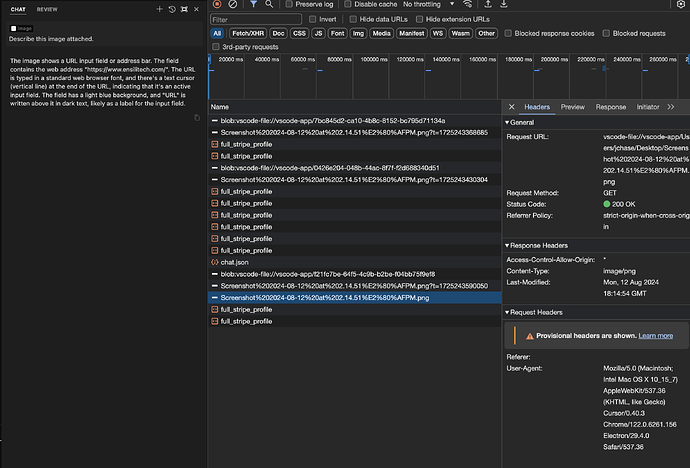
Cursor is an AI code editor built as a fork of VS Code, so it keeps a familiar interface while adding AI features throughout the development workflow. It indexes an entire codebase and uses semantic search to give its AI context about the whole repository, which informs its suggestions and edits. Cursor includes a Tab autocomplete feature for predicting the next edits, and a Composer mode that can make changes across multiple files in a single step.
The editor also offers an agent mode and background agents that can work autonomously and in parallel on tasks. It supports multiple underlying models, including its own Composer model and models from other providers, and lets users bring their own API keys. Cursor connects to external tools and services through MCP, integrates with Slack and GitHub for pull request review, and includes enterprise features such as single sign-on and a privacy mode.
Key features include:
- Codebase indexing: Builds an index of the whole repository and uses semantic search to give the AI context across files.
- Tab autocomplete: Predicts and suggests the next edits as developers type.
- Composer multi-file edits: Makes coordinated changes and refactors across multiple files at once.
- Agent mode and background agents: Runs autonomous tasks, including agents that work in the background and in parallel.
- Multiple model support: Works with its own Composer model and models from other providers, with an option to use your own API key.
- Tool and service integration: Connects through MCP, integrates with Slack, and supports pull request review on GitHub.
Limitations (as reported by users on G2):
- Aggressive edits: Some users report that the AI can make unneeded changes in large codebases, requiring careful review.
- Inconsistent output: A number of users note that results can be unreliable or include invented details on complex tasks.
- Performance on large projects: Some users mention that the editor can slow down and use significant system resources on big projects.
- Usage costs: Several users find that premium models and the usage-based credit model can become expensive.
- Support response: Some users report slow responses from support.
Source: Cursor

2. Claude Code

Best for: Agentic coding from the terminal, IDE, and other surfaces.
Strengths: Maps whole codebases and turns issues into pull requests.
Things to consider: Token use is high and limits can be reached quickly.
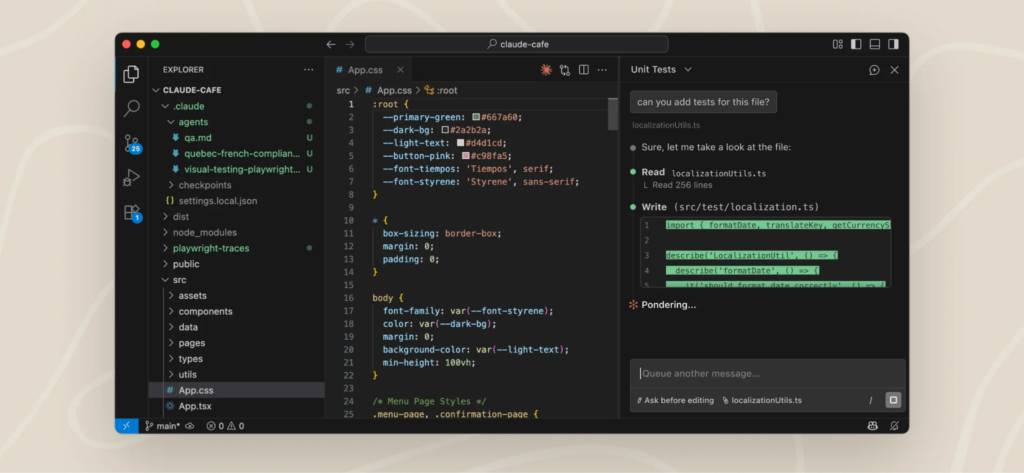
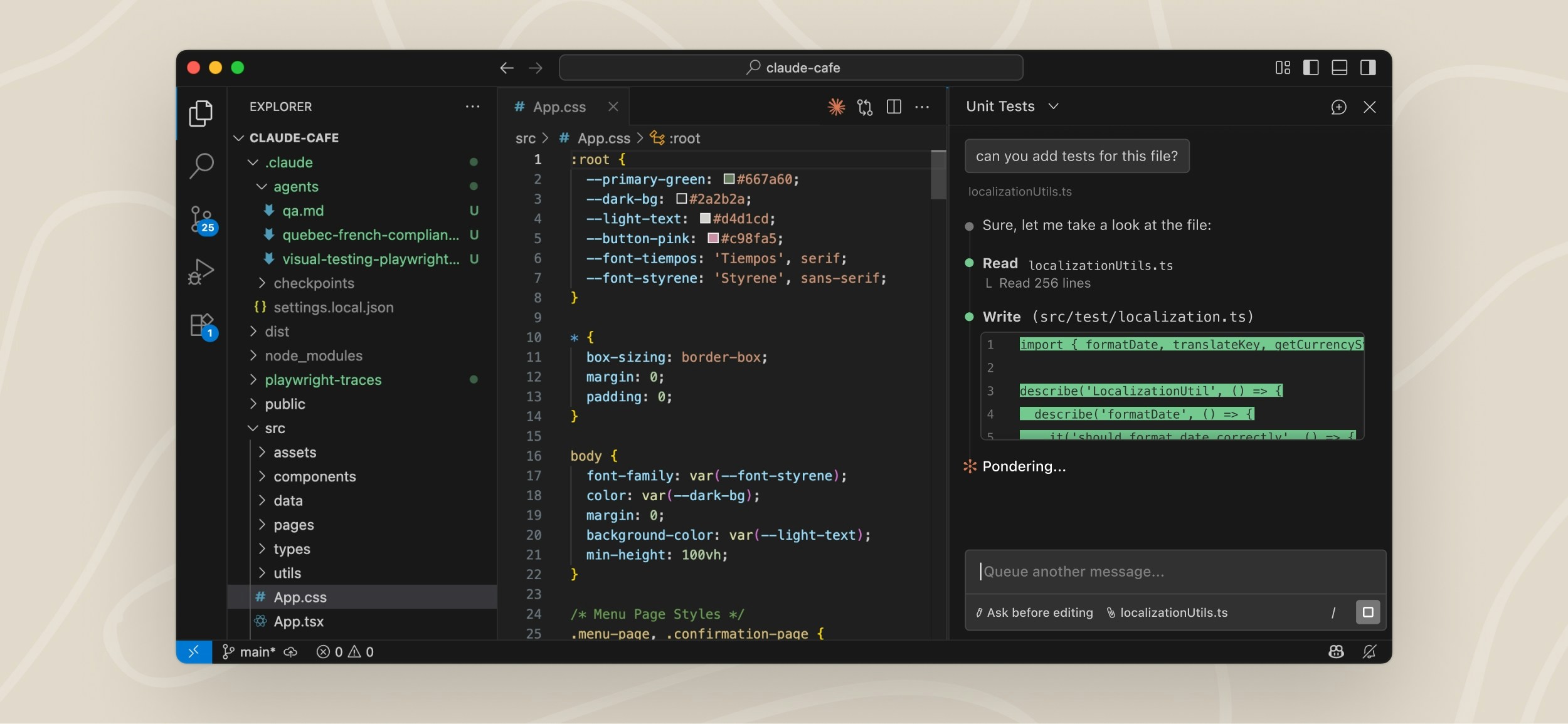
Claude Code is an agentic coding tool from Anthropic that works in the terminal, in IDEs such as VS Code and JetBrains, in a desktop app, on the web, and in Slack. It reads and maps an entire codebase using agentic search, which lets it answer questions about a project and onboard to unfamiliar code without a developer manually pointing it to relevant files. It can take an issue, write the code to address it, run tests, and submit a pull request.
The tool makes coordinated edits across multiple files and uses command-line tools such as Git, along with MCP servers, to carry out its work. It asks for permission before changing files or running commands, giving developers control over its actions. Claude Code runs locally and communicates with model APIs rather than building a remote index of code, and it includes routines that can run on a schedule or in response to events. It is available on macOS, Linux, and Windows.
Key features include:
- Codebase mapping: Reads and maps an entire project through agentic search to understand its structure and answer questions about it.
- Issue to pull request workflow: Reads an issue, writes code, runs tests, and submits a pull request.
- Multi-file edits: Makes coordinated changes across several files in a project.
- Tool and MCP use: Works with command-line tools such as Git and connects to MCP servers, including for GitHub.
- Permission controls: Asks for approval before modifying files or running commands.
- Multiple surfaces: Runs in the terminal, IDEs, a desktop app, the web, and Slack, across macOS, Linux, and Windows.
Limitations (as reported by users on G2):
- Token consumption: Some users report that usage limits can be reached quickly, with only a few prompts on higher-end models.
- Limit transparency: A number of users find the daily limits and cooling-off periods unclear.
- Pricing steps: Several users note a large jump in price between plan tiers.
- Model and command constraints: Some users mention they cannot connect third-party models and find custom command options limited.
- Output review: Users report that the agent can become overconfident or loop, so its output still needs review.
Source: Anthropic
3. Gemini Code Assist


Best for: Code completion and chat across IDEs with Google Cloud integration.
Strengths: Agent mode, local codebase awareness, and enterprise data controls.
Things to consider: Can invent APIs and handle context inconsistently.
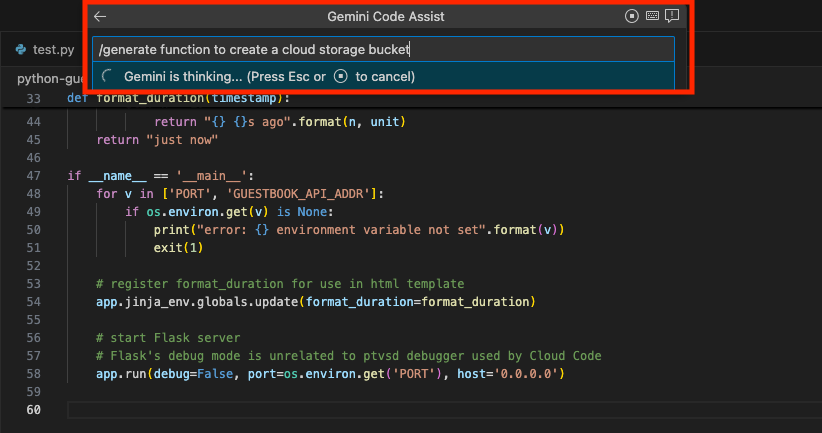
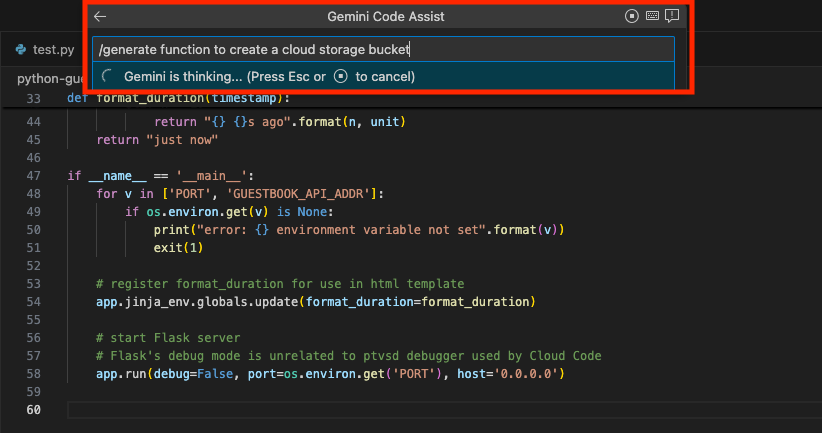
Gemini Code Assist is Google’s AI coding tool that provides code completion, code generation, and a natural language chat assistant inside IDEs such as VS Code and JetBrains, as well as in Cloud Workstations and Cloud Shell. It includes a command-line agent called Gemini CLI and an agent mode that can make multi-file edits with full project context, connect to external tools through MCP, and pause for human review at key points. It can be aware of a local codebase and can be customized to work with private code.
The tool offers smart actions for tasks such as generating tests and explaining code, and provides a dashboard showing usage metrics. It connects to Google Cloud services for API development, workflow automation, and data insights. On the security and governance side, it does not train on customer code, supports controls such as VPC Service Controls and IAM, provides source citations with intellectual property indemnification, and holds a range of compliance certifications.
Key features include:
- In-IDE assistance: Provides code completion, generation, and chat inside common IDEs and Google Cloud development environments.
- Agent mode and CLI: Makes multi-file edits with full project context and includes a terminal agent, with a human review step in the loop.
- Codebase awareness: Understands a local codebase and can be customized to work with private repositories.
- Smart actions: Offers commands for generating tests, explaining code, and similar tasks.
- Data governance: Does not use customer code for training and supports controls such as VPC Service Controls and IAM.
- Source citation: Cites sources for generated code and includes intellectual property indemnification.
Limitations (as reported by users on G2):
- Hallucinated APIs: Some users report that it can confidently suggest methods or APIs that do not exist, requiring review.
- Inconsistent context handling: A number of users find that it handles project-specific and multi-file logic unevenly.
- Model access and limits: Several users mention limited model choice and usage limits.
- Generic suggestions: Some users note that vague prompts produce generic results.
- Latency and long sessions: Users report latency in the editor on large files and reduced value in long sessions or complex architectures.
Source: Google
AI App Builders
4. Replit

Best for: Building and deploying full-stack apps from the browser.
Strengths: Natural language agent with zero-setup infrastructure.
Things to consider: Credit consumption can run high on larger projects.
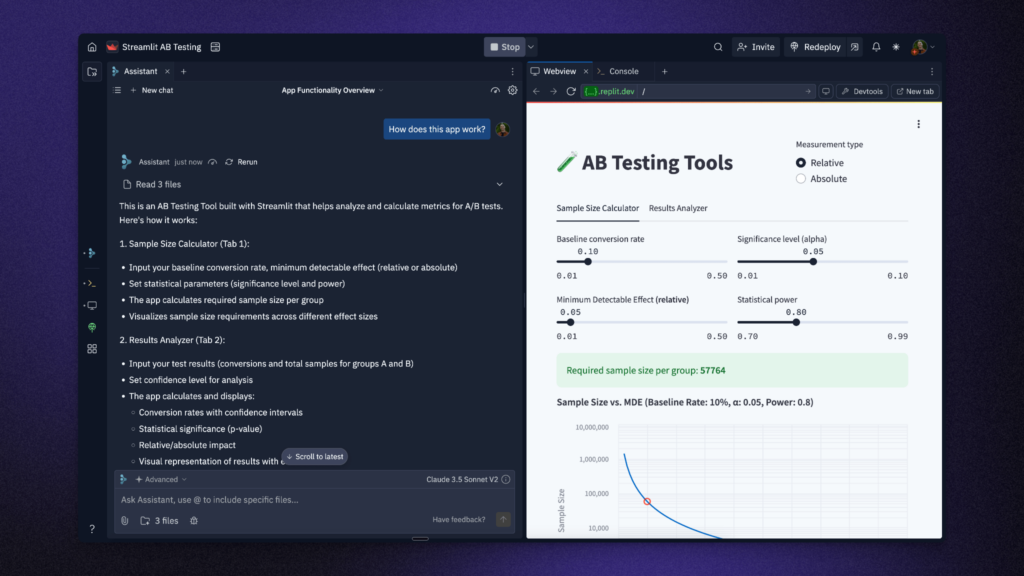
Replit is a browser-based platform that builds applications from natural language prompts. Its Agent feature turns a written description into a full-stack application, and Parallel Agents can work on multiple tasks at once. The platform includes an Infinite Canvas for visual design and supports multiple artifact types, including web and mobile apps, landing pages, and videos. Because it runs in the browser, it removes the need to set up a local development environment.
Replit provides full-stack infrastructure out of the box, including authentication, a database, hosting, and monitoring, so applications can run without separate setup. It connects to a large library of third-party integrations, including services such as OpenAI, Stripe, and Google Workspace, and supports team workflows with multi-user editing and a kanban board. Applications can be deployed with a single click, and the platform includes enterprise features such as single sign-on and SOC 2 compliance.
Key features include:
- Agent app generation: Turns natural language prompts into production-ready full-stack applications.
- Parallel agents: Runs multiple agents at once to work on different tasks.
- Built-in infrastructure: Provides authentication, a database, hosting, and monitoring without separate setup.
- Visual design canvas: Includes an Infinite Canvas and support for multiple artifact types such as apps, landing pages, and videos.
- Integrations: Connects to a large set of third-party services, including OpenAI, Stripe, and Google Workspace.
- Team and deployment support: Offers multi-user editing, a kanban board, one-click deployment, and enterprise single sign-on.
Limitations (as reported by users on G2):
- Credit consumption: Some users report high credit use and unexpected bills, and note that annual plan credits are issued monthly rather than pooled.
- Agent reliability: A number of users find the agent inconsistent on larger projects, sometimes ignoring instructions or changing unintended files.
- Not a full local replacement: Several users mention it is not a substitute for local development on complex, production-scale work.
- Performance: Some users report that performance varies and sessions can crash during long work.
- Context limits: Users note there is no warning as a project nears its context limit.
Source: Replit

5. Lovable

Best for: Building apps and websites through a chat interface.
Strengths: Prompt-to-app generation with a connected backend.
Things to consider: Limited control over deep customization.
Lovable is a platform that builds applications and websites through a chat interface. Users describe what they want using prompts, screenshots, or documents, and the tool generates a working prototype in real time that can be refined through further feedback. It produces applications built with React and Tailwind, and connects a Supabase backend that handles authentication, database, and storage by default.
The platform supports two-way synchronization with GitHub, so users own and can edit the underlying code, and it includes a visual editor and a set of templates. Applications can be deployed with a single click and hosted with a custom domain. Lovable also offers connectors and an MCP server for linking to external services, along with enterprise and security resources through a trust center.
Key features include:
- Chat-to-app generation: Builds applications and websites from prompts, screenshots, or documents.
- Real-time prototyping: Generates a working prototype that can be refined through feedback.
- Connected backend: Wires up a Supabase backend with authentication, database, and storage by default.
- GitHub sync: Supports two-way synchronization with GitHub so users own the underlying code.
- Visual editor and templates: Provides a visual editor and a set of starting templates.
- Deployment and connectors: Offers one-click deployment with custom domains, plus connectors and an MCP server.
Limitations (as reported by users on G2):
- Credit system: Some users find the credit system limiting for larger projects and note that credits are used quickly when iterating.
- Prompting effort: A number of users report that complex interfaces need multiple prompts and can produce generic layouts that need polish.
- Limited customization: Several users mention limited control over project structure and deep customization.
- Complex backends: Some users find it struggles with complex backends and can enter debugging loops.
- Documentation: Users note that documentation and integrations can be sparse for new users.

Source: Lovable

6. Bolt

Best for: Generating full-stack web apps entirely in the browser.
Strengths: In-browser Node.js runtime with live preview.
Things to consider: Token costs can be unpredictable on large projects.
Bolt, also known as bolt.new and built by StackBlitz, is a browser-based AI web development agent. It runs on WebContainers, a technology that provides a full Node.js development environment inside the browser, so there is no local setup required. From a prompt, it generates a full-stack application, including frontend, backend, and database, and shows a live preview alongside the code.
The Bolt Agent automatically routes between models depending on the task, and the platform can import designs from Figma and projects from GitHub. Bolt Cloud adds hosting, databases, user management, SEO support, and analytics. The tool supports several design systems, can deploy to Netlify, and produces code that users own and can export.
Key features include:
- In-browser runtime: Runs a full Node.js environment in the browser through WebContainers, with no local setup.
- Prompt-to-app generation: Generates full-stack applications with frontend, backend, and database from a prompt.
- Live preview: Shows a running preview of the application alongside the generated code.
- Model routing: Uses the Bolt Agent to automatically route between models based on the task.
- Design and code import: Imports designs from Figma and projects from GitHub, and supports several design systems.
- Hosting and deployment: Provides Bolt Cloud for hosting, databases, and analytics, and can deploy to Netlify with exportable code.
Limitations (as reported by users on G2):
- Token consumption: Some users report that token use can be hard to control because the whole codebase is synced on each interaction, leading to unpredictable costs.
- Code export: A number of users find moving code into their own Git repository awkward, with dependency issues and manual steps.
- Production-scale work: Several users mention it struggles with complex, production-scale applications and can be inconsistent in depth and reliability.
- Bug fixing: Some users note that fixing one bug can rewrite whole files and break working code.
- Plan limits and compliance: Users report a very limited free plan and note an absence of stated compliance certifications.

Source: Bolt

Security and Code Review for AI Code Generation
7. Checkmarx One Developer Assist

Best for: Teams adopting AI coding assistants that want agentic AppSec across the SDLC – prevention in the IDE, enforcement in CI/CD, and portfolio-level visibility for AppSec leadership.
Key strengths: A unified Assist layer that includes Developer Assist (IDE), plus additional agentic layers that apply policy context, reduce noise, and help teams operationalize remediation in developer workflows.
Things to consider: You’ll get the most value when you roll it out across workflows (IDE + CI/CD + governance) and define guardrails up front (scope, policies, approvals, audit needs).
Checkmarx One Assist is a multi-layer, agentic AppSec capability designed to keep software delivery secure at AI speed. It includes Developer Assist in the IDE (to prevent insecure code before commit) and adds additional agentic layers that help standardize policy enforcement in CI/CD and improve portfolio-level visibility for AppSec and engineering leaders.
Developer Assist provides real-time guardrails for both human and AI-generated code in AI-native IDEs (e.g., Cursor and Windsurf) as well as VS Code and JetBrains, helping developers fix issues immediately without leaving their workflow. Developer Assist is one layer of Checkmarx One Assist, which extends agentic security beyond the IDE into CI/CD policy enforcement and portfolio-level insights – so prevention, enforcement, and governance work together as one program.
Key features include:
- Secure AI-generated and human code in real time: Detect vulnerabilities, misconfigurations, hard-coded secrets, and risky dependency patterns early—starting in the IDE and reinforced through CI/CD guardrails.
- Inline, agentic remediation: Use Checkmarx agentic AI to propose and apply validated code changes, not just suggestions, directly in the IDE.
- Shorter fix cycles and lower remediation cost: Cut pre-commit fix cycles from hours to minutes and reduce remediation costs per issue, helping teams avoid expensive downstream rework.
- Guardrails for AI coding assistants: Work alongside copilots such as GitHub Copilot, Cursor, and Windsurf to provide security guardrails and safe refactoring for AI-generated changes across developer workflows.
- Workflow-scaled governance: Extend agentic guidance beyond the IDE with CI/CD policy enforcement and portfolio-level visibility so fixes, exceptions, and risk trends are governed consistently across teams.
Key differentiators:
- True agentic AI, not just LLM chat: Developer Assist orchestrates scanning engines, tools, and policy context to take actions identify, explain, and safely refactor vulnerable code rather than just answering prompts.
- One agent, many risks: Covers SAST, open-source and malicious packages, IaC, containers, and secrets in a single IDE experience, powered by Checkmarx One unified intelligence and threat data.
- Designed for AI-native IDEs: Provides first-class support for AI-centric environments such as Cursor and Windsurf in addition to VS Code and JetBrains, meeting teams where AI-assisted coding actually happens.
- Enterprise-grade security and governance: Built on a secure gateway with strict access control and no code exfiltration, aligned with enterprise compliance expectations.
Limitations (as reported by users on G2):
- False positives: Some users report that scans can flag issues that turn out not to be real problems, adding review work.
- Language and file coverage gaps: A few users note that certain newer file extensions and languages are not yet supported for scanning.
- Initial learning curve: Some users mention that setup and configuration take time to learn, and scans on larger projects can run longer.

No committments, nothing to install before you sign up.
Get Started Free: Checkmarx Developer Assist
One month of full access to the Developer Assist agent, running inside the IDE you already use.
Checkmarx Developer Assist8. Snyk Code
Best for: Developers who want security scanning inside the IDE and pull requests.
Strengths: Real-time scanning with automated fixes and data-flow analysis.
Things to consider: The SAST engine is less mature than the SCA product.
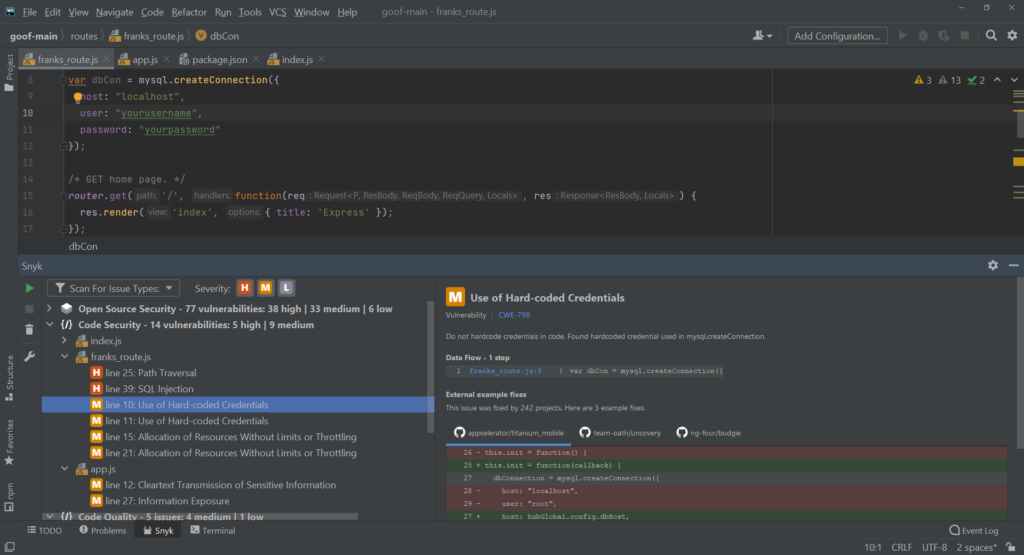
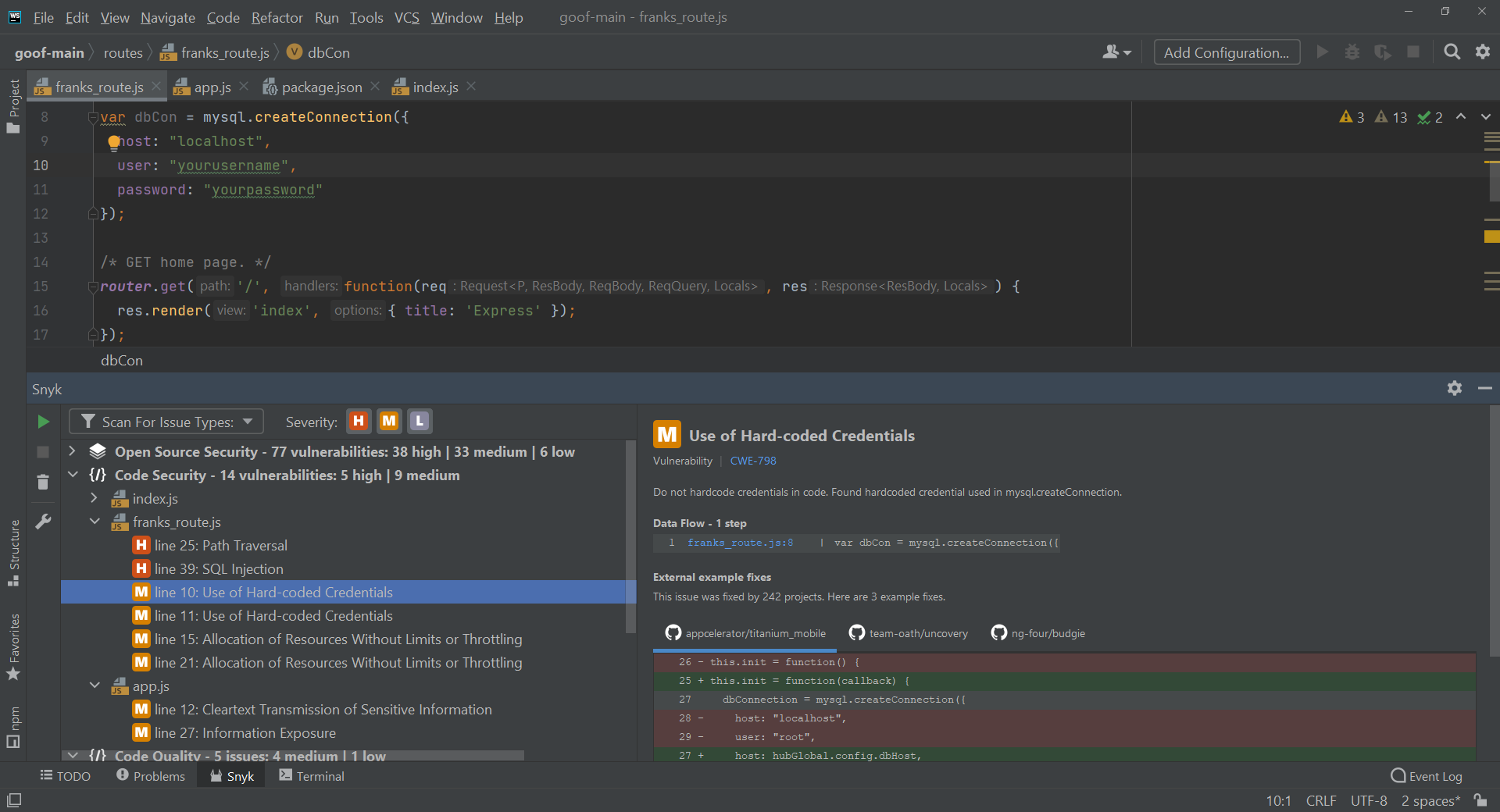
Snyk Code is a developer-first static application security testing tool that scans code as it is written and inside pull requests. It runs in the IDE and in the development pipeline, flagging vulnerabilities in real time and offering automated fixes through its Agent Fix capability. The tool is built on a system that combines a large database of real-world vulnerabilities with AI analysis, allowing it to trace how data moves through an application and identify security issues that span multiple files.
Snyk Code analyzes how untrusted input flows through code using semantic taint and data-flow analysis, and it prioritizes findings based on whether a vulnerability can actually be reached and exploited. It covers a wide range of programming languages and includes coverage for many of the libraries used in AI and machine learning projects. The tool integrates with common editors, source control systems, and CI/CD pipelines, where it can act as a security gate on pull requests.
Key features include:
- Real-time SAST scanning: Checks code for vulnerabilities as developers write it, directly in the IDE and in pull requests.
- Automated fixes: Suggests and applies code fixes through Snyk Agent Fix without requiring a separate build step.
- Data-flow analysis: Traces how untrusted input moves across files to detect issues such as injection vulnerabilities.
- Reachability prioritization: Ranks findings by whether a vulnerability can be reached and exploited, helping teams focus on real risk.
- AI library coverage: Scans code that uses common AI and machine learning libraries, including those from providers such as OpenAI and Hugging Face.
- Pipeline integration: Works with IDE plugins, Git integrations, and CI/CD checks, and exports results in the SARIF format.
Limitations (as reported by users on G2):
- SAST maturity: Some users find the code scanning less developed than the dependency scanning product, with more false positives and less context.
- Fix reliability: A number of users report that suggested fixes sometimes recommend changes that can break a build.
- Pricing structure: Several users note that costs rise steeply between tiers and that some reporting and access features sit behind higher plans.
- Noise from low-severity findings: Some users mention that low-severity alerts require filter tuning to keep results manageable.
Source: Snyk
9. SonarQube

Best for: Automated code review and quality enforcement across large codebases.
Strengths: Deep static analysis with quality gates that can block merges.
Things to consider: Setup and rule tuning can be involved on large projects.
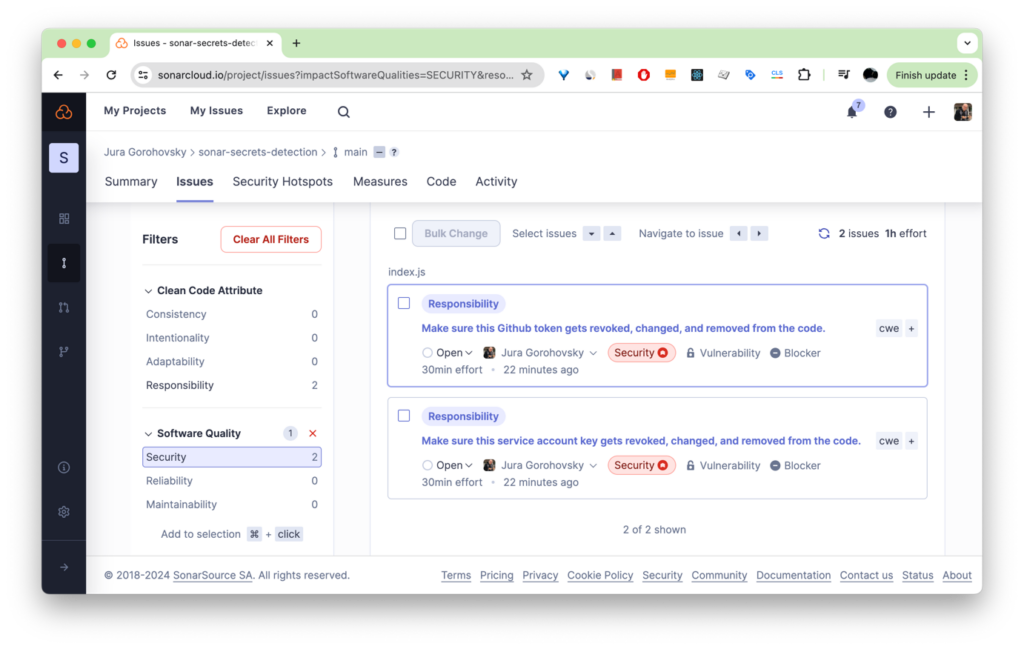
SonarQube, from Sonar, is a code review and static analysis platform that checks code for quality, reliability, and security issues. It scans branches, pull requests, and merges automatically as code is committed, and applies quality gates that can block a merge when code does not meet defined standards. The platform comes in a self-managed server edition, a hosted cloud edition, and an IDE version, with options for air-gapped deployment and data residency control for teams with strict requirements.
The platform runs deep static analysis using thousands of deterministic rules and reports on metrics such as maintainability, reliability, and technical debt. Its security capabilities include static application security testing, taint analysis, secrets detection, infrastructure as code scanning, and software composition analysis, available through an advanced security add-on. SonarQube also includes an AI CodeFix feature that uses language models to suggest context-aware fixes, and it supports a wide set of languages, including older enterprise languages such as COBOL and ABAP.
Key features include:
- Automated code review: Scans all branches, pull requests, and merges as soon as code is committed or pushed.
- Quality gates: Blocks merges that fail defined standards through pull request decoration in GitHub, GitLab, Bitbucket, and Azure DevOps.
- Deep static analysis: Applies a large set of deterministic rules to assess maintainability, reliability, and technical debt.
- Security testing: Provides SAST, taint analysis, secrets detection, infrastructure as code scanning, and software composition analysis through an add-on.
- AI CodeFix: Uses language models to generate context-aware fix suggestions inside the developer workflow.
- Broad language and deployment options: Supports over 40 languages, including legacy enterprise languages, across self-hosted, cloud, and IDE editions.
Limitations (as reported by users on G2):
- Setup complexity: Some users find the initial configuration and rule tuning involved, especially on large projects.
- Strict rules: A number of users report that default rules can be too strict and produce findings that need manual review.
- Performance on large codebases: Some users note that the interface can slow down when working with very large projects.
- Paid-tier features: Several users mention that capabilities such as branch analysis and advanced security are only available in paid editions.
- Maintenance overhead: Users running the self-hosted edition report ongoing time spent on upgrades and infrastructure.
Source: SonarQube
Related content: Read our guide to AI developer tools
How to Choose an AI Code Generation Tool
Choosing an AI code generation tool involves more than evaluating how well it writes code. Organizations should consider how the tool fits into existing development workflows, supports code quality, and helps manage security risks. The most effective solutions combine code generation capabilities with features that help developers review, validate, and improve generated code throughout the software development lifecycle.
When comparing tools, consider the following factors:
- IDE integration and workflow compatibility: The tool should integrate directly into the development environments your team already uses. Native IDE support allows developers to receive suggestions, review generated code, and address issues without switching between multiple applications, reducing friction and improving adoption.
- Real-time code analysis: Look for tools that can analyze code as it is written rather than relying solely on post-development reviews. Early detection of vulnerabilities, misconfigurations, secrets, and coding issues helps reduce remediation effort and prevents problems from progressing further into the development pipeline.
- Security validation capabilities: Code generation alone is not enough. The tool should help identify security risks in both human-written and AI-generated code. Solutions that provide vulnerability detection, explain risks, and support secure coding practices can help teams maintain code quality while increasing development speed.
- Automated fixes and refactoring support: Some tools go beyond issue detection by proposing or applying validated fixes. Automated remediation and secure refactoring capabilities can significantly reduce the time developers spend addressing vulnerabilities, bugs, and code quality issues.
- Coverage across different risk types: Evaluate whether the tool can identify a broad range of issues, including source code vulnerabilities, insecure dependencies, exposed secrets, infrastructure configuration problems, container risks, and malicious packages. Broader coverage helps reduce the need for multiple disconnected tools.
- Clear explanations and developer guidance: The best tools do more than generate code or flag problems. They explain why an issue exists, how it affects the application, and what changes are needed to resolve it. This helps developers learn from recommendations and make better decisions during development.
- Support for AI-assisted development: As AI coding assistants become more common, organizations should consider tools that can work alongside them. Additional guardrails, validation, and review capabilities help ensure that AI-generated code meets security and quality requirements before it is committed to the codebase.
- Privacy and data protection: Organizations should understand how the tool handles source code, prompts, and project data. Review whether code is stored externally, shared with model providers, or kept within controlled environments. Data protection and compliance requirements may influence tool selection, especially in regulated industries.
- Remediation efficiency: A useful metric is how quickly developers can identify and resolve issues. Tools that streamline scanning, prioritization, and fixing can shorten remediation cycles, reduce development costs, and help teams address problems before they reach later stages of testing or production.
- Governance and compliance features: For larger organizations, auditing, policy enforcement, and visibility into AI-assisted development activities may be important requirements. Tools that support governance processes can help organizations maintain consistent standards while scaling AI adoption across development teams.
FAQ
-
Not exactly. AI code generation is the specific capability of producing code from prompts or context. An AI coding assistant is broader – it combines code generation with debugging, code review, documentation, and other tasks across the development lifecycle. Most modern assistants include code generation as one feature among several.
-
It can, if not reviewed and scanned the same way as human-written code. Checkmarx’s 2026 research found that 70% of developers say AI code generation created more vulnerabilities in their code in 2025, which is why scanning AI-generated code is as important as human-written code.
-
Yes, but it requires the same discipline applied to any other source of code: security scanning (SAST, SCA, secrets detection, IaC security), pull request gates, and governance policies defining what can be shared with AI tools and how AI-generated contributions are tracked.
-
Traditional code completion suggests the next few lines as you type. Agentic AI coding tools plan and execute multi-step tasks – editing multiple files, running tests, and preparing pull requests – with limited human involvement at each step, though human review before merging remains standard practice.
Conclusion
AI code generation can accelerate development significantly, but the strongest teams combine productivity gains with validation, secure workflows, and governance over generated code. Organizations should treat AI-generated code as they would any other software artifact by applying code review, automated testing, and security scanning before deployment. As AI coding assistants become more autonomous, selecting tools that integrate seamlessly into developer workflows while supporting policy enforcement, compliance, and secure software development practices will help teams realize the benefits of AI without compromising software quality or security.