
Summary
AI coding assistants use large language models and project context to help developers generate, explain, debug, refactor, and review code directly within their development workflows. Modern assistants increasingly include agentic capabilities that automate multi-step software engineering tasks, but organizations should combine them with code review, security scanning, and governance
What Is an AI Coding Assistant?
An AI code assistant uses machine learning and Large Language Models (LLMs) to help developers write, debug, refactor, and understand software. These tools boost developer velocity by offering real-time code assistance, automating tests, explaining code, and increasingly, performing entire development workflows with agentic AI.
Coding AI assistants differ from general AI code generation tools because they are integrated into the development workflow and operate with awareness of the current project. Instead of generating isolated code snippets from a prompt, they can use information from open files, project structure, documentation, and version control history to provide more relevant assistance. They are designed to support developers during coding rather than act as standalone code generators.
They also differ from autonomous coding agents. A coding assistant typically works interactively and requires developer review before changes are accepted. An autonomous coding agent can independently plan tasks, edit multiple files, run tests, execute commands, and iterate toward a goal with limited supervision. The top AI coding assistants function as collaborative tools that keep developers in control.
This is part of a series of articles about AI in software development
How AI Coding Assistants Work
Large Language Models with Code Training
AI coding assistants rely on large language models (LLMs) that have been extensively trained on publicly available code, open-source repositories, and technical documentation. These models learn the syntax, semantics, and idiomatic patterns of various programming languages. The training data includes everything from simple scripts to complex enterprise applications, allowing the models to understand context, infer intent, and generate relevant code snippets or explanations.
The continuous evolution of these models means they are constantly improving their ability to handle new coding and software engineering tasks. Developers benefit from the breadth and depth of knowledge encoded in these models, which helps them solve problems faster and perform coding tasks autonomously.
Context From Your Codebase
Modern coding AI assistants do more than reference generic code patterns; they analyze the specific context of your codebase. By parsing project files, reading code comments, and understanding function definitions, these tools tailor suggestions to fit your architecture and naming conventions. This contextual awareness leads to more relevant and accurate code completions, bug fixes, and refactoring recommendations.
Contextual integration also helps prevent mismatches and redundant code. When the assistant understands your codebase’s unique structure and dependencies, it reduces the likelihood of introducing errors or inconsistencies.
IDE, CLI, Browser, and Git Integration
Some AI coding assistants integrate with popular development environments like Visual Studio Code, JetBrains, and Eclipse, while others like Replit and Cursor offer their own AI-native IDE. These assistants also work directly in the command-line interface (CLI), browsers, and through Git-based workflows.
Integration with version control systems like Git enables AI assistants to help with code reviews, generate pull request summaries, and suggest changes directly in the workflow. Browser plugins extend support to cloud-based editors and code collaboration platforms. By embedding themselves across these touchpoints, AI coding assistants become a natural extension of the developer toolkit.
Agentic Coding
Modern AI coding systems such as Claude Code, OpenAI Codex, and similar tools extend beyond code completion by acting as software engineering agents. Instead of generating a single function or answering a question, they can break down a development task into multiple steps, inspect a codebase, modify files, run terminal commands, execute tests, and iterate until they reach a working solution.
These tools may operate directly inside the developer’s local environment or a controlled sandbox, allowing them to use project context, dependency information, and test results to make informed decisions while keeping developers involved through review and approval workflows.
These agentic capabilities enable developers to delegate larger units of work, such as implementing a feature, fixing bugs across multiple files, upgrading dependencies, or preparing a pull request with documentation and tests. Because agentic tools can make broad changes across a project, organizations must combine them with code review, automated testing, and security scanning to ensure generated changes meet quality, security, and compliance requirements.
What Can an AI Coding Assistant Do?
AI coding assistants support developers throughout the software development lifecycle by automating common programming tasks and providing context-aware guidance. They can generate and improve code, help identify and fix errors, explain unfamiliar code, and create documentation, allowing developers to spend more time on design and problem solving.
- Code generation and refactoring: Generate functions, classes, and other code from natural language prompts, then improve existing code by restructuring logic, renaming variables, and applying modern coding practices.
- Code completion: Predict and suggest context-aware code as you type, including multi-line completions that follow project conventions and reduce typing, syntax errors, and repetitive work.
- Debugging and error fixing: Analyze error messages and code context to identify bugs, recommend fixes, detect security issues, and suggest more reliable implementation patterns.
- Code explanation: Explain functions, classes, and code flows in plain language to help developers understand unfamiliar code, accelerate onboarding, and simplify code reviews.
- Documentation: Generate docstrings, comments, and usage examples from existing code, helping keep documentation accurate, consistent, and aligned with code changes.
- Legacy code modernization: Analyze legacy applications, upgrade frameworks and libraries, replace deprecated APIs, and migrate code to newer language versions while validating compatibility with automated tests.
- CI/CD failure investigation: Diagnose failed builds and test pipelines by examining logs, reproducing errors, identifying root causes, applying fixes, and rerunning validation until the pipeline succeeds.
- Large-scale codebase maintenance: Perform repetitive repository-wide changes such as updating APIs, renaming symbols, enforcing coding standards, removing deprecated patterns, or applying security fixes across hundreds of files while preserving consistency.
Benefits of Using an AI Coding Assistant
AI coding assistants provide practical advantages throughout the software development lifecycle. By automating routine work and offering real-time guidance, they help developers work more efficiently while maintaining code quality. As these tools become more capable and deeply integrated into development workflows, they deliver benefits for individual developers as well as entire engineering teams.
- Increased developer productivity: Automates repetitive tasks such as writing boilerplate code, generating tests, and creating documentation. Developers can spend more time solving business problems and building features.
- Faster development cycles: Speeds up coding, debugging, and code review processes, helping teams deliver software updates and new features more quickly.
- Improved code quality: Suggests best practices, identifies potential issues, and recommends cleaner implementations. This helps maintain consistent coding standards across projects.
- Reduced context switching: Provides answers, code examples, and explanations directly within the development environment, reducing the need to search external documentation or forums.
- Faster onboarding for new developers: Helps team members understand unfamiliar codebases, frameworks, and internal conventions through code explanations and contextual guidance.
- Better knowledge sharing: Makes expertise more accessible across teams by providing recommendations based on established coding patterns and practices.
Risks and Limitations of AI Coding Assistants
Incorrect or Insecure Code
AI coding assistants can generate code that is syntactically correct but functionally flawed or insecure. Since these tools rely on training data from public repositories, they may inadvertently replicate outdated patterns, introduce vulnerabilities, or misunderstand project-specific requirements. This risk is heightened when developers accept suggestions without thorough review, potentially leading to bugs, security flaws, or non-compliant code in production systems.
To mitigate these risks, developers must validate AI-generated code through testing, code review, and security analysis. Relying solely on the assistant’s output can create a false sense of security, especially when dealing with sensitive data or critical infrastructure. Awareness of these limitations is essential to avoid costly mistakes and ensure that AI coding assistants enhance, rather than compromise, software quality.
Data Privacy Risks
AI coding assistants often require access to proprietary codebases, which raises concerns about data privacy and intellectual property protection. If code is sent to external servers for processing, there is a risk that sensitive information could be exposed or stored without proper safeguards. This is particularly problematic for organizations subject to regulatory compliance or working on confidential projects.
To address privacy concerns, some AI assistants offer on-premises deployment or client-side processing options. Developers should carefully evaluate the data handling policies of any AI tool before integration, ensuring compliance with organizational and legal requirements. Transparent privacy practices and robust security controls are necessary to protect both company assets and customer data when leveraging AI coding assistants.
Quality Control at Scale
Widespread use of AI coding assistants can create challenges for maintaining consistent code quality across large teams or organizations. If multiple developers accept AI-generated suggestions without coordination, it can result in inconsistent coding styles, duplicated logic, or conflicting architectural decisions. This fragmentation undermines maintainability and increases the effort required for future updates or integrations.
Establishing clear guidelines and integrating automated quality checks are essential to manage this risk. Organizations should enforce code standards and use tools like static analysis or linters alongside AI assistants. By combining AI-generated code with established quality control processes, teams can leverage productivity gains without sacrificing codebase consistency or long-term maintainability.
Governance and Policy Concerns
Organizations adopting AI coding assistants must establish clear policies around when and how these tools can be used. Without governance, developers may use different models, share sensitive code with external services, or rely on AI-generated output in ways that conflict with security, compliance, or licensing requirements. This can create legal and operational risks that are difficult to detect after code has already entered production.
Governance frameworks typically define approved tools, acceptable data usage, review requirements, and audit processes. Many organizations also require human approval for AI-generated changes and maintain records of how AI contributed to development work. Clear policies help ensure that AI adoption remains consistent with regulatory obligations, internal standards, and software engineering best practices.
Knowledge Erosion / Cognitive Debt
AI coding assistants can reduce the amount of effort developers spend solving problems themselves. While this improves short-term productivity, excessive dependence on AI suggestions may weaken a developer’s understanding of programming concepts, debugging techniques, and system design. Over time, teams may become less capable of diagnosing issues or evaluating the quality of generated code without AI assistance.
This phenomenon is often described as cognitive debt. Just as technical debt accumulates when shortcuts are taken in software, cognitive debt accumulates when developers repeatedly rely on automation instead of building expertise. Organizations can reduce this risk by encouraging code reviews, training, and deliberate learning practices that require developers to understand and validate AI-generated solutions rather than simply accepting them.
Best Practices for Using an AI Coding Assistant Securely
1. Scan AI-Generated Code in Real Time
AI-generated code should be reviewed as it is created rather than after it has already been merged into a project. Real-time scanning helps identify security vulnerabilities, coding errors, dependency issues, and policy violations before they become part of the codebase. Integrating security scanners directly into the IDE or development pipeline allows developers to receive immediate feedback on AI-generated suggestions.
This approach reduces the risk of introducing insecure code while preserving the productivity benefits of AI assistance. Automated checks can flag hardcoded credentials, insecure functions, weak cryptographic implementations, and other common issues before developers accept the generated code.
2. Use SAST to Validate Every AI-Suggested Change
Static application security testing (SAST) tools should be applied to all AI-generated code, regardless of its source or apparent quality. SAST analyzes code without executing it and can identify vulnerabilities such as injection flaws, insecure data handling, access control issues, and unsafe coding patterns. Running these checks consistently helps ensure that AI-generated changes meet the same security standards as manually written code.
Organizations should integrate SAST into pull request workflows, continuous integration pipelines, and pre-commit checks. Automated validation creates a consistent review process and reduces the likelihood that vulnerable code reaches production environments.
3. Give the Assistant Secure Coding Instructions
The quality and security of AI-generated code often depend on the instructions provided to the assistant. Developers should include explicit requirements related to security, compliance, error handling, authentication, input validation, and approved frameworks. Clear prompts help guide the assistant toward safer implementation patterns and reduce the chance of insecure recommendations.
For example, teams can instruct the assistant to follow secure coding standards, avoid deprecated functions, sanitize user input, and use approved cryptographic libraries. Establishing prompt templates and organizational guidance can improve consistency across development teams and projects.
4. Keep AI Coding Assistants Inside Approved Development Workflows
AI coding assistant tools should be used within established development processes rather than as standalone tools operating outside organizational controls. Generated code should pass through the same review, testing, approval, and deployment procedures as any other code contribution. This ensures accountability and maintains visibility into how software is developed.
Organizations can reduce risk by integrating AI assistants into approved IDEs, source control systems, and CI/CD pipelines. Centralized governance helps enforce security requirements, maintain audit trails, and ensure that AI-generated code is subject to the same oversight as human-written code.
5. Use Policy-as-Code for AI-Assisted Development
Policy-as-code allows organizations to define security, compliance, and engineering requirements as automated rules that can be enforced throughout the development lifecycle. When combined with AI coding assistants, these policies help ensure that generated code aligns with organizational standards before it is merged or deployed.
Examples include enforcing approved dependencies, restricting insecure configurations, requiring encryption standards, and validating infrastructure definitions. Automated policy checks provide consistent enforcement at scale and reduce reliance on manual reviews, allowing teams to benefit from AI-assisted development while maintaining governance and compliance requirements.
Types of AI Coding Assistants
The AI coding assistant market includes several categories of tools that support different stages of the software development lifecycle. Some focus on improving code quality and security within the developer workflow, while others emphasize code generation, developer productivity, or autonomous task execution.
- AI code security tools: Tools that secure and validate code as it’s written, rather than generating it from a prompt. Embedded directly in development environments alongside coding assistants like Copilot or Cursor, they apply real-time security analysis, code review, static analysis, policy enforcement, and remediation guidance, validating both human-written and AI-generated code before it ships.
- Security-integrated Coding Assistants : AI assistants embedded directly into development environments that prioritize secure, high-quality code. They combine code assistance with capabilities such as real-time security analysis, code review, static analysis, policy enforcement, and remediation guidance to help developers identify and fix issues as they write code.
- AI coding assistants and IDE integrations: AI-powered coding assistants that integrate with existing IDEs or provide AI-native editors to accelerate everyday development. They focus on code generation, intelligent autocomplete, debugging, refactoring, documentation, and code explanations, while increasingly supporting multi-file editing and workflow automation.
- Agentic and autonomous AI coding tools: AI systems that can independently plan, execute, and iterate on multi-step software engineering tasks. They analyze codebases, modify multiple files, run commands and tests, manage development workflows, and work toward completing larger objectives with developers reviewing and approving the results.
AI Coding Assistants at a Glance
| Tool | Category | Best For | Key Strengths | Things to Consider |
| Checkmarx One Developer Assist | AI Code Security Tools | Teams adopting AI coding assistants wanting agentic AppSec across the SDLC | Unified agentic AppSec: IDE prevention, MCP integration, CI/CD enforcement, portfolio visibility | Greatest value when deployed across IDE + CI/CD + governance workflows |
| Qodo | AI Code Security Tools | Teams wanting automated, context-aware code review across IDE and PRs | Agentic PR review, multi-repo context engine, rules system, test generation | Learning curve across multiple surfaces; IDE plugin can slow on large codebases |
| Snyk Code | AI Code Security Tools | Developers who need real-time SAST with one-click auto-fix in the IDE | 35,000+ vulnerability database, pre-validated fixes, risk-based prioritization | False positives over time; SAST results less mature than Snyk’s SCA offering |
| SonarQube | AI Code Security Tools | Orgs needing code-quality gates and SAST with cloud or self-hosted deployment | Quality gates, taint analysis, secrets detection, AI CodeFix, 40+ languages | Complex initial setup; false positives require tuning; limited free-tier features |
| GitHub Copilot | AI Coding Assistants and IDE Integrations | Teams already on GitHub wanting AI assistance across editor, terminal, and cloud | Multi-model support, cloud agent, MCP integration, enterprise audit logs | Suggestions can miss intent in large projects; cost and weaker niche-language support |
| Cursor | AI Coding Assistants and IDE Integrations | Developers wanting an AI-native VS Code fork with deep codebase indexing | Tab completion, parallel autonomous agents, multi-model support, semantic search | Usage-based pricing surprises; agent can make aggressive edits in large codebases |
| Tabnine | AI Coding Assistants and IDE Integrations | Enterprises needing private, air-gapped AI coding with strict IP protection | Enterprise Context Engine, zero data retention, flexible on-prem/air-gap deployment | Code quality concerns; more conservative suggestions; no free individual tier |
| JetBrains AI Assistant | AI Coding Assistants and IDE Integrations | JetBrains IDE users wanting an open agent platform with MCP tool integration | Open agent platform (Junie + external agents), MCP support, skills manager | Noticeable latency; value tied to JetBrains IDEs; some cloud service dependencies |
| Gemini Code Assist | AI Coding Assistants and IDE Integrations | Google Cloud teams wanting AI coding with usage metrics and org codebase context | Agent mode with MCP, terminal CLI, enterprise codebase customization, usage dashboard | Occasional hallucinations; requires Google Cloud setup; usage limits on models |
| Amazon Q Developer | AI Coding Assistants and IDE Integrations | AWS teams wanting AI coding assistance integrated with AWS Console and services | Agentic task execution, security scanning, app transformation, AWS expertise | Less helpful outside AWS; out-of-context responses; limited advanced customization |
| Claude Code | Agentic and Autonomous AI Coding Tools | Developers wanting end-to-end agentic task execution from terminal to PR | Cross-surface operation, parallel task management, mobile-to-desktop routing | Usage limits and throttling; unpredictable usage-based pricing; separate review billing |
| Devin | Agentic and Autonomous AI Coding Tools | Engineering teams with complex, multi-repo migrations and large-scale refactors | Autonomous task execution, parallel migration fleet, PR review with visual QA | Inconsistent on complex work; requires oversight; struggles with vague requirements |
| Replit | Agentic and Autonomous AI Coding Tools | Builders who want to create and deploy full-stack apps from natural language prompts | Prompt-based app building, built-in auth/DB/hosting, parallel agents, 100+ integrations | Unpredictable credit-based pricing; agent can break existing code; reliability issues |
| Aider | Agentic and Autonomous AI Coding Tools | Developers who want open-source AI pair programming in the terminal via Git | Git-tracked edits, codebase mapping, 100+ languages, bring-your-own-model flexibility | Terminal-only; manual file selection required; no built-in code completion |
| Augment Code | Agentic and Autonomous AI Coding Tools | Orgs wanting lifecycle-spanning AI agents coordinated across triage, review, and verify | Lifecycle agents (Cosmos), multi-repo Context Engine, customizable expert agents | Credit-based pricing drew criticism in 2025; agentic workflows can feel slower |
Representative AI Coding Assistant Categories and Tools
How we selected these tools: We shortlisted AI coding assistant tools based on IDE integration depth, code generation and completion capabilities, security analysis features, agentic task execution, context awareness, and privacy/deployment options.
AI Code Security Tools
These tools don’t generate code from a prompt; they secure and validate code, whether it was written by a human or an AI coding assistant, as part of the development workflow.
1. Checkmarx One Developer Assist

Best for: Teams adopting AI coding assistants that want agentic AppSec across the SDLC – prevention in the IDE, enforcement in CI/CD, and portfolio-level visibility for AppSec leadership.
Key strengths: A unified Assist layer that includes Developer Assist (IDE), plus additional agentic layers that apply policy context, reduce noise, and help teams operationalize remediation in developer workflows.
Things to consider: You’ll get the most value when you roll it out across workflows (IDE + CI/CD + governance) and define guardrails up front (scope, policies, approvals, audit needs).
Checkmarx One Assist is a multi-layer, agentic AppSec capability designed to keep software delivery secure at AI speed. It includes Developer Assist in the IDE (to prevent insecure code before commit) and adds additional agentic layers that help standardize policy enforcement in CI/CD and improve portfolio-level visibility for AppSec and engineering leaders. Developer Assist provides real-time guardrails for both human and AI-generated code in AI-native IDEs (e.g., Cursor and Windsurf) as well as VS Code and JetBrains.
Key features include:
- Secure AI-generated and human code in real time: Detect vulnerabilities, misconfigurations, hard-coded secrets, and risky dependency patterns early-starting in the IDE and reinforced through CI/CD guardrails.
- Inline, agentic remediation: Use Checkmarx agentic AI to propose and apply validated code changes, not just suggestions, directly in the IDE.
- Shorter fix cycles and lower remediation cost: Cut pre-commit fix cycles from hours to minutes and reduce remediation costs per issue, helping teams avoid expensive downstream rework.
- Guardrails for AI coding assistants: Work alongside copilots such as GitHub Copilot, Cursor, and Windsurf to provide security guardrails and safe refactoring for AI-generated changes across developer workflows.
- Workflow-scaled governance: Extend agentic guidance beyond the IDE with CI/CD policy enforcement and portfolio-level visibility so fixes, exceptions, and risk trends are governed consistently across teams.
Key differentiators:
- True agentic AI, not just LLM chat: Developer Assist orchestrates scanning engines, tools, and policy context to take actions identify, explain, and safely refactor vulnerable code rather than just answering prompts.
- One agent, many risks: Covers SAST, open-source and malicious packages, IaC, containers, and secrets in a single IDE experience, powered by Checkmarx One unified intelligence and threat data.
- Designed for AI-native IDEs: Provides first-class support for AI-centric environments such as Cursor and Windsurf in addition to VS Code and JetBrains, meeting teams where AI-assisted coding actually happens.
- Enterprise-grade security and governance: Built on a secure gateway with strict access control and no code exfiltration, aligned with enterprise compliance expectations.
- Secure MCP access for agentic workflows: The Checkmarx MCP Server extends Developer Assist’s remediation guidance to any MCP-compatible AI assistant, including Claude, Cursor, GitHub Copilot, and Windsurf. It allows agents to have direct, governed access to SAST, SCA, secrets, and IaC findings without leaving the development environment.
Limitations (as reported by users on G2):
- False positives: Some users report that scans can flag issues that turn out not to be real problems, adding review work.
- Language and file coverage gaps: A few users note that certain newer file extensions and languages are not yet supported for scanning.
- Initial learning curve: Some users mention that setup and configuration take time to learn, and scans on larger projects can run longer.
Developer Assist
See Self-Healing Code in Action
Detect, fix, and verify issues as code is created,
with reviewable changes that keep risk out of the repo and backlog.
2. Qodo

Best for: Teams that want AI-powered code review and test generation across IDEs and pull request workflows.
Key strengths: Agentic pull request review, multi-repository context engine, configurable review rules, and automated unit test generation.
Things to consider: IDE performance can slow on large codebases, and teams may need time to adopt the platform across multiple workflows.
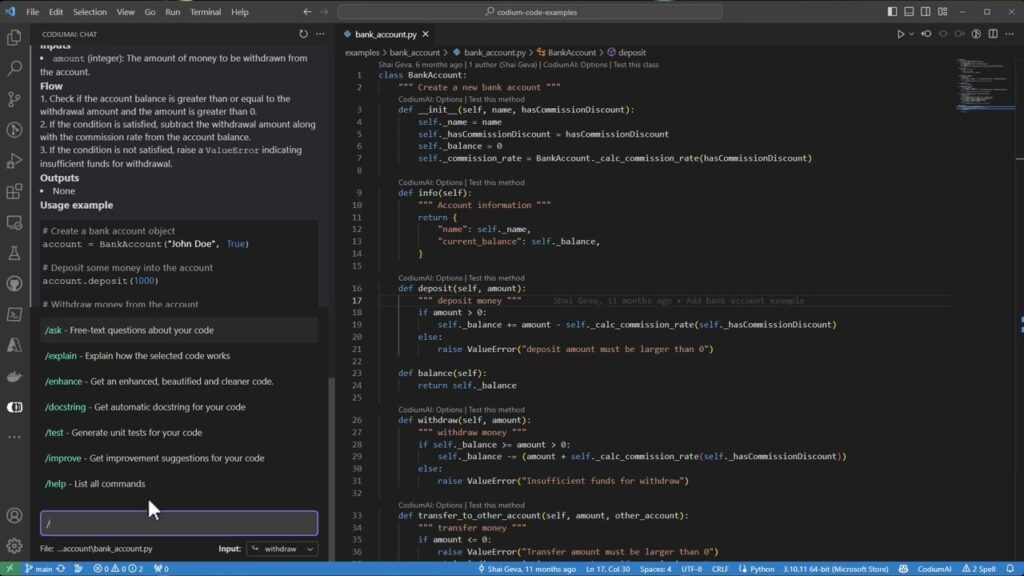
Qodo, formerly CodiumAI, is an AI code review and quality platform that adds an automated review layer across the IDE, pull requests, the command line, and Git workflows. It is built specifically for reviewing code rather than treating review as a side feature of generation, and it uses a context engine that indexes repositories, dependencies, past pull requests, and project requirements to reason about how a change fits the wider codebase.
Key features include:
- Agentic pull request review: Qodo runs specialized review agents on pull requests to find bugs, logic gaps, and missing tests, and to suggest code changes. The agents are designed to pre-review every pull request so human reviewers begin with a prioritized list of issues and suggested fixes.
- Local review inside the IDE: Built-in review intelligence runs in the editor with guided changes and code suggestions, allowing issues to be resolved at the source before code is committed rather than waiting until the pull request stage.
- Context engine for multi-repo codebases: The platform indexes repository structure, dependencies, prior pull request diffs and discussions, and project tickets or specs, so review agents can reason about cross-service and cross-repo impact rather than a single file in isolation.
- Rules system: Teams define, edit, and enforce coding standards in one place, and Qodo keeps those rules consistent and up to date as the codebase and teams change, applying them on every change for consistency across large organizations.
- Test generation: Qodo generates unit tests for code changes, including edge cases, which can shorten the time teams spend writing tests manually as part of the review workflow.
- Enterprise security and deployment options: The platform offers zero data retention, SOC 2 Type II certification, and on-premises or single-tenant deployment so code can be analyzed without leaving an organization’s infrastructure.
Limitations (as reported by users on G2):
- IDE plugin performance on large codebases: Some users report that the IDE extension can feel slow or less responsive on larger codebases, which affects developers who rely on it for interactive use.
- Learning curve across surfaces: Because Qodo spans pull request review, an IDE plugin, a CLI, test generation, and a context engine, several reviewers note it takes longer to master than single-purpose tools.
- Generated tests need adjustment: Reviewers mention that generated unit tests sometimes require manual changes before they run, occasionally needing more than one attempt.
- IDE coverage gaps: Some users note missing support for certain editors, such as Visual Studio, which limits teams that use a mix of environments.

Source: Qodo
3. Snyk Code

Best for: Developers who want real-time application security testing directly in the IDE and pull requests.
Key strengths: Real-time SAST, automated security fixes, semantic data-flow analysis, and risk-based prioritization.
Things to consider: False positives can require tuning, SAST capabilities are less mature than Snyk’s SCA offering, and pricing increases with team size.
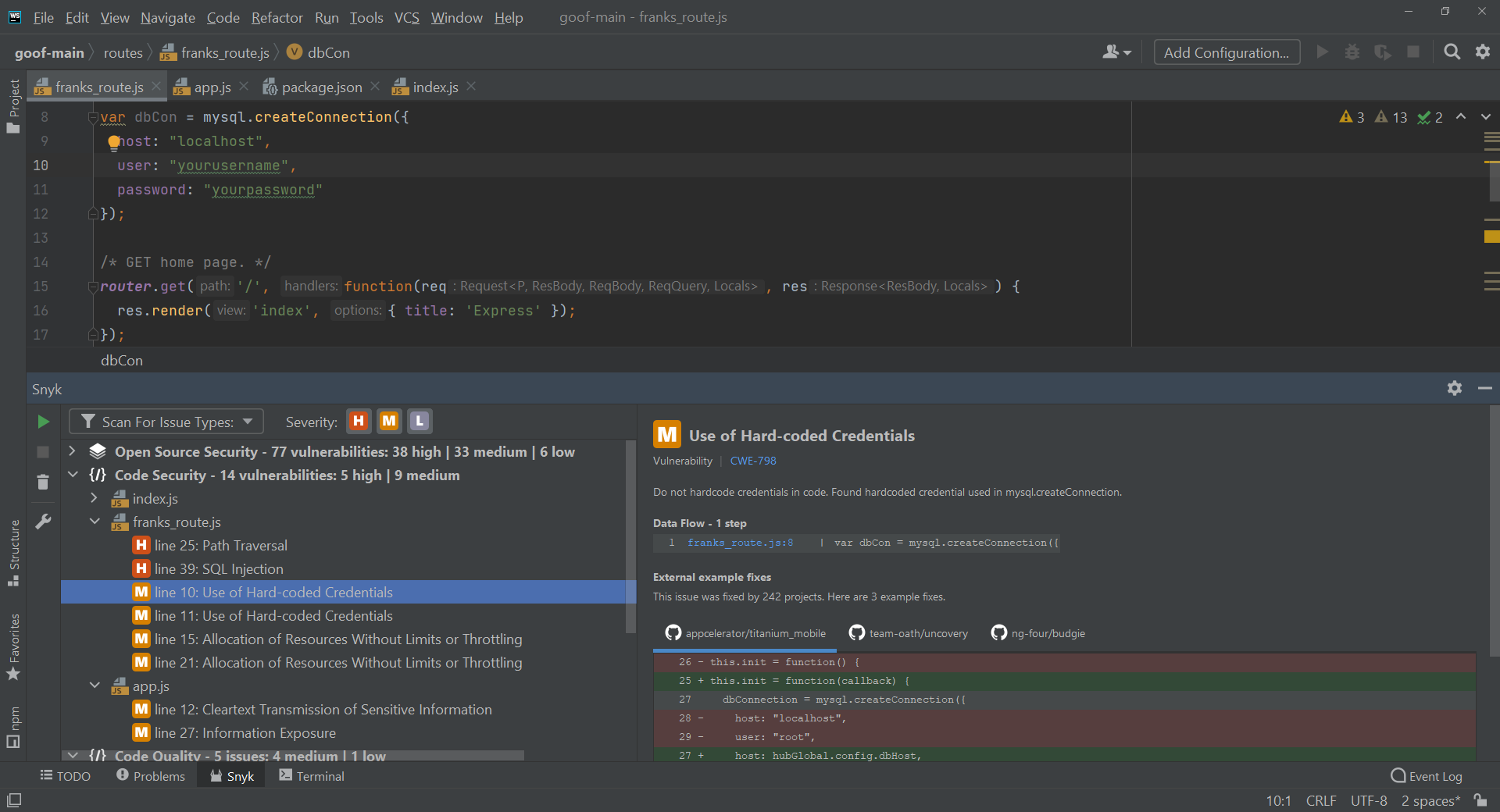
Snyk Code is a static application security testing (SAST) tool built for developers, focused on finding and automatically fixing vulnerabilities in code as it is written. It provides real-time, in-line scanning in the IDE and in pull requests, with results returned without waiting for a separate SAST report. Snyk Code pairs frontier AI models with the company’s own security intelligence through an agentic architecture branded DeepCode AI, and draws on a database of more than 35,000 real-world vulnerabilities and fixes authored by Snyk’s security researchers.
Key features include:
- Real-time SAST in the developer workflow: Snyk Code scans source code and returns in-line results in the IDE and in pull requests in seconds to minutes, without requiring a separate scan report or build step.
- Automatic, pre-validated fixes: Through Snyk Agent Fix, the tool proposes pre-screened fixes that can be applied with one click, combining frontier AI models with Snyk’s proprietary security data to produce remediation suggestions.
- Security intelligence knowledge base: Snyk maintains a database of more than 35,000 real-world vulnerabilities and fixes written by its security experts, and models over 25 million data-flow cases to inform detection and remediation.
- Risk-based prioritization: Findings are ranked using broad application context, so newly introduced, deployed, or publicly exposed issues are surfaced ahead of lower-priority results in an effort to reduce noise.
- Broad coverage including LLM libraries: Snyk Code supports most popular languages, IDEs, and CI/CD tools, and its source library coverage includes a large share of common LLM libraries such as those from OpenAI and Hugging Face.
- SDLC integration: The tool integrates across the IDE, pull request checks, and CI/CD security gates, allowing scans to run during development and as part of the build process.
Limitations (as reported by users on G2):
- False positives over time: Multiple reviewers note that false positives can appear, particularly in complex business-logic scenarios and after a project has been scanned for some time, which requires manual review.
- SAST less mature than SCA: Some users describe Snyk Code’s SAST results as less developed than the company’s software composition analysis side, with more false positives and less context around findings.
- Fix suggestions not always actionable: Reviewers report that recommended fixes occasionally introduce breaking changes, leaving developers to do additional manual research.
- Per-developer pricing: Several users note that per-developer pricing grows with team size, which can become costly for smaller teams, and that some reporting is reserved for higher license tiers.

Source: Snyk
4. SonarQube

Best for: Organizations that want automated code quality enforcement and security analysis across large development teams.
Key strengths: Quality gates, deep static analysis, taint analysis, AI CodeFix, and broad language support.
Things to consider: Initial setup and rule tuning can be complex, and advanced capabilities require commercial editions.
SonarQube, from Sonar, is a code-quality and security analysis platform built around static analysis, branch and pull request scanning, and quality gates that block code from merging until it meets defined standards. It is offered as SonarQube Cloud, a managed SaaS option, and SonarQube Server, a self-hosted option with full data residency and air-gapped deployment for regulated environments. The platform includes security capabilities such as SAST, taint analysis, secrets detection, and Infrastructure as Code scanning.
Key features include:
- Automated code review with quality gates: SonarQube automatically scans branches, pull requests, and merges as code is committed, applies curated rules and compliance standards, and uses quality gates to enforce consistent standards before code is merged.
- Static analysis and taint analysis: Its SAST engine detects vulnerabilities across popular languages, and a taint analysis engine tracks data flow across files and functions to find injection flaws such as SQL injection, cross-site scripting, and SSRF.
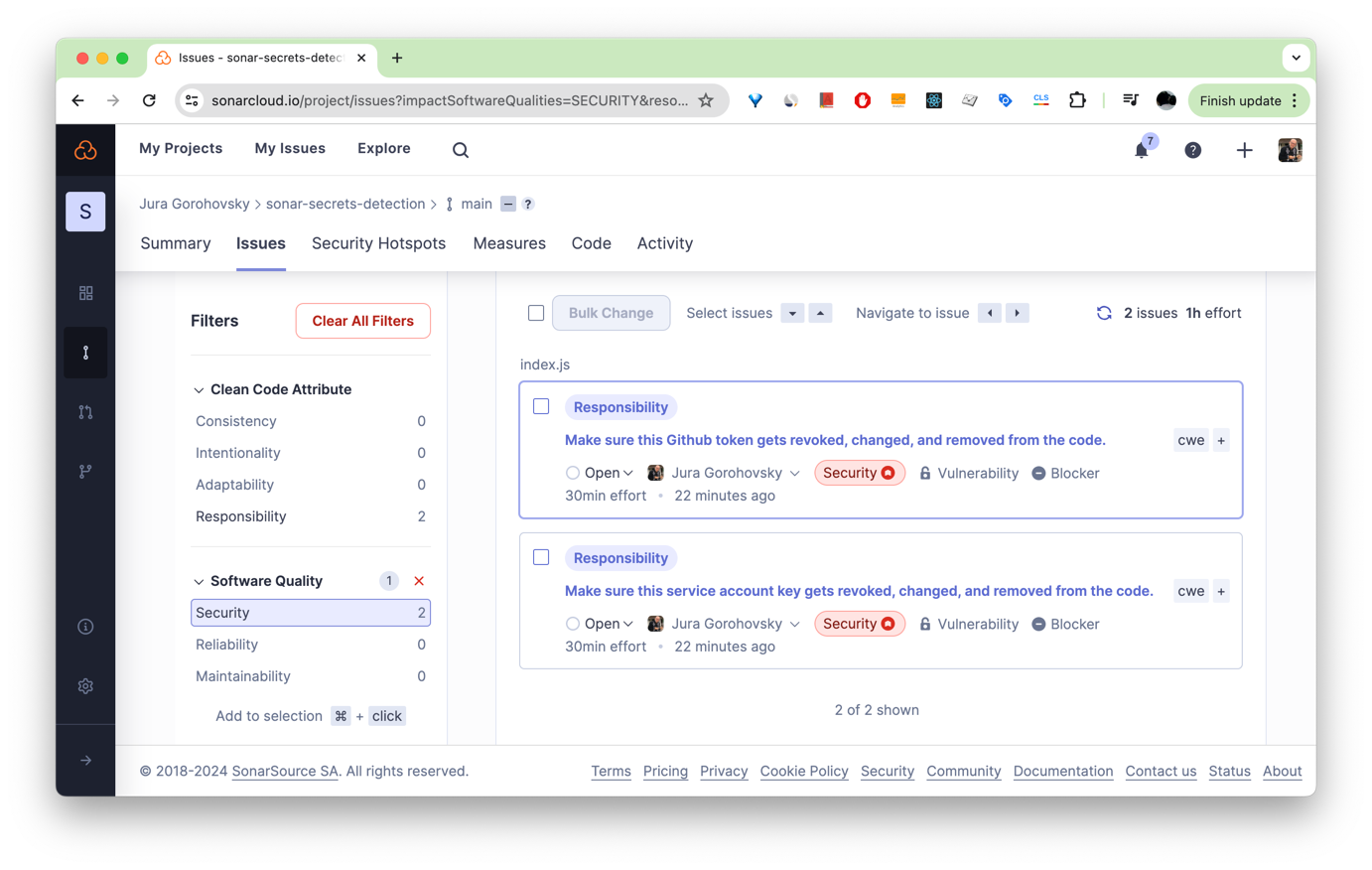
- Secrets detection: SonarQube identifies leaked API keys, passwords, and tokens in the IDE and CI/CD pipeline using a combination of pattern matching and semantic analysis, with the option to define organization-specific patterns in higher editions.
- AI CodeFix: The platform uses large language models to generate context-aware fix suggestions for bugs and security issues directly in the developer’s workflow, allowing some issues to be resolved with a single action.
- Two deployment models: SonarQube Cloud provides a managed SaaS service that scales without infrastructure management, while SonarQube Server offers self-hosted deployment with full data residency and air-gapped options for regulated industries.
- Broad language and tool coverage: The platform supports more than 40 languages and frameworks and integrates with tools such as GitHub, GitLab, Bitbucket, and Azure DevOps, providing feedback in the IDE and CI/CD pipeline.
Limitations (as reported by users on G2):
- False positives requiring tuning: Reviewers report that out-of-the-box rules can generate false positives, especially in the security hotspot category and on legacy code, requiring time spent on rule exclusions and suppressions.
- Complex initial setup: Several users find the initial setup and configuration complex, particularly for self-hosted deployments and large projects.
- Performance on large codebases: Some reviewers note that the interface can feel slow and that report generation can take time when working with large codebases.
- Limited rule customization and free-tier gaps: Users mention the inability to create fully custom rule sets, and that the free Community edition lacks branch analysis and pull request decoration, with some flagging pricing increases at renewal.

Source: SonarQube
AI Coding Assistants and IDE Integrations
These assistants center on generating, completing, and explaining code in the editor, with autocomplete, chat, and increasingly agentic features that act across files.
5. GitHub Copilot

Best for: Development teams already using GitHub that want AI assistance throughout coding, reviews, and workflows.
Key strengths: Multi-model support, agent mode, cloud agents, GitHub integration, and enterprise governance controls.
Things to consider: Suggestions still require review, context awareness can weaken in large codebases, and subscription costs may be significant for larger teams.
GitHub Copilot is an AI assistant that works across GitHub, the IDE, the terminal, chat apps, and custom Model Context Protocol servers. In the editor it explains concepts, completes code, proposes edits, and validates files through an agent mode, while its cloud agent can be assigned tasks to plan and execute work in the background. Copilot supports multiple underlying models, including options from Anthropic and OpenAI, and allows model selection on paid tiers.
Key features include:
- In-editor assistance: Copilot completes code, suggests whole functions, explains concepts, and proposes edits in the IDE, including next-edit suggestions, drawing context from comments and surrounding code.
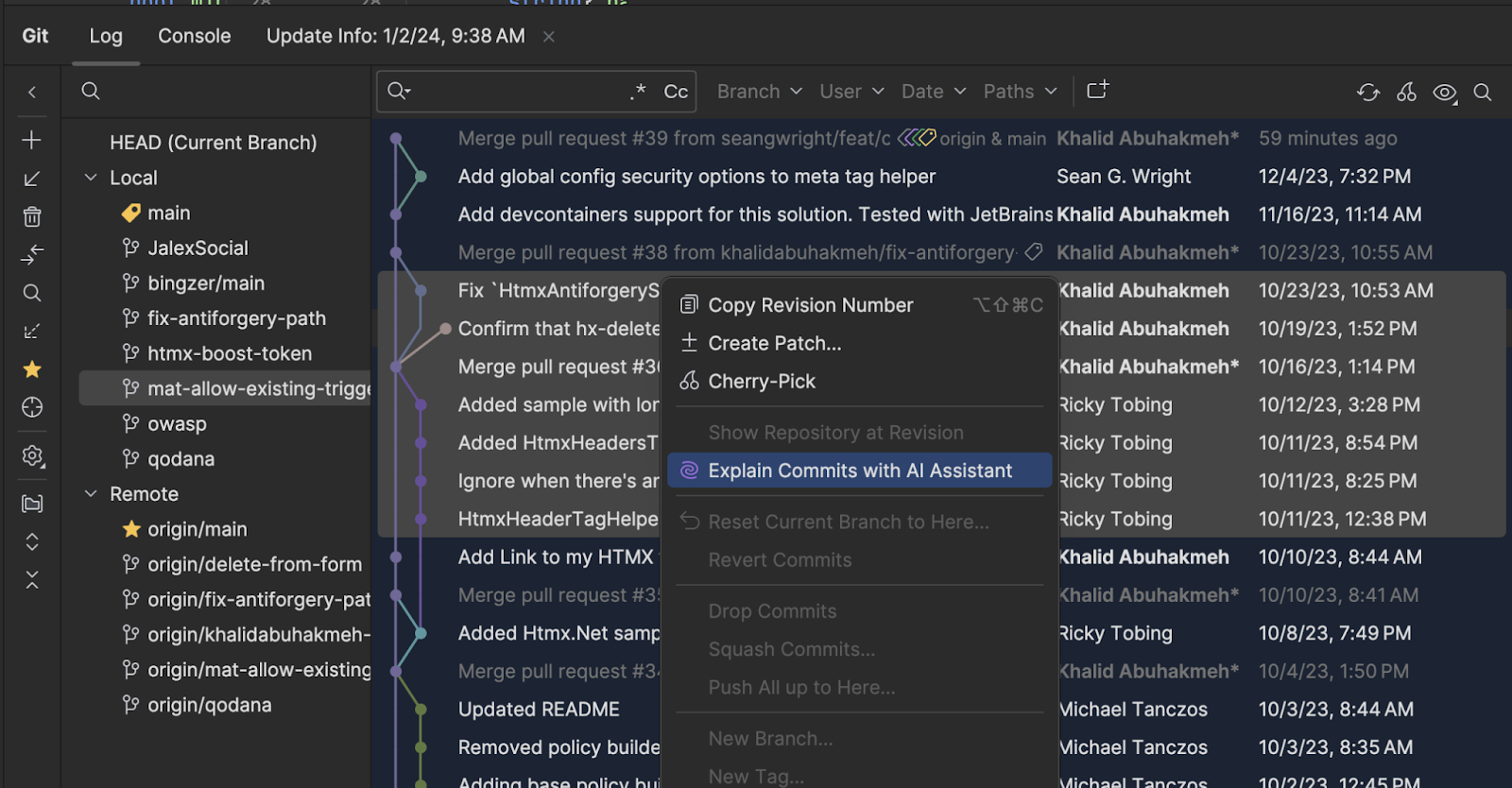
- Agent and cloud agent modes: An agent mode validates files and executes multi-step work in the editor, and a cloud agent can be assigned tasks, including third-party agents, to plan and execute work autonomously in the background.
- Command-line interface: Copilot CLI lets developers direct work in the terminal using natural language, planning and executing workflows that draw on GitHub context.
- Multiple model options: Copilot supports a range of underlying models and offers model selection on paid plans, including access to premium models on higher tiers.
- Code review and shared context: It includes code review capabilities and Copilot Spaces for creating a shared source of truth from documentation and repositories to keep teams consistent.
- Enterprise governance: Administrators can track activity with audit logs, manage agents from a central control plane, and control which MCP servers developers can access through allow lists.
Limitations (as reported by users on G2):
- Irrelevant or incorrect suggestions: A frequently cited concern is that suggestions can be inaccurate or miss the intent of the surrounding code, requiring careful manual review.
- Context in large projects: Reviewers note that Copilot can struggle with context awareness in larger projects, occasionally leading to less relevant suggestions.
- Outdated references and connectivity: Some users report that suggestions can reference outdated libraries and that the tool depends on a stable internet connection.
- Cost and niche languages: A number of reviewers describe the subscription as expensive for some teams, and note that suggestion quality is weaker for less common languages.

Source: GitHub
6. Cursor

Best for: Developers who want an AI-native editor with deep codebase awareness and autonomous editing capabilities.
Key strengths: Repository indexing, semantic search, multi-file editing, autonomous agents, and support for multiple AI models.
Things to consider: Usage-based pricing can be unpredictable, and autonomous edits should be reviewed carefully in large projects.
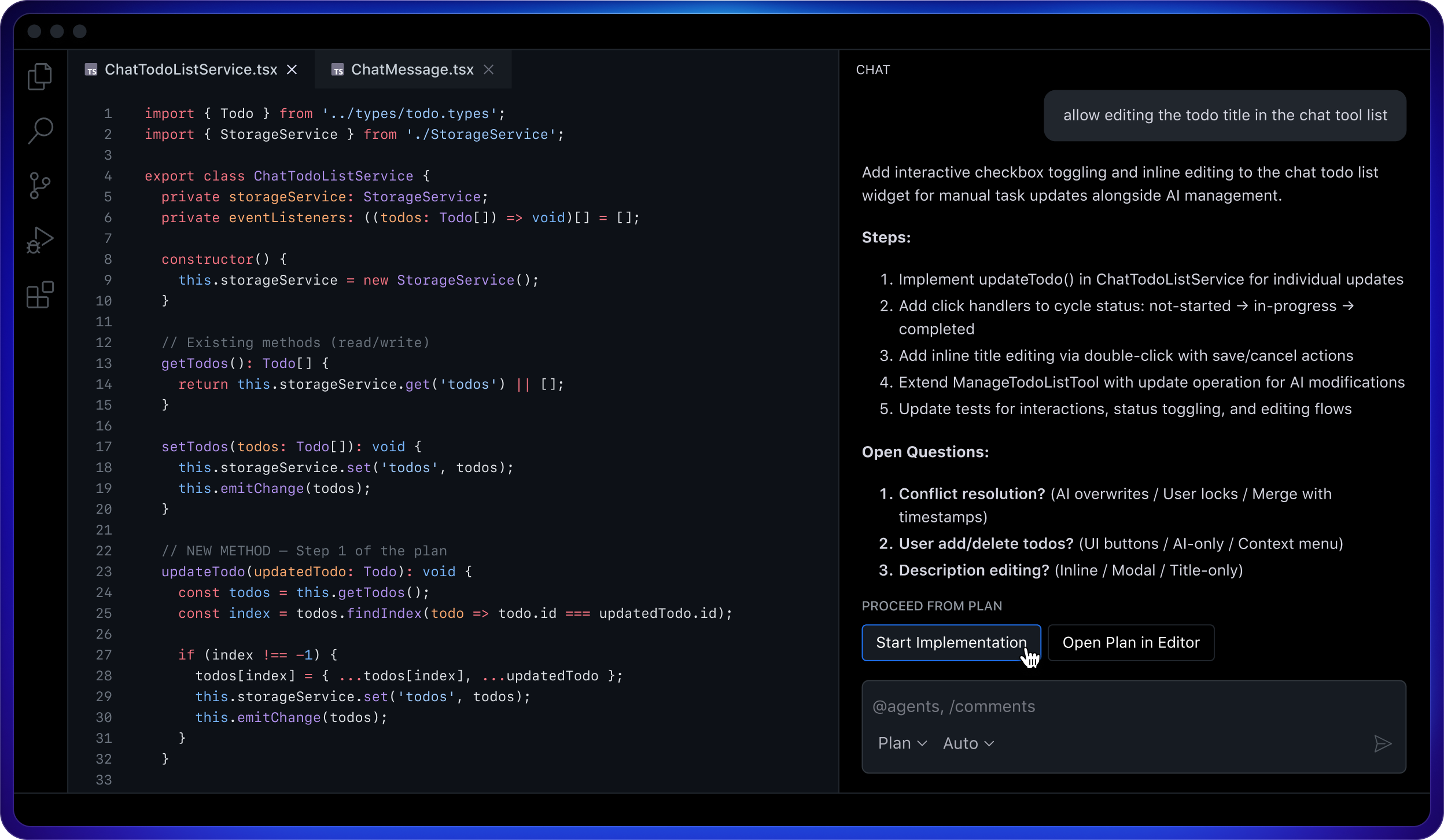
Cursor is an AI-native code editor, built as a fork of VS Code, with AI integrated into the editing workflow rather than added as an extension. It combines tab-based code completion, codebase-aware chat, inline edits, and an agent that can carry out multi-step tasks. Cursor indexes the entire project so that completions and chat responses reflect the code’s functions, types, and patterns, and it supports multiple underlying models. Its agents can run autonomously and in parallel, including cloud agents that build, test, and demonstrate features.
Key features include:
- Tab completion: Cursor provides context-aware code completion as developers type, taking surrounding code and project patterns into account to suggest lines and edits.
- Codebase-aware chat and inline edits: The editor indexes the whole project, so chat and inline edits reflect the codebase’s functions, types, and conventions, supporting repository-wide refactoring and multi-file editing.
- Autonomous and parallel agents: Cursor’s agents take on tasks and can run in parallel, including cloud agents that use their own environments to build, test, and demonstrate features end to end for review.
- Multiple model support: The editor supports a range of underlying models and lets users select among them for different tasks.
- Cross-tool presence: Cursor runs in the terminal through a CLI, collaborates in Slack, and reviews pull requests in GitHub, extending its use beyond the editor.
- Secure indexing and search: Features such as secure codebase indexing and semantic search support working across larger projects.
Limitations (as reported by users on G2):
- Hallucinated or incorrect code: Reviewers report that the AI can hallucinate functions or generate incorrect code that needs manual correction.
- Usage-based pricing surprises: Several users note that the shift to usage-based credits led to unexpected overage charges and limits on premium model requests, requiring monitoring of usage.
- Aggressive edits in large codebases: Some reviewers find that the agent can make overly aggressive changes in larger codebases, introducing unnecessary refactors or incorrect logic that must be reviewed.
- Resource use and latency: Users mention that the editor can feel resource-heavy and that server slowdowns occasionally interrupt their workflow.

Source: Cursor

7. Tabnine

Best for: Enterprises that require private AI coding assistance with strong data protection and deployment flexibility.
Key strengths: Enterprise Context Engine, on-premises and air-gapped deployment, zero data retention, and centralized administration.
Things to consider: Suggestions can be more conservative than competitors, and enterprise-focused pricing may not suit smaller teams.
Tabnine is an AI code assistant that provides chat, code completion, and agentic workflows across the IDE and command line, with a strong emphasis on privacy and enterprise control. Its core proposition is a context layer: the Enterprise Context Engine learns an organization’s architecture, frameworks, and coding standards so that suggestions align with internal patterns rather than relying only on generic training data. Tabnine can be deployed as SaaS, on-premises, or fully air-gapped, and offers zero data retention.
Key features include:
- Code completion and chat: Tabnine offers real-time code completion and AI chat across the IDE and command line, with completions intended to follow an organization’s existing patterns.
- Enterprise Context Engine: The context layer learns an organization’s architecture, frameworks, mixed stacks, and coding standards so that suggestions and agents reflect internal conventions rather than generic defaults.
- Flexible deployment: Tabnine can run as SaaS, on-premises, or fully air-gapped, keeping code inside an organization’s environment for teams with strict data requirements.
- Privacy and IP protection: The tool offers zero data retention, states that customer code is not used to train models, and includes provenance and attribution along with license-compliant models to address intellectual property concerns.
- Control plane: Centralized visibility, granular access controls, policy enforcement, and auditability across users, teams, and workspaces are provided for administration.
- Model and IDE flexibility: Tabnine supports a range of models, IDEs, and deployment environments, and includes a CLI for running AI workflows in the terminal.
Limitations (as reported by users on G2):
- Code quality concerns: Code quality is the most frequently cited dislike in reviews, with users reporting that generated code can require additional work and that some suggestions are not helpful.
- Resource use on large codebases: Reviewers note that the assistant can be resource-intensive and may cause performance or memory issues on large codebases.
- More conservative suggestions: Some users describe Tabnine’s suggestions as more conservative than tools built on larger general-purpose models, particularly when generating code from scratch.
- Pricing and individual options: A number of reviewers point to higher pricing and the absence of a free individual tier compared with some competitors.

Source: Tabnine

8. JetBrains AI Assistant

Best for: Existing JetBrains users who want AI assistance tightly integrated into their IDE.
Key strengths: Project-aware assistance, open agent platform, MCP integration, and support for multiple AI providers.
Things to consider: Value depends on the JetBrains ecosystem, and some users report latency during larger tasks.
JetBrains AI Assistant brings AI features into JetBrains IDEs, including code completion through the Tab key, chat, code generation, refactoring suggestions, and context-aware explanations. JetBrains positions it as part of an open platform: developers can use JetBrains’ own coding agent, Junie, connect external agents through the Agent Client Protocol, or bring their own models and providers. The assistant integrates with project context and supports the Model Context Protocol to connect agents to external data and tools.
Key features include:
- In-editor completion and chat: The assistant provides code completion and next-edit suggestions through the Tab key, from single lines to edits across files, along with chat, code generation, and refactoring suggestions inside JetBrains IDEs.
- Open agent platform: Developers can use JetBrains’ Junie agent, connect external agents such as Claude Agent or Codex through the Agent Client Protocol, or bring their own models and providers, with model and autonomy settings configured in the chat.
- MCP and external tools: Through the Model Context Protocol, agents can connect to APIs, databases, file systems, and other tools to access real-world context.
- Skills manager: Developers can browse, install, and manage agent skills in one place, control where they apply, and add third-party or custom skills.
- JetBrains models and data control: The platform includes JetBrains-owned models such as Mellum, keeps data sharing optional and under the user’s control, and carries SOC 2 Type 2 certification.
- Project-aware context: The assistant integrates with project context and supports deterministic IDE actions alongside AI reasoning.
Limitations (as reported by users on Gartner Peer Insights):
- Latency and delays: Reviewers and broader feedback cite noticeable latency and delays during use.
- Large diffs and reviews: Some users report mixed accuracy when the assistant works on very large diffs or code reviews.
- Provider and cloud dependencies: Feedback notes that third-party model support has historically been limited to chat and that some core features depend on JetBrains cloud services.
- Value tied to JetBrains IDEs: Reviewers note that the assistant’s value depends heavily on already using JetBrains IDEs and accepting add-on pricing, with some pointing to support friction on complex cases.

Source: JetBrains
9. Gemini Code Assist


Best for: Google Cloud development teams seeking AI coding assistance with enterprise governance.
Key strengths: Agent mode, local codebase awareness, terminal integration, usage analytics, and Google Cloud integration.
Things to consider: Hallucinated APIs and inconsistent context handling require review, and enterprise features depend on the Google Cloud ecosystem.
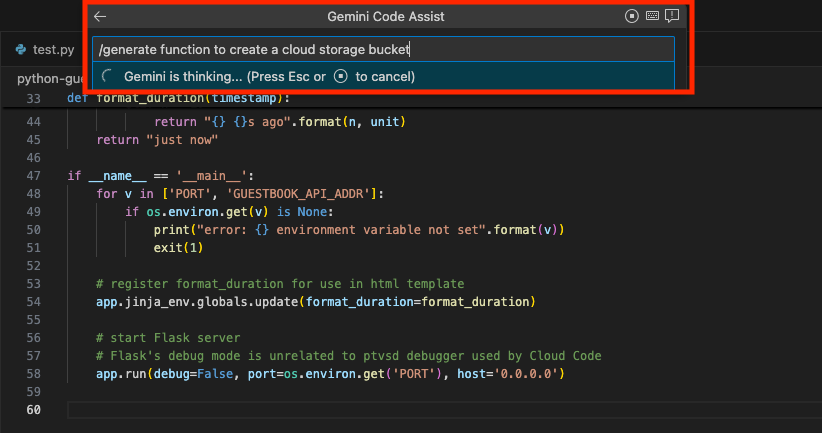
Gemini Code Assist is Google’s AI development assistance offering, available in editions including Standard and Enterprise within the Gemini for Google Cloud portfolio. It provides code completion and generation, a natural language chat interface, and an agent mode that supports multi-file edits, full project context, and integration with external tools through the Model Context Protocol with human-in-the-loop oversight. It runs in popular IDEs such as VS Code and JetBrains IDEs and supports most common programming languages.
Key features include:
- Code completion and generation: Gemini Code Assist completes code as it is written and generates whole code blocks or functions on demand across most popular languages in IDEs such as VS Code and JetBrains.
- Agent mode: An agent mode supports multi-file edits, full project context, built-in tools, and integration with external tools through MCP, with human-in-the-loop checkpoints for oversight.
- Terminal assistance: The Gemini CLI brings code understanding, file manipulation, command execution, and troubleshooting into the command line.
- Code customization and local awareness: Enterprise editions can use an organization’s private codebases for more tailored suggestions and ground responses in the local codebase and current session for larger cross-file changes.
- Usage metrics: Metrics, logging, and a dashboard track daily active use, code suggestions, acceptance rates, and lines of code accepted.
- API development: In Apigee, Gemini Code Assist can generate API specifications aligned to enterprise standards and help create mock servers and proxies.
Limitations (as reported by users on G2):
- Hallucinations and incorrect code: Reviewers report occasional hallucinations and cases where the tool returns incorrect code.
- Generic output: Some users find suggestions can be generic and require refinement, and that results are weaker when prompts are vague.
- Setup and latency: Feedback notes that it requires Google Cloud account setup and can have latency on complex or large codebases.
- Model and usage limits: Reviewers mention usage limits on models and, for some, pricing considered steep.

Source: Google
10. Amazon Q Developer

Best for: AWS-focused engineering teams building and operating cloud-native applications.
Key strengths: AWS expertise, agentic task execution, security scanning, application modernization, and AWS Console integration.
Things to consider: Provides the most value within AWS environments, with less flexibility for non-AWS development.
Amazon Q Developer is AWS’s AI coding assistant, available in IDEs such as JetBrains, VS Code, Visual Studio, and Eclipse, in the command line, in the AWS Management Console, and in chat applications including Microsoft Teams and Slack. It generates real-time code suggestions from comments and existing code, supports inline chat in the editor and natural-language-to-shell translation in the terminal, and offers agentic capabilities that can implement features, write tests, review and refactor code, and perform software upgrades.
Key features include:
- Code suggestions and inline chat: Amazon Q Developer generates real-time suggestions ranging from snippets to full functions, supports inline chat in the editor, and offers CLI completions and natural-language-to-shell translation in the terminal.
- Agentic capabilities: Its agents can autonomously implement features, write unit tests, document, review, and refactor code, and perform software upgrades across multi-step tasks.
- Security scanning: The assistant scans for vulnerabilities and suggests remediations, with AWS reporting strong detection results across popular languages.
- Application transformation: Transformation agents accelerate tasks such as porting .NET applications from Windows to Linux and upgrading Java applications.
- AWS expertise: Amazon Q Developer provides guidance on cost optimization, architectural best practices, operational incidents, and networking within the AWS Management Console and chat applications.
- Identity and access integration: The tool respects existing AWS IAM Identity Center identities, roles, and permissions to personalize its interactions.
Limitations (as reported by users on G2):
- Strongest within AWS: Reviewers note that the assistant is less helpful outside the AWS ecosystem and offers limited value for non-AWS or frontend-heavy projects, with suggestions that can be overly AWS-specific.
- Out-of-context responses: Some users report responses that are out of context or overly generic, requiring manual validation.
- Latency: A number of reviewers mention the time it can take to generate responses.
- Limited customization: Feedback notes that advanced customization and fine-grained control are limited compared with some open AI coding tools, and that suggestions occasionally reference outdated libraries.

Source: Amazon

Agentic and Autonomous AI Coding Tools
These tools take on tasks with more autonomy, planning and executing multi-step work such as building features, running migrations, and resolving issues, often with human review at defined checkpoints.
11. Claude Code

Best for: Developers who want autonomous, end-to-end software engineering from the terminal to pull requests.
Key strengths: Full codebase understanding, multi-step task execution, parallel workflows, and cross-platform availability.
Things to consider: Usage-based pricing and throttling can interrupt workflows, and generated changes require careful review. Organizations should also understand Claude Code security risks before adopting autonomous coding workflows.
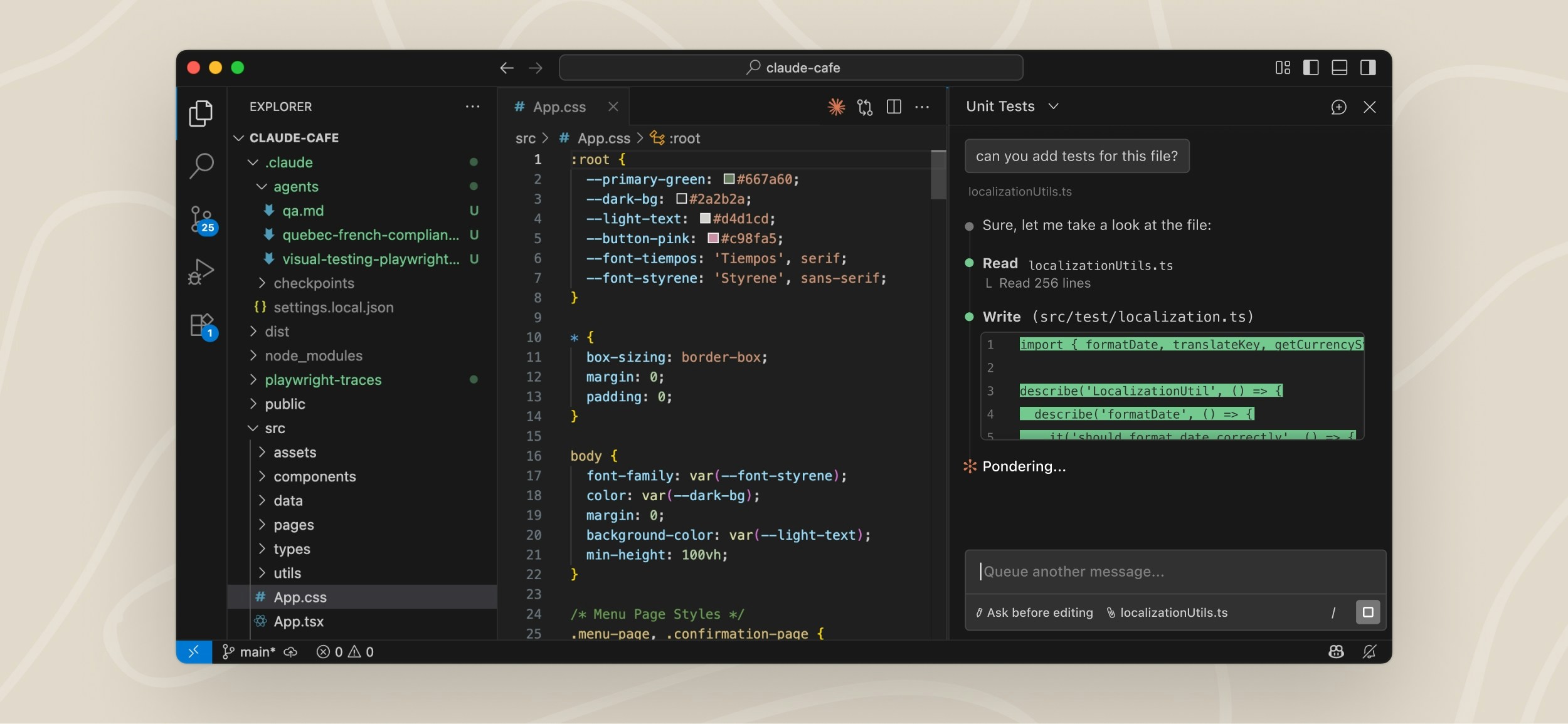
Claude Code, from Anthropic, is an agentic coding tool that works directly in a codebase from the terminal, IDE, desktop app, web, and Slack. Developers describe a task and Claude Code reads code in the local environment, writes changes, runs tests, and opens a pull request, drawing on the project’s context without manual setup. On the desktop it can manage multiple parallel tasks, review visual diffs, preview servers, and monitor pull request status from one place, and tasks can be started from a phone and routed to a local machine.
Key features include:
- Works across surfaces: Claude Code runs in the terminal, IDE, desktop app, web, and Slack, letting developers work where they already are and pick up codebase context across sessions.
- End-to-end task execution: Given a task, it reads code in the local environment, writes changes, runs tests, and opens a pull request with a diff for review rather than only returning a status update.
- Parallel task management: On the desktop app, developers can manage multiple parallel tasks, review visual diffs, preview servers, and monitor pull request status in one place.
- Mobile-to-desktop routing: Tasks can be started from the Claude mobile app and routed to a local machine, where Claude runs on the developer’s environment and reports back a working pull request.
- Codebase onboarding and refactoring: Claude Code can analyze an unfamiliar codebase to explain its structure and purpose, triage issues, and carry out refactoring work.
- Code review: A code review capability can run on pull requests to surface issues.
Limitations (based on publicly available sources):
- Usage limits and throttling: Users report that usage limits can be reached quickly and that throttling can interrupt work mid-task, with limits that are not always transparent.
- Pricing structure: Reviewers describe usage-based costs as unpredictable and note a large jump between the lower and higher subscription tiers.
- Separate code review billing: The code review capability is billed separately by usage and can be costly and comparatively slow on large pull requests.
- Agent behavior: Some users note that the agent can occasionally over-reach or loop, so generated changes still require review.

Source: Anthropic
12. Devin

Best for: Engineering teams automating complex implementation, migration, and refactoring projects.
Key strengths: Autonomous software engineering, parallel task execution, codebase learning, and multi-repository support.
Things to consider: Performance varies on complex tasks, requires human oversight, and pricing targets enterprise customers.
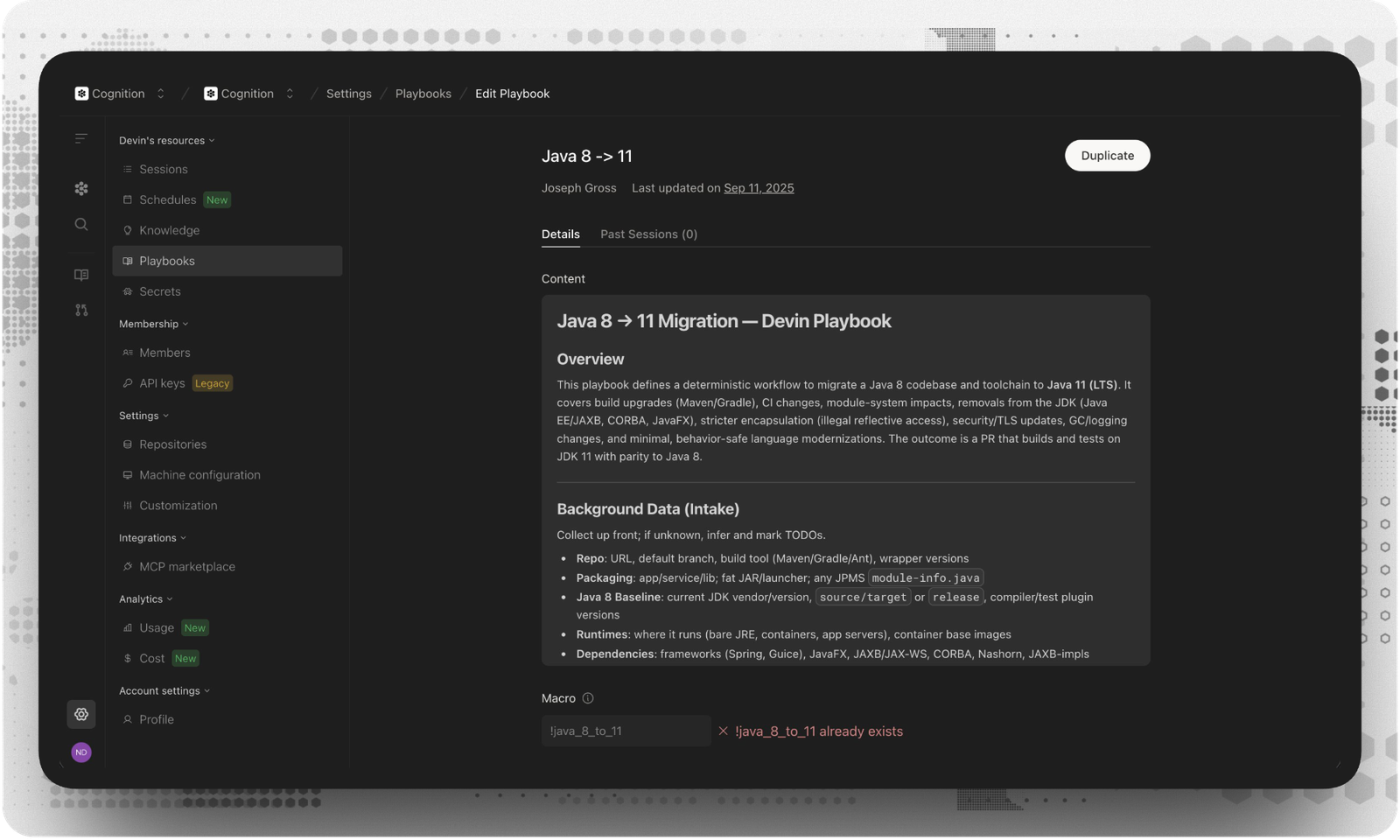
Devin, from Cognition, is an autonomous AI software engineer that takes a task description and works independently to plan, code, test, and debug until the task is complete, with a human kept in the loop to manage the project and approve changes. It is offered across Devin Cloud, Devin Desktop, a CLI, and a code review product, and it spins up sandboxed environments with shell, browser, and editor access. Devin is aimed at engineering teams with complex, multi-repo projects and is frequently used for large code migrations and refactors.
Key features include:
- Autonomous task execution: Devin takes a task description and independently plans, writes, tests, and debugs code, keeping a human in the loop to review and approve its changes.
- Parallel migrations and refactors: Teams can assign a fleet of agents to migrate repositories in parallel, covering modernizations such as COBOL, .NET, and legacy ETL, with auditability at each step.
- Pull request review and visual QA: Devin Review identifies and resolves bugs, performs visual QA using browser and desktop access, and organizes code diffs for review.
- Documentation generation: Devin can auto-generate documentation and system diagrams for legacy codebases to provide visibility into systems a team did not build.
- Issue triage and incident response: It can investigate incidents, route bug reports, fix CI failures, and resolve tickets, working where teams already operate through integrations.
- Codebase learning and tooling: Devin learns a team’s codebase and conventions over time, can run multi-week multi-repo projects, and connects to a wide range of external tools.
Limitations (based on publicly available sources):
- Inconsistent results on complex work: Independent testing reports inconsistent performance on complex or novel tasks, with a gap between demonstrations and real-world results.
- Requires oversight: Reviewers note that Devin’s autonomous approach needs human review, including for security, as it may not reliably catch vulnerabilities.
- Struggles with vague requirements: Devin performs poorly with vague instructions and can go down unproductive paths when it hits unexpected errors, needing specific, measurable goals.
- Cost: Reviewers describe Devin as expensive, which makes it less suitable for some individual or small-team use.

Source: Cognition
13. Replit

Best for: Developers who want to build and deploy full-stack applications directly from natural language prompts.
Key strengths: Prompt-based app generation, built-in infrastructure, parallel agents, and browser-based development.
Things to consider: Credit-based pricing can become unpredictable, and larger projects may require significant manual refinement.
Replit is a cloud-based platform for building applications from natural language prompts, centered on its Replit Agent. Developers describe what they want, and the Agent writes and evolves the code while Replit provides the surrounding infrastructure. The platform includes built-in services with no setup, such as authentication, databases, hosting, and monitoring, and supports building web apps, mobile apps, landing pages, and other artifacts in a single project.
Key features include:
- Prompt-based app building: Replit Agent writes production-oriented code from a natural language description and continues to evolve the project, building apps without requiring local environment setup.
- Built-in full-stack infrastructure: The platform provides authentication, databases, hosting, and monitoring with no setup, so applications can be built and deployed from a single environment.
- Parallel agents: The Agent can run tasks in parallel and sequence requests submitted in any order, keeping progress visible while it handles coordination.
- Multiple artifact types: Web apps, mobile apps, landing pages, and other artifacts can be built in one project with shared design, including publishing web apps to mobile app stores.
- Integrations: Replit connects to more than 100 services, including OpenAI, Stripe, and Google Workspace, to extend applications.
- Enterprise controls: Security features such as SSO/SAML, SOC 2, and admin controls are available for teams scaling their use.
Limitations (as reported by users on G2):
- Credit-based pricing: Many reviewers report unpredictable costs tied to credit consumption and describe billing as confusing, with usage on heavier weeks leading to unexpected charges.
- Agent can break working code: Users note that the Agent’s changes can unintentionally break other parts of an app or alter code without consent, requiring further debugging.
- Agent gets stuck: Reviewers mention that the Agent can get stuck on certain tasks and respond slowly, which slows development.
- Reliability and support: Some users report bugs and setbacks, and a portion cite weak or slow customer support on critical issues.

Source: Replit

14. Aider

Best for: Developers who prefer an open-source AI pair programmer that works directly with Git.
Key strengths: Git-native workflow, broad model support, codebase mapping, and automated testing integration.
Things to consider: Terminal-only workflow, manual file selection, and no built-in IDE code completion.
Aider is an open-source AI pair programming tool that runs in the terminal and works with both new projects and existing codebases. Developers point Aider at files, describe a change, and it applies edits directly through Git-tracked commits with sensible commit messages that can be reviewed, diffed, and undone with familiar Git tools. Aider builds a map of the codebase to work effectively in larger projects and supports more than 100 programming languages.
Key features include:
- Direct, Git-tracked edits: Aider applies code changes directly and commits them with sensible messages, so changes can be reviewed, diffed, managed, and undone with standard Git tools.
- Codebase mapping: It builds a map of the entire codebase to help it work effectively in larger projects, and supports more than 100 programming languages.
- Model flexibility: Aider connects to most cloud and local language models on a bring-your-own-model basis, letting developers choose and switch models.
- Linting and testing: It can automatically lint and test code after each change and attempt to fix problems detected by linters and test suites.
- Editor and terminal workflow: Aider runs in the terminal alongside any editor and can act on changes requested through code comments.
- Additional context inputs: Developers can add images and web pages for visual context and use voice input to request changes.
Limitations (based on publicly available sources):
- Terminal-only interface: Aider has no graphical interface, which can be a steeper learning curve for developers used to visual IDE tools.
- Manual file selection: It requires explicit file selection rather than automatically navigating large monorepos, which some teams find limiting.
- No built-in completion: Unlike some IDE-based tools, Aider does not provide built-in code completion, and managing API keys is left to the user.
- Pre-1.0 development: Because it is actively developed and not yet at a 1.0 release, updates can occasionally introduce breaking changes.

Source: Aider
.png)
15. Augment Code

Best for: Large organizations adopting AI agents across the entire software development lifecycle.
Key strengths: Specialized lifecycle agents, multi-repository context engine, customizable expert agents, and enterprise integrations.
Things to consider: Usage-based pricing can be expensive, and agentic workflows may feel slower than interactive coding assistants.
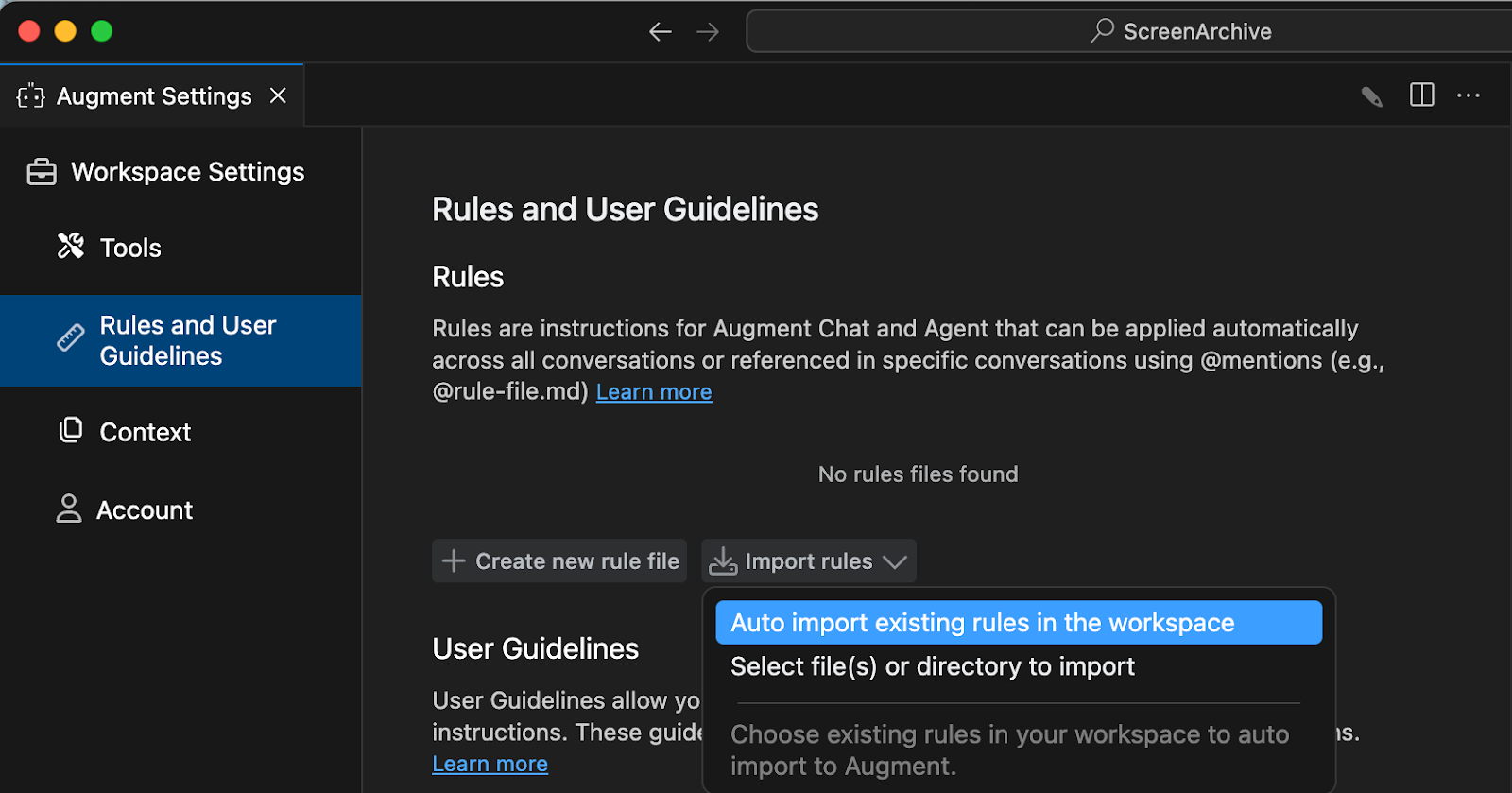
Augment Code is an agentic software development platform, branded Cosmos, that coordinates AI agents across the software development lifecycle at organizational scale. Rather than a single assistant, it provides a set of specialized agents, or experts, that own stages such as triage, authoring, review, and verification, hand off to one another, and pull humans in at defined checkpoints. The platform is built around a Context Engine for codebase understanding that can index large, multi-repository codebases.
Key features include:
- Lifecycle agents: Cosmos ships experts for stages including triage, pull request authoring, review, and verification, each owning its part of the workflow and handing off to the next, with humans involved at checkpoints.
- Context Engine: A context engine provides codebase understanding across large, multi-repository codebases, maintaining architectural context for the agents.
- Code review experts: The platform includes pair review alongside the author, deep code review that posts inline comments, and pull request risk analysis that surfaces blast radius, security exposure, and migration risk.
- Customizable experts: Teams can use the experts Augment ships, choose from a library, fork them, or build their own as reusable templates with their own environment, capabilities, and memory.
- Integrations and environments: Cosmos integrates with Slack, GitHub, Jira, and CI, and runs on laptops, dev VMs, and managed or self-hosted cloud.
- Shared organizational knowledge: The platform provides shared memory and knowledge across agents and teams, with enterprise security certifications and human-in-the-loop escalation.
Limitations (based on publicly available sources):
- Credit-based pricing: Reviewers report that usage-based credits can be consumed quickly, and that a 2025 pricing change drew criticism from some users.
- Workflow speed: Some users note that agentic workflows can feel slower than expected on larger tasks.
- Model comparison interface: Feedback mentions that the interface for comparing model capabilities side by side could be improved.
- Cost relative to alternatives: Reviewers note that the platform can be more expensive than some competing tools.

Source: Augment Code
Related content: Read our guide to AI developer tools
How to Choose an AI Coding Assistant Tool
When evaluating an AI coding assistant, focus on how well it fits into real development work, not only on how well it generates code. The best tool should improve speed while helping teams keep control over security, privacy, and code quality.
- Development environment compatibility: Choose a tool that works inside the IDEs your team already uses, such as VS Code, JetBrains, Cursor, Windsurf, or Kiro. This lets developers get help without leaving their normal workflow.
- Context awareness and code understanding: Look for assistants that understand the code being written, the surrounding files, and relevant security policies. Context-aware tools can provide more accurate explanations, fixes, and recommendations.
- Real-time security analysis: The assistant should scan code continuously as developers type. It should detect vulnerabilities, misconfigurations, hard-coded secrets, malicious packages, and other risks before code is committed.
- Automated remediation capabilities: Strong tools do more than flag problems. Look for solutions that combine deterministic checks with contextual filtering to cut false-positive noise, and that explain the issue and provide validated fixes that can be applied directly in the editor.
- Support for AI-generated and human-written code: The assistant should protect both traditional code and code produced with tools like GitHub Copilot, Cursor, or Windsurf. This is important as teams mix human-written and AI-generated changes.
- Data privacy and code protection: Evaluate how the tool handles source code. Prefer solutions that keep code local and only send minimal metadata outside the developer environment.
- Workflow and governance integration: The tool should support controlled, auditable development practices. It should help security and engineering teams enforce policies without blocking delivery.
- Impact on productivity: A good assistant should reduce fix cycles, lower remediation costs, cut false positives, and help developers resolve issues earlier in the lifecycle.
Conclusion
The top AI coding assistants help developers write, review, debug, and maintain software faster while improving overall code quality through context-aware assistance and automation. As organizations adopt these tools across larger engineering teams, productivity gains must be balanced with security validation, data privacy protections, and governance.
AI-generated code should pass through the same testing, code review, security scanning, and policy enforcement as human-written code, ensuring teams can scale AI-assisted development without introducing unnecessary risk or compromising software quality.