

Summary
Some organizations use enterprise AI coding assistants that provide audit trails, identity controls and policy enforcement, while others combine coding assistants with AI governance platforms. Checkmarx Developer Assist is best for governing and securing AI-generated code across the SDLC, GitHub Copilot is best for org-wide rollout with audit logs, and Cursor is suitable for central AI coding with MCP control.
What Are Enterprise AI Coding Assistants and AI Governance Platforms?
AI-assisted development creates new governance requirements because prompts, repository context, generated code, autonomous agent actions, and security decisions can all influence production software. Enterprises need audit trails that show who used AI, which resources were involved, what controls applied, and how generated output moved through development workflows.
Security governance platforms complement these records by independently testing resulting code and enforcing policies across repositories, pull requests, and pipelines. They do not replace AI coding assistants; they run alongside them to provide an additional security and governance layer.
Enterprise AI coding assistants are developer tools that use generative AI to help write, explain, review, debug, test, and modify software. More advanced assistants can operate as agents that inspect repositories, edit multiple files, execute commands, run tests, and prepare pull requests. Enterprise editions add centralized controls so organizations can manage how developers and agents use AI.
Relevant capabilities include:
- AI code generation and agentic development: Generates code, tests, documentation, fixes, and multi-file changes from developer instructions and repository context.
- Centralized access and policy controls: Lets administrators control users, models, repositories, features, MCP servers, and autonomous capabilities.
- Enterprise identity integration: Supports SSO, role-based access, provisioning, and centralized account removal.
- Usage and audit logging: Records user activity, administrative changes, model usage, repository access, and other supported AI events.
- Data privacy and retention controls: Defines how prompts, source code, generated output, and telemetry are stored, processed, and used for model training.
- Sensitive data safeguards: Restricts access to sensitive repositories or context and can detect secrets, prohibited content, or unsafe data sharing.
- Security checks on generated code: Some assistants identify insecure patterns, scan generated code, or perform automated code review before changes are accepted.
AI code security and governance platforms provide independent security controls around AI-assisted development. Instead of generating most application code themselves, these platforms analyze code produced by developers and AI assistants, apply security policies, track application risk, and support remediation across the software development lifecycle. They can therefore provide a consistent security layer when an organization uses several coding assistants, IDEs, repositories, or agentic development tools.
Relevant capabilities include:
- Independent security scanning: Applies controls such as SAST, software composition analysis, secret scanning, and infrastructure-as-code scanning to AI-generated and human-written code.
- Security policy enforcement: Defines which findings can block pull requests, builds, or releases and which require remediation or approved exceptions.
- Application and repository risk visibility: Aggregates findings across projects so security teams can monitor risk independently of the assistant that generated the code.
- Vulnerability and remediation traceability: Connects findings to repositories, files, applications, remediation activity, and available development context.
- Developer remediation workflows: Delivers fixes, guidance, and security feedback through IDEs, pull requests, tickets, and CI/CD pipelines.
- Human review and approval controls: Keeps security-sensitive changes subject to review, exception handling, and documented approval processes.
- Compliance evidence and audit records: Preserves scan results, policy decisions, remediation history, exceptions, and other evidence needed for security investigations and compliance reviews.
This is part of a series of articles about AI in software development
Enterprise AI Coding Assistants and AI Security/Governance Platforms at a Glance
The table below summarizes the key differences between the platforms covered in this guide, including what each one is suited to and where its trade-offs lie. Each solution is explored in more detail in the sections that follow.
| Category | Solution | Best For | Key Strengths | Things to Consider |
| AI Code Security and Governance Platforms | Checkmarx Developer AssistCheckmarx One Assist | Securing and governing AI-generated code across the SDLC | IDE guardrails, documented audit trail API, agentic remediation | Scans of very large codebases can take longer to complete |
| AI Code Security and Governance Platforms | Snyk AI Security Platform | Independent validation of code written by AI coding agents | Cross-tool guardrails, asset inventory, policy analytics | Finding volumes can require tuning to control review overhead |
| AI Code Security and Governance Platforms | Sonar AI Code Assurance | Tracking and gating projects that contain AI-generated code | Project tagging, enforced quality gates, assurance badges | Setup and rule tuning can be complex on large projects |
| Enterprise AI Coding Assistants | GitHub Copilot | Org-wide AI coding rollout with central policy and audit logs | Audit logs, MCP allow lists, public-code matching filter | Suggestions can be inaccurate and still require manual review |
| Enterprise AI Coding Assistants | Cursor | AI-native IDE rollout with central model and MCP controls | SSO and SCIM, repo and model allowlists, usage analytics | No on-premises deployment; cloud-hosted only |
| Enterprise AI Coding Assistants | Tabnine | Private or air-gapped AI coding with output traceability | Provenance records, MCP safeguards, air-gapped deployment | Local model inference can be heavy on CPU and memory |
| Enterprise AI Coding Assistants | Amazon Q Developer | AWS-centric teams needing IAM-aligned AI coding assistance | IAM-scoped access, code scanning, automated code review | Governance depth is tied to the AWS identity and account model |
| Enterprise AI Coding Assistants | Gemini Code Assist | Google Cloud teams needing IAM-scoped AI coding assistance | VPC Service Controls, usage logging, source citation | Individual tiers moved to Antigravity; business licences continue |
Related content: Read our article about Enterprise AI coding assistants
Why Do Enterprises Need Audit Trails and Security Governance for AI Coding Assistants?
This gap is already common: Checkmarx’s 2026 Future of Application Security research found that 62% of CISOs and AppSec managers require human sign-off before AI can act on a security finding, and only 13% are comfortable with full autonomy.
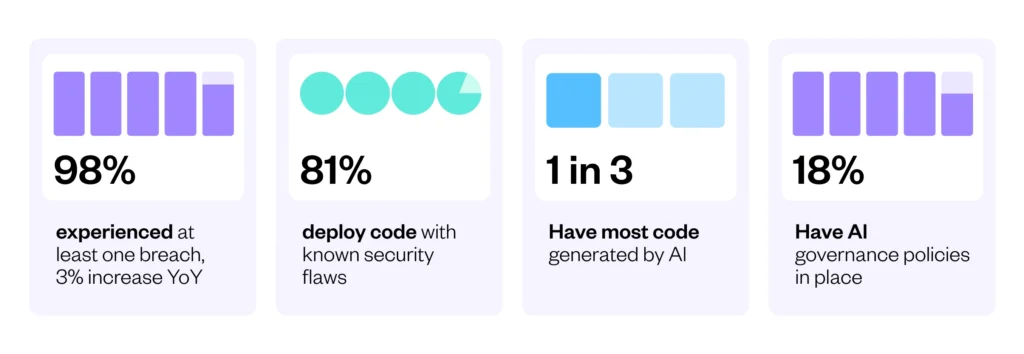
And yet, just 22% of organizations have a formal, policy-based governance process for AI use in development.
Most organizations want control over AI-assisted development; few have actually built the audit infrastructure to exercise it.
The Future of Application Security in the Era of AI
Based on a global survey of 2,350 CISOs, AppSec managers, and developers across 14 countries.
Protecting Proprietary Source Code
Source code can contain proprietary algorithms, product logic, architecture details, and other intellectual property. An AI coding assistant may receive this information through prompts, open files, repository indexing, or automatically collected context. Enterprises need governance policies that define which repositories and code can be shared with an assistant.
Controls should also cover how providers process and retain source code. Administrators may need to restrict model training on company data, define retention periods, and limit access to approved services. Audit trails provide evidence of who used the assistant, which resources were accessed, and whether configured policies were applied.
Preventing Sensitive Data Leakage
Development environments often contain more than source code. Configuration files, logs, test data, database queries, API keys, credentials, customer information, and internal URLs can become part of a prompt or model context. Sending this data to an unauthorized service can expose information outside approved security boundaries.
Enterprises can reduce this risk with data classification, secret scanning, access controls, and policies that block sensitive files or repositories from AI tools. Logging AI activity also helps security teams investigate possible exposure. Logs should capture enough information to trace an event without unnecessarily storing the sensitive content they are intended to protect.
Controlling AI-Generated Code Risks
AI-generated code can contain security flaws, incorrect logic, outdated APIs, or dependencies that do not meet organizational requirements. Developers may also accept plausible-looking suggestions without fully understanding their behavior. Governance should therefore treat generated code as untrusted input that must pass the same review and testing processes as human-written code.
Organizations can require code review, automated tests, static analysis, dependency scanning, and secret detection before generated code is merged. Audit data can show when and where AI assistance was used, supporting incident analysis and policy enforcement. These controls reduce risk without relying on the model itself to determine whether its output is safe.
Meeting Regulatory and Compliance Requirements
Regulated organizations may need to demonstrate who accessed sensitive systems, how software changes were produced, and which controls were applied during development. AI coding assistants introduce another system that can process company data and influence production code. Their use therefore needs to fit existing identity, access, change-management, and vendor-risk controls.
Audit trails can record user identities, administrative changes, policy events, and AI tool activity for later review. Retention and access to these records should follow the organization’s compliance requirements. Combined with documented policies and periodic reviews, these records help provide evidence that AI-assisted development operates within established controls.
What Should Be Recorded in an Audit Trail for AI Assisted Coding?
An audit trail for AI-assisted coding should capture enough information to connect AI activity to identities, repositories, policies, and resulting code changes without creating unnecessary exposure of sensitive data. Records should support security investigations, compliance reviews, incident response, and traceability from prompt to recommendation to developer action.
- User and developer identity: Record the authenticated user or service account, organization, role, session ID, and authentication method using stable identifiers.
- Prompts and developer requests: Log prompts when permitted, with redaction, encryption, restricted access, or metadata-only logging where prompts may contain sensitive data.
- Source code and context sent to the model: Track what files, repository data, terminal output, documentation, or other context was included, using paths, hashes, or classifications when full code storage is risky.
- AI-generated code and recommendations: Capture the model response or enough detail to reconstruct it, including generated code, commands, explanations, dependency suggestions, model name, and version.
- Accepted, rejected, and modified suggestions: Record whether suggestions were accepted, rejected, or edited, and link them to resulting code edits or commits where tooling allows.
- Repository and project context: Include repository IDs, branches, files, commits, workspaces, and development environments to support investigation scope and project-specific policy enforcement.
- Policy violations and security events: Log blocked prompts, restricted access attempts, secret detection, unauthorized model use, policy applied, enforcement action, timestamp, and related context for monitoring and response.
Enterprise AI Coding Assistants vs. AI Code Security and Governance Platforms
AI coding assistants can provide security controls around their own use. Enterprise offerings may include access management, data-retention settings, audit logs, policy controls, vulnerability detection, or security checks on generated code. These capabilities are useful, but their scope is usually centered on the assistant and the code or context it processes.
A full application security platform adds controls across the broader software development lifecycle. It can analyze AI-generated and human-written code using the same security policies, scan dependencies and infrastructure-as-code, detect exposed secrets, and integrate findings into development and security workflows. This provides security teams with a consistent view of application risk rather than relying only on controls built into individual AI assistants.
| Capability | Enterprise AI Coding Assistant | AI Security Governance Platform |
| AI code generation and explanation | Core capability | Not the primary purpose; can complement coding assistants |
| Controls over AI assistant access and usage | Often available for the vendor’s own assistant | Can add security controls and governance across development workflows |
| AI activity and administrative audit logs | Often available, with scope depending on the assistant | Adds security findings and remediation activity to broader application security workflows |
| Security checks on generated code | May identify vulnerabilities or suggest safer code | Uses dedicated application security testing to analyze AI-generated and human-written code |
| Static application security testing | May provide limited or integrated scanning | Dedicated SAST for application code |
| Open-source dependency analysis | May flag some risky packages or dependencies | Software composition analysis for vulnerabilities, licenses, and dependency risk |
| Secret detection | May detect secrets in prompts or code | Scans source repositories and development workflows for exposed secrets |
| Infrastructure-as-code security | Typically limited or outside scope | Scans infrastructure-as-code for insecure configurations |
| API security | Typically limited or outside scope | Provides application security testing and visibility for API-related risks |
| Centralized application risk management | Primarily covers activity within the assistant | Correlates security findings across applications, repositories, and multiple testing methods |
| Security policy enforcement across the SDLC | Usually limited to the assistant’s environment | Applies application security policies across development and security workflows |
| Developer remediation workflows | Provides code suggestions and fixes | Prioritizes findings and integrates remediation guidance into developer workflows |
The two categories therefore address different layers of the problem. An enterprise AI coding assistant can govern how developers interact with that assistant and may catch some security issues. A security platform provides independent testing and governance for the resulting software, including code that was written without AI or generated by other AI tools.
This separation is important when organizations use several IDEs, repositories, AI assistants, and deployment pipelines. Security controls tied to one assistant cannot provide complete coverage of that environment. A platform such as Checkmarx can provide a common application security layer so code is evaluated against consistent security requirements regardless of how it was produced.
Security Governance and Audit Capabilities in Enterprise AI Coding Assistants
Centralized AI Usage Visibility
Enterprises should be able to monitor AI coding activity across teams, repositories, and development environments from a central location. Useful visibility includes active users, request volumes, models used, repositories accessed, policy events, and changes made through AI-assisted workflows.
Centralized telemetry helps security teams detect unusual activity and identify unapproved usage patterns. Dashboards and searchable logs can reveal sudden increases in requests, access to sensitive projects, or use of models that are not approved for particular workloads.
Developer and User Attribution
Each AI interaction should be attributable to an authenticated developer, service account, or automated workflow. Audit events should include stable user identifiers and relevant organization, team, role, session, and authentication information where available.
Attribution allows security teams to determine who initiated a sensitive request or action. For agentic workflows, records should also distinguish autonomous actions from human actions and identify the user or process that authorized the agent.
Prompt and AI-Generated Code Traceability
The assistant should provide a traceable relationship between developer requests and model responses. Depending on privacy requirements, records can contain prompts and generated code or protected metadata such as hashes, timestamps, request IDs, model names, and model versions.
Where possible, organizations should be able to connect an interaction with subsequent file changes or commits. Access to detailed prompt and response records should be restricted because these records can contain proprietary code, secrets, or personal data.
Repository and Development Context Tracking
Audit events should identify the repository, branch, file, workspace, or other development context involved in an AI interaction. This helps security teams determine which code was provided to an assistant and where generated content was used.
Context also supports differentiated policies. For example, an organization can allow AI access to some repositories while restricting access to projects containing regulated data, proprietary algorithms, or security-sensitive components.
Policy Enforcement and Administrative Controls
Administrators should be able to centrally control approved models, repositories, features, data sources, tool permissions, external connections, and autonomous actions. Policies can vary by organization, team, repository, or other supported scope.
Administrative actions should also be auditable. Records should show who modified a policy, what changed, and when the change took effect so investigators can determine which controls applied during an event.
Enterprise Identity and SSO Integration
AI coding assistants should integrate with enterprise identity providers using mechanisms such as SAML or OpenID Connect. This allows organizations to apply existing authentication requirements and centrally revoke access when users leave or change roles.
Role-based access control and automated provisioning and deprovisioning can further reduce unmanaged access. Separate permissions for developers, administrators, security teams, and auditors can limit access to sensitive AI configuration and audit data.
Sensitive Data and Secrets Protection
The assistant should provide controls that reduce the chance of credentials, personal data, or restricted source code being sent to a model. Relevant features can include content filtering, secret detection, repository and file exclusions, and controls over the context automatically collected by the assistant.
Organizations should also protect AI audit data itself. Encryption, redaction, retention settings, and granular permissions reduce the risk of prompts, source code, or other sensitive information being exposed through logs.
Data Privacy and Model Training Controls
Organizations should be able to control how prompts, source code, generated output, and telemetry are processed and retained. This includes understanding data location, retention periods, subprocessors, model providers, and whether data can cross geographic or organizational boundaries.
Enterprise settings should also specify whether customer data can be used for model training or product improvement. These controls should be centrally enforceable rather than depending on individual developer settings.
Key Capabilities of Dedicated AI Code Security and Governance Platforms
AI-Generated Code Security Scanning
A dedicated security platform should independently analyze AI-generated code rather than depend on the coding assistant to identify problems in its own output. Generated code should pass through the same application security controls used for human-written code.
Relevant testing can include static application security testing, software composition analysis, secret scanning, infrastructure-as-code scanning, and checks for vulnerable or prohibited dependencies. Integrating these controls with IDE, pull request, and CI/CD workflows helps identify problems before code reaches production.
Vulnerability and Risk Traceability
Security findings should be connected to affected applications, repositories, branches, files, and remediation activity. Where integrations provide the required data, platforms can also associate findings with AI-assisted development activity.
Risk records should capture information such as severity, status, timestamps, affected assets, and remediation decisions. This provides security teams with a persistent record of application risk rather than limiting visibility to individual AI interactions.
Security Policy Enforcement Across Development Workflows
Dedicated platforms can apply security policies after code leaves the AI assistant and moves through source control, pull requests, builds, and deployment pipelines. This is important because not every developer, repository, or code change will use the same AI assistant.
Policies can define which findings block a build or merge, which vulnerabilities require remediation, and which exceptions require approval. Applying these rules across development workflows creates a security control layer that is independent of how the code was produced.
Application and Repository Risk Visibility
Security teams need visibility beyond AI usage statistics. A dedicated platform can aggregate vulnerabilities and other findings across applications and repositories, allowing teams to identify affected assets and track unresolved risk.
This broader view is especially useful when an organization uses multiple AI assistants. Instead of relying on each assistant’s security telemetry separately, teams can evaluate resulting code through a common application security process.
Human Review and Approval Workflows
Organizations should be able to require human review before security-sensitive changes reach protected branches or production environments. Dedicated platforms can integrate security findings with existing pull request, ticketing, and remediation workflows so developers and security teams can review issues before approving changes.
For high-risk findings, policies can require remediation or an authorized exception before development continues. Approval and exception activity should be recorded to provide a traceable history of how security decisions were made.
Remediation Guidance and Developer Feedback
Finding a vulnerability is only part of the security process. Dedicated platforms should provide developers with information about the affected code, vulnerability type, data flow or dependency involved, and appropriate remediation.
Developer integrations can surface findings in IDEs, pull requests, or other existing workflows. This allows AI-generated vulnerabilities to be addressed using the same remediation process as vulnerabilities introduced through conventional development.
Compliance Reporting and Evidence Collection
Dedicated platforms should provide exportable records covering security scans, findings, policy decisions, remediation, exceptions, and other relevant application security events. These records can complement the AI assistant’s logs of prompts, model usage, and administrative activity.
Reliable timestamps, consistent identifiers, configurable retention, access controls, and integrations with security information and event management systems make this evidence easier to preserve and correlate. Together, assistant-level audit data and application security records provide a more complete account of AI-assisted software development.
Notable Enterprise AI Coding Assistants and AI Code Governance Platforms
How we selected these tools: We shortlisted AI coding assistants and AI code governance platforms based on audit logging and usage visibility, developer attribution, centralized policy enforcement, enterprise identity integration, data handling and retention controls, and security scanning of AI-generated code.
Enterprise AI Code Security and Governance Platforms
1. Checkmarx Developer Assist

Best for: Securing code as developers and AI coding agents create it
Strengths:Fix verification, agent guardrails, documented audit trail API
Things to consider: Initial setup and policy configuration take time to tune
Checkmarx Developer Assist is an agentic security solution that helps developers and AI coding agents detect, remediate and verify security issues as code is created. It brings Checkmarx security intelligence into developer workflows before risk reaches the repository, the pipeline or the AppSec backlog.
It runs as a loop of detect, fix and safe refactor, verify, then repeat. Coverage spans application code, dependencies, malicious packages, IaC, secrets and containers. Developer Assist supports both IDE-based work and AI coding-agent workflows, and sits in the Checkmarx One Assist family alongside Triage & Remediation Assist and Policy Assist.
Key features include:
- Analysis of human and AI-generated changes: Developer Assist analyzes changes as they are created, identifying risk across application code, dependencies, malicious packages, IaC, secrets and containers.
- Remediation grounded in AppSec context: Remediation uses the vulnerability, the surrounding code and application context. Depending on the workflow, Developer Assist can guide the change, propose a reviewable fix, or support autonomous remediation.
- Fix verification by rescan: Changed code is rescanned to determine whether the original issue is still present, so a change is not treated as complete because it compiles or looks reasonable.
- Remediation loop with coding agents: In supported autonomous workflows, Developer Assist returns the finding to the coding agent and retries remediation before risky work continues. In developer-led workflows, developers review and accept changes before verification runs.
- Safe Refactor for vulnerable packages: Safe Refactor identifies an appropriate package version, analyzes compatibility impacts, generates the required code changes, and uses available tests and application context to check the updated application still functions.
- Access through Checkmarx MCP: Remediation capabilities can be reached through Checkmarx MCP from compatible IDEs, editors, terminals, CLIs, AI assistants and custom integrations. The MCP server supplies structured, controlled context including remediation instructions, policies and risk signals.
- Guardrails and standards validation: Assist agents operate within a guardrail-enforced environment built into Checkmarx One. Output is validated against secure coding standards, and the system prevents insecure or non-compliant changes from being suggested or applied.
- Policy enforcement in the pipeline: Policy Assist continuously evaluates packages, configurations and code changes, and enforces the organization’s security policies as part of the Checkmarx One Assist family.
- Documented Audit Trail API for Triage decisions: Triage & Remediation Assist’s GA Audit Trail API records before-and-after values, user identity, timestamp, and triage method for every SAST triage decision, giving security and compliance teams a specific, queryable record of who made which call, not just a general activity log.
- Compatibility with AI coding assistants: Checkmarx One Assist works alongside GitHub Copilot, Cursor and Windsurf, so developers keep their existing assistant while findings and fixes come from Checkmarx.
- Certifications: Checkmarx is SOC 2 Type II certified and ISO/IEC 27001:2013 certified.
Limitations (as reported by users on G2):
- Initial setup and configuration: Reviewers describe a learning phase for initial setup and policy configuration, particularly for teams that are new to application security testing.
- Dashboard and reporting presentation: Several reviewers would like clearer dashboard layout and navigation, and more flexibility in how results are displayed and reported.
- Scan duration on large codebases: Reviewers note that deeper analysis can extend scan times on large or complex projects.

Watch Security Close the Loop
See Self-Healing Code in Action
See Developer Assist detect risk, guide security-specific remediation, verify the change, and return a clear summary inside an AI-assisted development workflow.
Jump to Key Benefits2. Snyk AI Security Platform
Best for: Independent validation of code written by AI coding agents
Strengths: Cross-tool guardrails, asset inventory, policy analytics
Things to consider: Finding volumes can require tuning to control review overhead
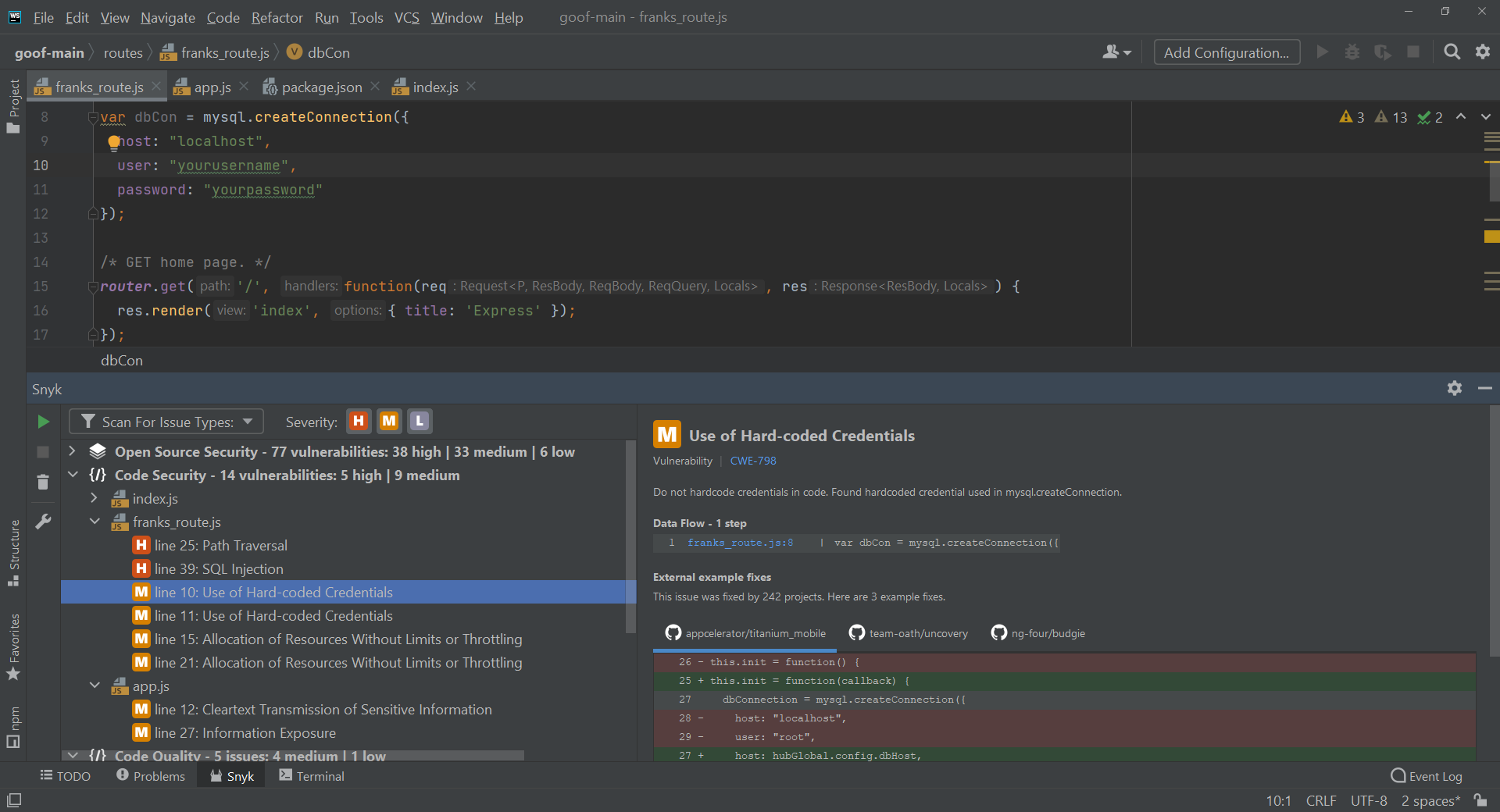
The Snyk AI Security Platform positions itself as a validation layer that sits apart from the systems generating code. It pairs deterministic security engines with frontier-model reasoning to check the code AI writes, the models and agents that run, and the applications that result, rather than relying on the generating tool to assess its own output.
The platform covers three main areas. Agentic Development Security governs what agents use, what they do and what they generate. AI Security Posture Management provides centralized, code-first governance for AI assets. Continuous Offensive Security applies AI pentesting and red teaming to find architectural and chained business-logic flaws.
Key features include:
- Validation across multiple coding agents: Snyk validates output from a mixed stack of AI tools including Claude, Cursor, Copilot, Codex and Windsurf, so a single control layer applies across assistants from different vendors.
- Agent behavior governance: Agentic Development Security validates external tools before an agent uses them, governs agent behavior during execution, and applies checks to code at the point it is created.
- Asset discovery and inventory: The platform discovers and inventories application assets including code, dependencies and AI models, which establishes what exists before policy is applied to it.
- Guardrails across assistants, IDEs and pipelines: Prevention controls are enforced at the point of code creation across AI assistants, development environments and CI/CD pipelines.
- Code-first policy governance: AI Security Posture Management converts organizational intent into enforceable guardrails and replaces manual review cycles with automated policy checks.
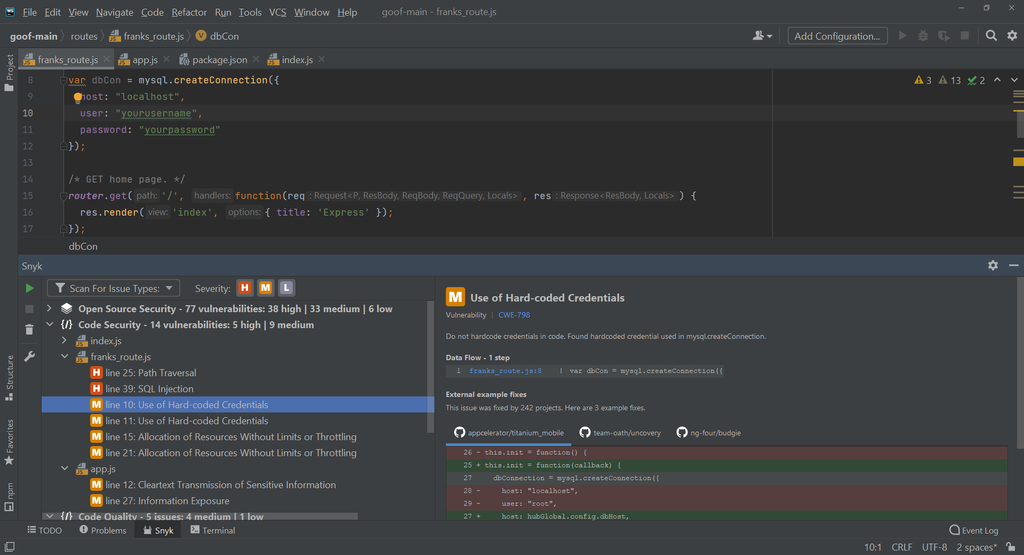
- Risk prioritization and remediation: Risk scores and reachability analysis narrow findings to exploitable issues, and Snyk Agent Fix generates and validates fixes inside the IDE and pull request.
- Governance measurement and reporting: Automated policy enforcement is paired with analytics that track risk reduction and developer adoption across the program.
- Regional data hosting: Enterprise customers can be hosted in United States, European Union or Australian regions, which supports data residency requirements.
Limitations (as reported by users on G2):
- Alert volume on larger projects: Reviewers describe noise from lower-severity findings on bigger codebases, with filter tuning required to match the organization’s risk tolerance.
- False positives: Multiple reviewers report findings that do not hold up under review, including licensing flags that are not a concern in their specific use case, which adds triage time.
- Cost as teams scale: Reviewers note that the step between pricing tiers feels steep and that some capabilities they consider essential sit in higher plans.
- Interface usability: Several reviewers point to interface design as a drawback that affects day-to-day usability.
Source: Snyk
3. Sonar AI Code Assurance
Best for: Tracking and gating projects that contain AI-generated code
Strengths: Project tagging, enforced quality gates, assurance badges
Things to consider: Setup and rule tuning can be complex on large projects
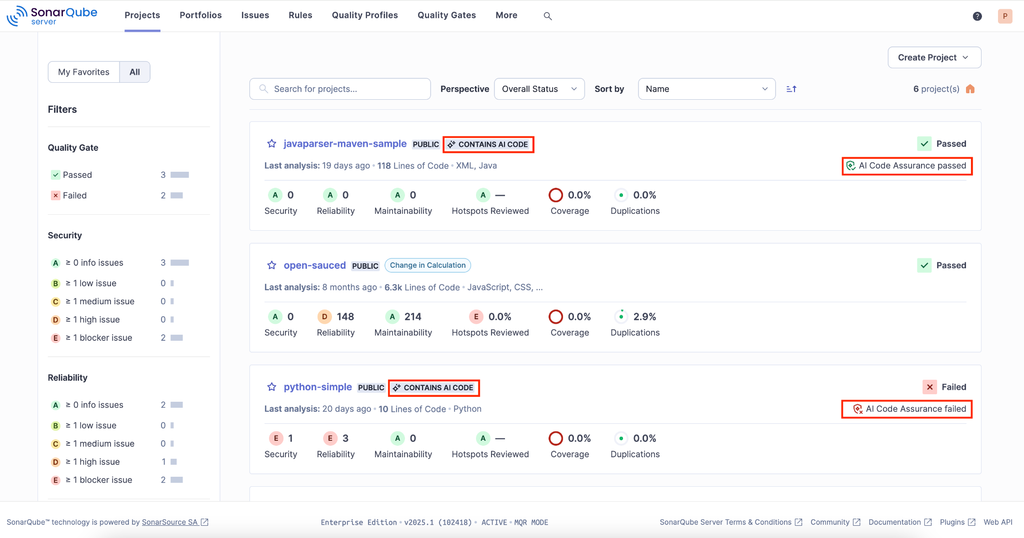
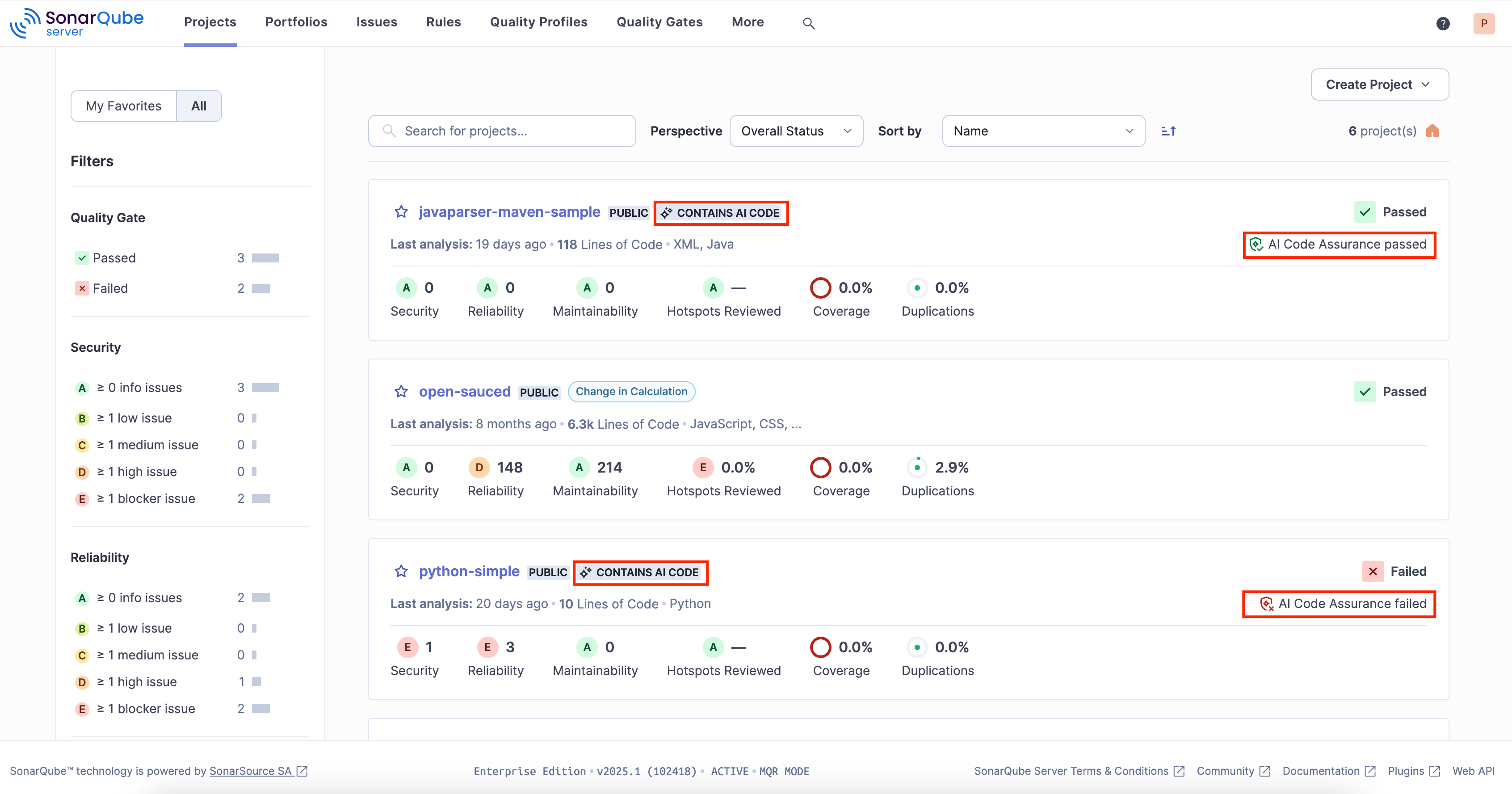
Sonar AI Code Assurance is a workflow inside SonarQube Server and SonarQube Cloud for projects that contain AI-generated code. It addresses the pattern in which AI-generated code receives less scrutiny than code developers write themselves, by marking those projects and holding them to a defined standard before changes reach production.
The workflow has three parts. Projects are tagged as containing AI-generated code, a stricter quality gate and analysis are applied, and an assurance badge records the result. SonarQube Server is self-managed and SonarQube Cloud is hosted, and the analysis covers more than 30 programming languages.
Key features include:
- Project tagging for AI code: Developers mark projects that contain AI-generated code, which starts the AI Code Assurance workflow and makes the presence of generated code an explicit, recorded property of the project.
- Enforced quality gate: A stricter quality gate is applied to tagged projects, so generated code must clear a defined standard before it passes, rather than relying on reviewer judgement alone.
- Deep analysis of generated code: Comprehensive analysis runs against tagged projects to surface issues early and guide developers through resolving them.
- AI Code Assurance badge: Projects that meet the standard can publish an assurance badge externally, providing a visible record of the review status.
- Portfolio-level visibility: Teams can identify and track the status of every project containing AI-generated code, giving a consolidated view of where generated code sits and how it is performing against the standard.
- Native workflow integration: The workflow runs inside existing development processes rather than as a separate review step, so it does not require a parallel toolchain.
- Language and deployment coverage: Assurance applies across more than 30 languages and is available in both the self-managed SonarQube Server and the hosted SonarQube Cloud.
Limitations (as reported by users on G2):
- Configuration complexity: Reviewers report that initial setup and configuration can be involved, particularly on large projects and for teams new to the platform.
- Rule strictness and false positives: Some reviewers find default rules too strict for their context, producing findings that require time to review and adjust.
- Performance on large codebases: Reviewers note that scans can take a while and that the interface can feel slow when working with very large projects.
- Pricing and edition structure: Several reviewers mention pricing changes and the placement of advanced capabilities in higher editions as points of friction.
Source: Sonar
Enterprise AI Coding Assistants
4. GitHub Copilot

Best for: Org-wide AI coding rollout with central policy and audit logs
Strengths: Audit logs, MCP allow lists, public-code matching filter
Things to consider: Suggestions can be inaccurate and still require manual review
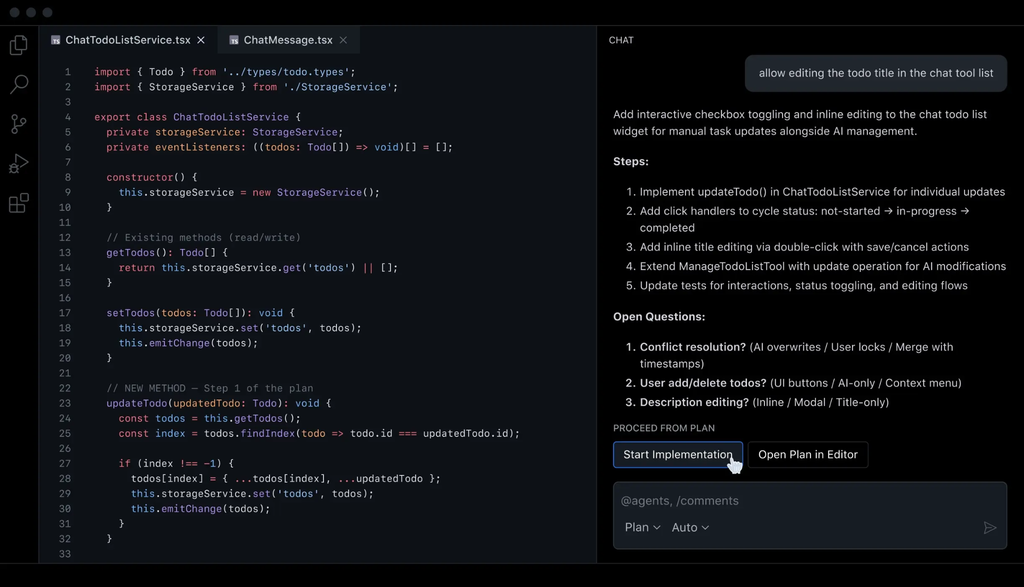
GitHub Copilot provides code completion, chat and agent workflows across GitHub, supported IDEs, the command line and mobile. It is available in Business and Enterprise plans for organizations, which add license management, policy management and IP indemnity on top of the capabilities available to individual users.
For governance, Copilot exposes audit logs, a single control plane for managing agents, and administrative controls over models, features and MCP access. Copilot supports Visual Studio Code, Visual Studio, JetBrains IDEs, Neovim, Eclipse and Xcode, and tasks can be assigned to Copilot, Claude and OpenAI Codex agents.
Key features include:
- Audit logs and agent control plane: Administrators can track activity through detailed audit logs and manage agent usage from a single control plane across the organization.
- MCP access controls: Administrators control which MCP servers developers can reach from their IDEs, using allow lists to prevent access to servers that have not been approved.
- Policy and access management: Organization and enterprise administrators control access to preview features and models, set Copilot policies, and can use network firewall rules to permit Business and Enterprise access while blocking Pro and Free tiers.
- Data retention and training controls: GitHub does not use Business or Enterprise data to train its models. For IDE chat and completions, prompts and suggestions are not retained by default; other access paths retain them for 28 days, and engagement data is kept for two years.
- Public code duplication filter: An administrator-enabled filter checks suggestions against public code on GitHub and suppresses matches of 65 lexemes or more, with control that can be applied enterprise-wide or delegated to individual organizations.
- Code referencing for license review: The code referencing feature searches public repositories for matches to a suggestion and reports where the match occurred, which licenses apply and links for further review.
- Insecure pattern filtering: Copilot filters block or notify users about common insecure coding patterns in suggestions, including hardcoded credentials, SQL injection and path injection.
- Budget and usage controls: On Business and Enterprise plans, administrators set usage limits and decide whether additional paid usage is permitted, with alerts at 75, 90 and 100 percent of a configured budget.
- Organizational knowledge through Spaces: Copilot Spaces creates a shared source of truth built from internal documentation and repositories so responses reflect organizational context.
Limitations (as reported by users on G2):
- Accuracy on complex logic: Reviewers report that suggestions are not always correct for complex business logic and can produce code with logical, security or performance issues that requires manual validation.
- Suggestion quality: A recurring theme is that suggestions need careful review and are not always suitable for the task at hand.
- Context handling: Some reviewers describe losing context during longer sessions and needing to prompt repeatedly to reach a usable answer.
- Subscription cost: Reviewers note the price relative to competing tools, particularly for individual and smaller-team use.
Source: GitHub

5. Cursor

Best for: AI-native IDE rollout with central model and MCP controls
Strengths: SSO and SCIM, repo and model allowlists, usage analytics
Things to consider: No on-premises deployment; cloud-hosted only
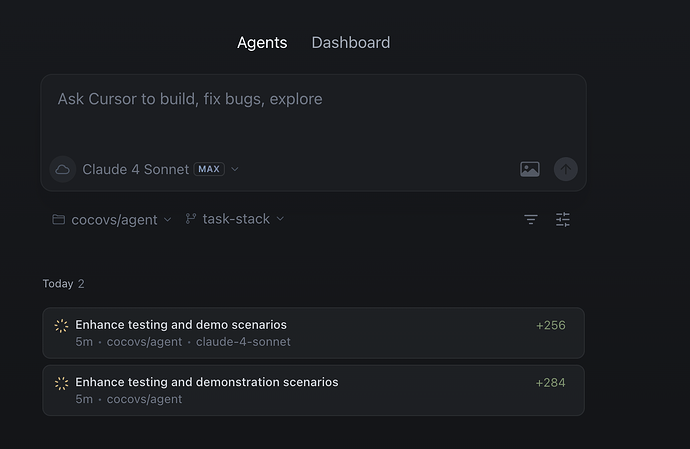
Cursor is an AI-native code editor with an enterprise tier aimed at organizations standardizing their engineering teams on a single toolset. It indexes codebases with millions of lines across hundreds of thousands of files, and gives administrators central control over which models, repositories and MCP servers developers can use.
Identity is handled through SAML-based single sign-on with SCIM provisioning, and Privacy Mode can be enforced across the organization. Cursor runs on SOC 2 Type II compliant AWS infrastructure with annual penetration testing, and provides model access from OpenAI, Anthropic, Google and xAI.
Key features include:
- Centralized model, MCP and agent controls: Administrators globally configure model access, MCP server availability and system-level agent rules, and can set global agent run settings for the organization.
- Repository and model allowlisting: Enterprise administrators set role permissions and can whitelist or blocklist repositories, models and MCP servers, so access is scoped rather than open by default.
- Identity and provisioning: Cursor supports major identity providers including Okta, Azure AD and Google Workspace. Administrators can enforce SSO, disable local login entirely, and create, update and remove users and groups through SCIM.
- Organization-wide privacy mode: With Privacy Mode enabled across the organization, code is not used for training, and Cursor maintains zero data retention agreements with its model providers.
- Adoption and usage analytics: Administrators have access to dashboards covering adoption rates, usage patterns by team and individual, and AI-assisted code metrics, with data exportable through an API for use in existing analytics platforms.
- Cost controls at team and user level: Organizations can pre-commit additional usage for high-volume teams while administrators set configurable spend limits for both teams and individual users.
- Pull request checks: When enabled, Bugbot runs automatically in the background on new pull requests alongside Cursor policy and security checks.
- Data protection and certifications: Data is encrypted with AES-256 at rest and TLS 1.2 or higher in transit, and Cursor states compliance with GDPR and CCPA requirements with reports available in its Trust Center.
Limitations (as reported by users on G2):
- Code accuracy: Reviewers report that generated code can be inaccurate or produce hallucinated output, so careful review is still required before it is used.
- Performance on large codebases: Several reviewers describe the editor becoming resource intensive or lagging when working with large projects.
- Over-suggestion: Some reviewers find the assistant too opinionated at times, proposing more changes than intended and interrupting their workflow.
- Feature discoverability: Reviewers new to the tool note that more in-editor guidance would help them find advanced capabilities faster.
Source: Cursor

6. Tabnine
Best for: Private or air-gapped AI coding with output traceability
Strengths: Provenance records, MCP safeguards, air-gapped deployment
Things to consider: Local model inference can be heavy on CPU and memory
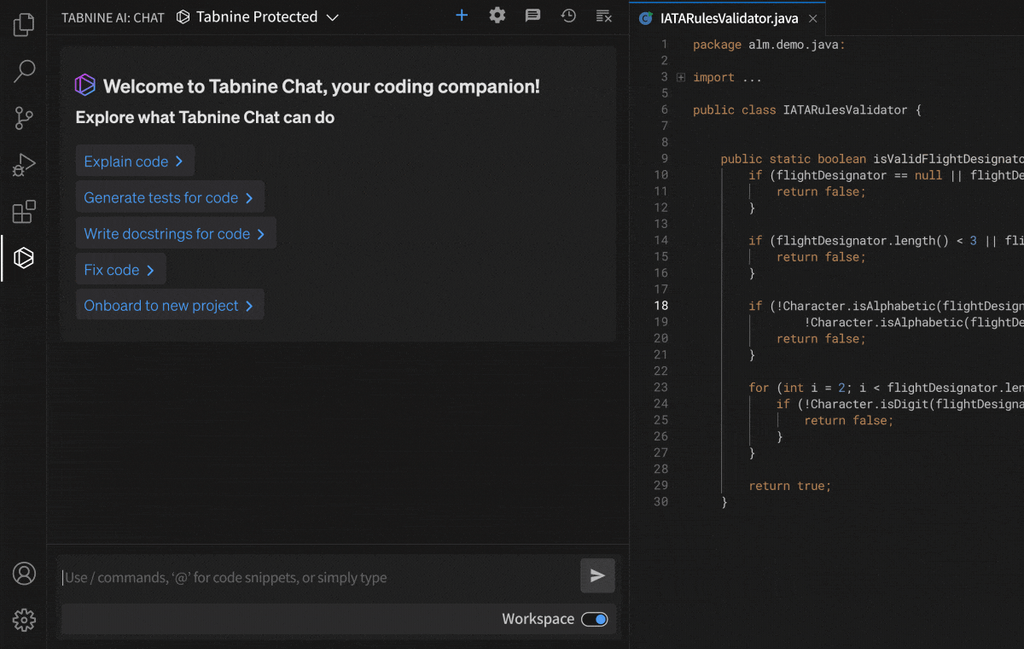
Tabnine is an organization-aware AI coding platform that runs entirely inside the customer’s environment, covering both the IDE and the command line. It connects to repositories and development systems to provide code assistance and automated workflows, and can be deployed as SaaS, on-premises or fully air-gapped.
The platform’s Enterprise Context Engine indexes the organization’s architecture, frameworks and coding standards so agents work from internal context rather than generic training data. Administration is handled through a control plane covering visibility, access, policy and audit across users, teams and workspaces.
Key features include:
- Centralized auditability and access control: The control plane provides centralized visibility, granular access controls, policy enforcement and full auditability across users, teams and workspaces in one place.
- Provenance and attribution: Tabnine records what context, tools and data sources were used to generate each AI output, creating a traceable link between an output and the inputs behind it.
- MCP safeguards: Administrators control which MCP servers agents can access, and MCP provides a governed interface for agents to read tickets, analyze logs, pull documentation and call approved services.
- Deployment flexibility including air-gapped: Tabnine can be deployed as SaaS, in a VPC, on-premises or fully air-gapped. In air-gapped or secure environments, no data leaves the customer’s infrastructure.
- Data retention and IP protection: The platform operates with zero data retention and does not train on customer code, and includes license-aware safeguards and enterprise indemnification.
- Configurable context ingestion: Organizations configure precise context settings so the assistant only uses information they have approved, drawing on the current file, open files, terminal output and repository history.
- Model selection with guardrails: Teams choose between frontier and open-source models and steer behavior with guardrails, prompts and team-level preferences.
- Coding standards enforcement: Coaching guidelines and code review capabilities check that agent output conforms to the organization’s coding standards.
- Adoption measurement: The platform provides visibility into adoption, usage and impact, and bills LLM tokens directly so organizations can track consumption.
Limitations (as reported by users on G2):
- Complex multi-file reasoning: Reviewers report that output for multi-line generation and broader architectural suggestions can miss project context compared with assistants that use deeper multi-file indexing.
- Local resource consumption: Running local inference is described as heavy on CPU and memory, which can slow the IDE on mid-range hardware.
- Framework-specific consistency: Several reviewers note weaker or repetitive suggestions when working with certain JavaScript UI frameworks and in larger projects.
- Self-hosted maintenance overhead: One enterprise reviewer describes version updates and security patching for a private instance as manual work that adds operational effort.
- Admin analytics depth: The same reviewer notes that the administration dashboard lacks detailed team usage analytics for tracking adoption.
Source: Tabnine
7. Amazon Q Developer
Best for: AWS-centric teams needing IAM-aligned AI coding assistance
Strengths: IAM-scoped access, code scanning, automated code review
Things to consider: Governance depth is tied to the AWS identity and account model
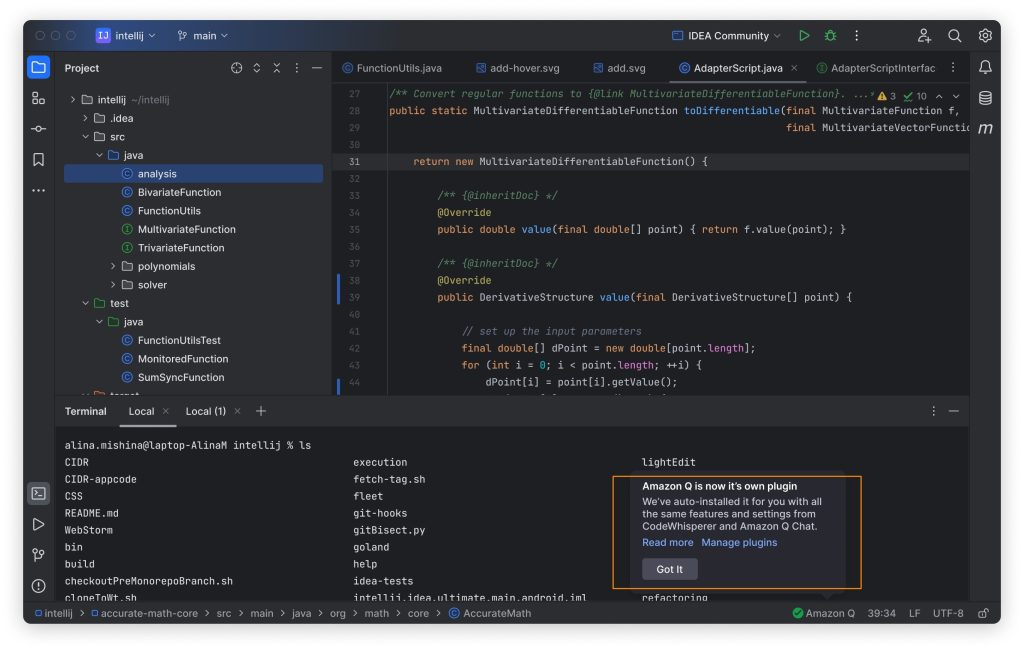
Amazon Q Developer is an AI assistant for software development that works across IDEs, the command line, the AWS Management Console and chat applications including Slack and Microsoft Teams. It provides code suggestions, an agentic coding experience, automated documentation, test generation and code review.
Its governance model is built on existing AWS constructs. The assistant understands and respects an organization’s identities, roles and permissions, and is built on Amazon Bedrock, so it inherits the safety and security controls implemented there. Amazon Q Developer Pro does not use customer content for service improvement.
Key features include:
- Identity-aligned access controls: Amazon Q understands and respects existing governance identities, roles and permissions. Users have the same access to account and billing information through Amazon Q as their existing AWS role permissions allow.
- Data isolation: Amazon Q Developer Pro does not use customer content for service improvement, keeping the boundary between customer code and the service explicit.
- Inherited Bedrock controls: Because the assistant is built on Amazon Bedrock, users inherit the controls implemented there for safety, security and responsible AI use, and AWS applies automated abuse detection.
- Security scanning of generated code: Beyond generating code, Amazon Q Developer scans for issues that are hard to detect, including exposed credentials and log injection, and suggests remediations tailored to the application code.
- Automated code review: The assistant reviews code to detect and resolve logical errors, anti-patterns, code duplication and security vulnerabilities, returning feedback during development rather than later in the cycle.
- Customization on internal codebases: Organizations can make the assistant aware of internal libraries, APIs, best practices and architectural patterns so inline recommendations and chat responses reflect their own code.
- Workspace-level context: Amazon Q Developer uses knowledge of the entire workspace rather than only open files when responding to instructions and questions.
- Agentic task execution: The assistant can analyze an existing codebase, produce a multi-file implementation plan and, on approval, apply the changes and run tests.
- Coverage across environments: Amazon Q is available in the AWS Management Console, IDEs, AWS documentation, Microsoft Teams and Slack, Amazon SageMaker and the AWS Console Mobile Application.
Limitations (as reported by users on G2):
- Out-of-context responses: Multiple reviewers report answers that fall outside the context of the question being asked.
- Suggestion accuracy: Reviewers note that suggestions are not always fully accurate and that code needs to be double-checked before use, with some suggested code not running correctly.
- Response latency: Some reviewers describe the time taken to generate a response as a drawback during active development.
- Prompt effort: Reviewers report needing to write more detailed prompts to reach a usable result, and describe an adjustment period when integrating the assistant with other tools.
Source: Amazon

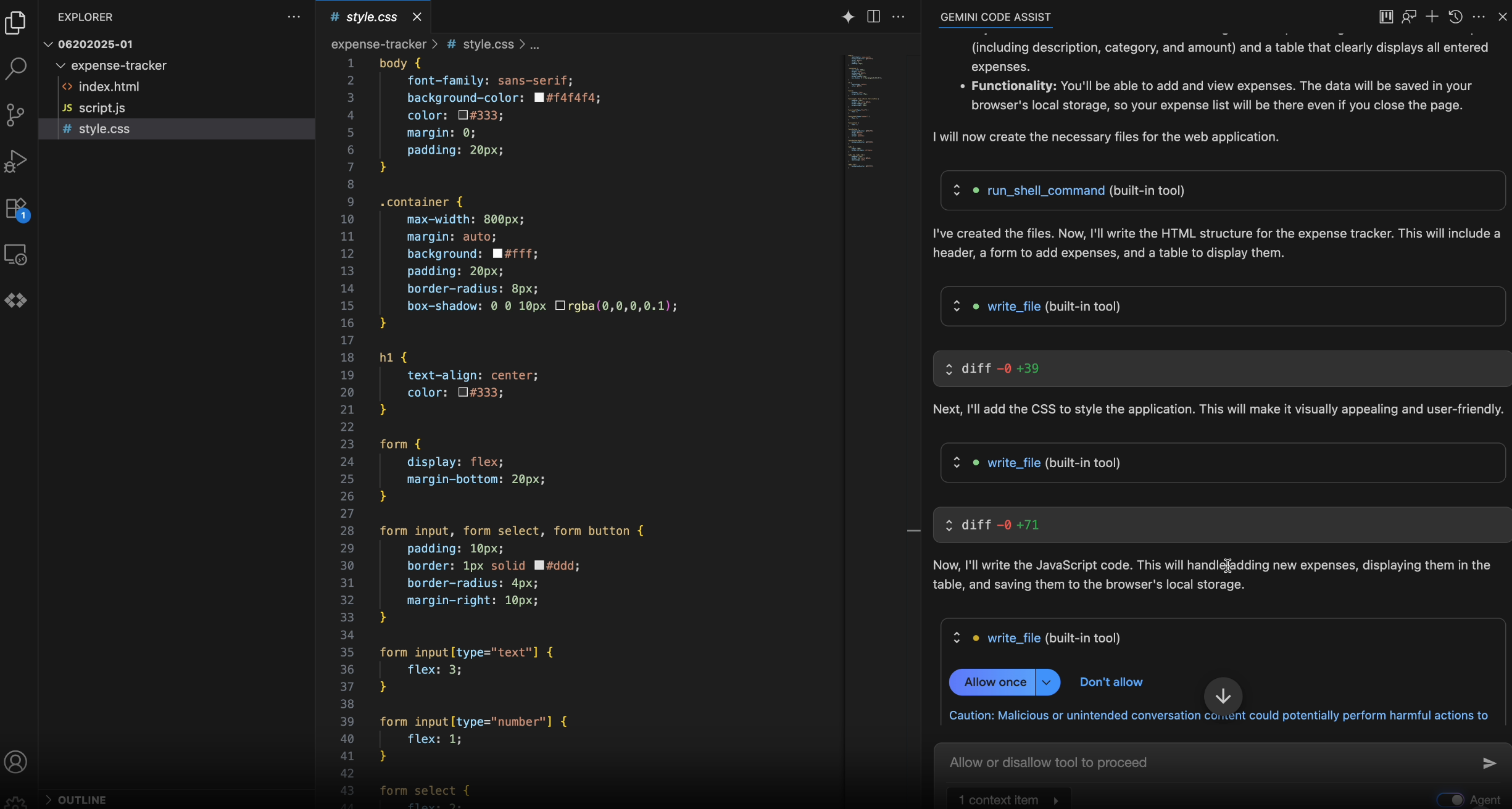
8. Gemini Code Assist

Best for: Google Cloud teams needing IAM-scoped AI coding assistance
Strengths: VPC Service Controls, usage logging, source citation
Things to consider: Individual tiers moved to Antigravity; business licences continue
Gemini Code Assist provides AI coding assistance and agents across the software development lifecycle, and is sold in Standard and Enterprise editions managed through Google Cloud. Note that the unpaid individual tier and Google One access to the IDE extensions and CLI were replaced by Antigravity in June 2026; the business editions continue.
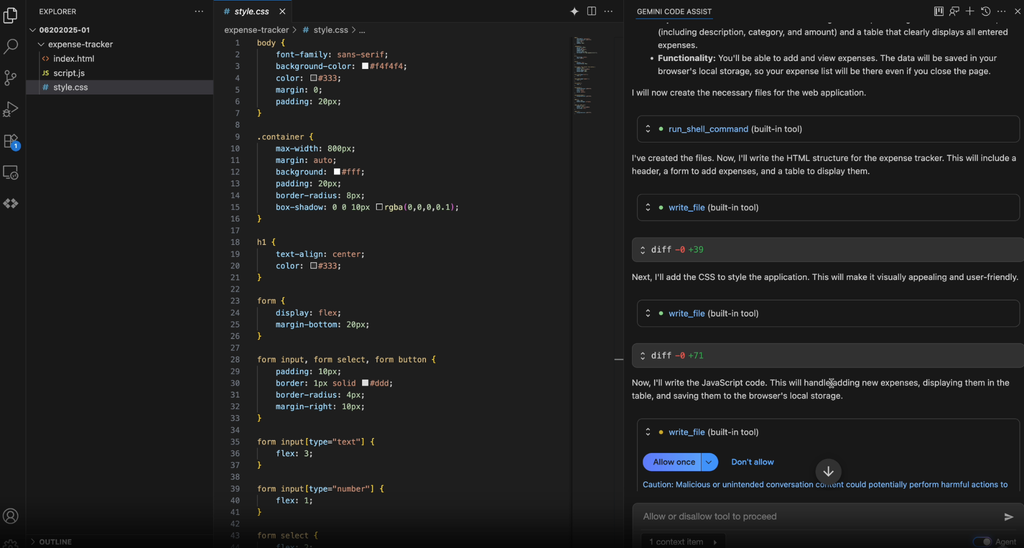
The product covers code completion, generation, chat and an agent mode with human-in-the-loop oversight, and works in Visual Studio Code, JetBrains IDEs, Cloud Workstations and Cloud Shell Editor. The Enterprise edition adds code customization on private repositories and integrations with Apigee, Firebase, BigQuery and Application Integration.
Key features include:
- Usage metrics and observability logging: Metrics and observability logging feed a dashboard that tracks daily active use, chat exposures, code suggestions, acceptance rates and lines of code accepted.
- Enterprise access controls and network isolation: Security capabilities include Private Google Access, VPC Service Controls and Enterprise Access Controls with granular IAM permissions.
- Data governance policy: Customer code, inputs and generated recommendations are not used to train shared models or develop products, and customers retain control and ownership of their data and IP.
- Source citation for license compliance: Code suggestions are automatically flagged when they quote at length from a source, and Google’s IP indemnification policy covers licensed users.
- Code customization on private repositories: Enterprise customers can tune the assistant against their own private codebases so suggestions reflect internal code rather than public patterns alone.
- Agent mode with human oversight: Agent mode supports multi-file edits, full project context, built-in tools and MCP integration with human-in-the-loop checkpoints where oversight is required.
- Local codebase grounding: Responses are grounded in context from the local codebase and current development session, which supports larger changes such as cross-file dependency updates and version upgrades.
- Compliance certifications: Gemini Code Assist holds SOC 1, SOC 2 and SOC 3, along with ISO/IEC 27001, 27017, 27018 and 27701.
Limitations (as reported by users on G2):
- Confidently incorrect output: Reviewers describe suggestions that read as authoritative but are not fully correct, including invented API and library methods that do not exist.
- Generic suggestions: Several reviewers report that output can be too generic for project-specific code and needs modification before it fits their requirements.
- Complex backend and integration work: Reviewers note weaker results on complex backend logic and integrations involving APIs, databases and payment systems.
- Review overhead: Because output is not consistently production-ready, reviewers report reviewing generated code carefully before using it.
Source: Google
FAQ
-
No. Coding assistants generate code; governance platforms independently test and police that code regardless of which assistant or developer produced it. Most enterprises run both together, not one instead of the other.
-
An activity log records that something happened. An audit trail connects identity, action, context, and outcome together in a way that can be reconstructed for a specific investigation or compliance review — for example, tying a specific triage decision back to the user, the timestamp, and the before/after state of the finding.
-
It depends on the tool. Look specifically for whether the audit trail distinguishes agent-initiated actions from developer-approved ones, and whether autonomous changes still require human sign-off before merging.
Conclusion
Effective AI adoption requires balancing developer productivity with rigorous security governance. Organizations should integrate dedicated oversight layers that provide comprehensive audit trails and policy enforcement alongside their coding assistants. This proactive approach protects intellectual property and ensures compliance while empowering teams to leverage automation safely. By establishing these guardrails, businesses can confidently scale their development efforts.