

Summary
AI is transforming the software development life cycle by accelerating requirements analysis, coding, testing, deployment, and operations through copilots, coding agents, and other AI-powered tools. Organizations can improve delivery speed and developer productivity, but they must also address new risks related to AI-generated code, secrets exposure, model supply chains, and autonomous workflows.
What Is AI in the SDLC?
The AI-powered Software Development Life Cycle (SDLC) integrates generative AI across all stages of development (requirements, design, coding, testing, and deployment) to automate tasks, enhance code quality, and speed up delivery. Modern organizations have AI assistants and agents acting as collaborators and coworkers for engineering teams.
The use of AI in the SDLC goes far beyond AI-generated code. AI can also help with design and architecture, test automation, security review, documentation, and remediation of defects or security vulnerabilities. Modern AI systems can support engineering decision-making and carry out engineering tasks, with various levels of autonomy, throughout the SDLC.
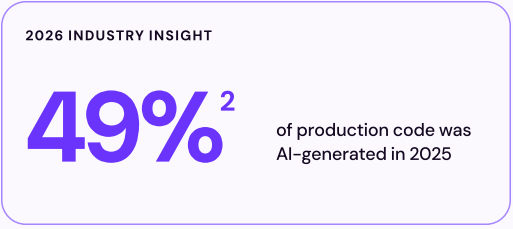
This shift is now the norm, not the exception: Checkmarx’s 2026 Future of Application Security research found that AI components are embedded in the applications of 96% of organizations surveyed: “every layer of modern applications has become a potential entry point.”
A critical distinction is between AI-assisted and AI-driven workflows:
- In AI-assisted development workflows, AI supports human practitioners by providing suggestions, analysis, drafts, or recommendations, while humans remain responsible for reviewing, deciding, and executing.
- In AI-driven workflows, AI systems take a more active role by initiating, coordinating, or completing tasks with limited human intervention, such as automatically creating tests, opening pull requests, triaging issues, or triggering remediation steps according to predefined policies and controls.
Key impacts of AI on SDLC phases:
- Requirements and design:Generative AI can parse stakeholder narratives to generate user stories and detect conflicts. AI converts requirements into diagrams, flowcharts, and initial wireframes.
- Development and coding: Coding assistants and AI-powered IDEs such as Claude Code, GitHub Copilot, and Cursor accelerate coding, auto-refactor code, and can provide security suggestions.
- Testing and QA: AI enables automated testing, creates synthetic, privacy-preserving test data, and performs intelligent regression testing to identify bugs early.
- Deployment and maintenance: AI can support engineers and DevOps teams by generating infrastructure as code (IaC) configurations, automating deployment workflows, and automatically remediating bugs and security issues.
This is part of a series of articles about AI security.
3 Reasons Teams Are Adopting AI in the SDLC
There are several drivers for using AI in SDLC processes.
1. Pressure for Faster Software Delivery
Organizations are under constant pressure to deliver new features, fixes, and updates more quickly. Competitive markets, cloud-native architectures, and continuous delivery practices have shortened release cycles and increased expectations for development teams.
AI helps reduce time spent on repetitive and time-consuming tasks across the SDLC. Teams use AI to accelerate requirements analysis, generate implementation drafts, create tests, review code, analyze incidents, and produce documentation. By reducing manual effort, AI allows engineers to dramatically increase their productivity.
2. Wide Adoption of Copilots, Coding Agents, and AI-Assisted Workflows
The rapid adoption of AI coding assistants has introduced many developers to practical AI use cases. Tools that can generate or refactor code, explain existing codebases, suggest fixes, and answer questions within development environments have demonstrated measurable productivity gains for many teams.
As confidence in these tools has grown, organizations have expanded AI usage beyond coding. AI capabilities are increasingly being integrated into code review, testing, security analysis, project management, operations, and support workflows. This has helped move AI from an experimental technology to a standard part of how engineering teams plan, write, test, and ship software.
3. Applicability of AI Across Planning, Coding, Testing, and Operations
Teams are adopting AI because software delivery depends on many interconnected activities, not just writing code. Delays often occur in requirements gathering, testing, reviews, security validation, deployment, and incident management rather than in implementation alone.
AI can improve efficiency throughout the lifecycle by helping teams process information, identify risks, automate routine work, and make decisions more quickly. Applying AI across planning, development, testing, security, and operations allows organizations to improve delivery speed, consistency, software quality, and operational resilience while reducing manual workload.
Who’s Involved in AI-Driven SDLC?
AI-driven development is no longer confined to a single team or use case: it touches nearly every function involved in shipping software:
- Engineering teams writing and reviewing code alongside copilots and coding agents, day to day.
- DevOps and QA teams using AI to automate testing, deployment, and repetitive operational work.
- Platform and AppSec teams setting the guardrails and policies that govern how AI is used across the organization.
- Engineering leadership balancing the delivery speed AI enables against the new risks it introduces.
Each of these roles engages with AI-driven SDLC differently, but none of them can opt out of it entirely — which is exactly why governance and security need to be built in from the start, not bolted on afterward.
AI SDLC vs. Traditional SDLC
In a traditional SDLC, humans drive most activities directly. Product managers write requirements, architects create designs, developers implement code, testers create test cases, and operations teams monitor systems. Tools support the work, but people perform most analysis, coordination, and decision-making.
In an AI-driven SDLC, many of these activities are accelerated or partially automated. AI can summarize requirements, generate design options, draft code, create tests, review changes, analyze logs, and recommend fixes. Humans still set goals, validate outputs, make tradeoffs, and remain accountable for quality, security, and business fit.
The key differences:
- Speed: AI does not replace the SDLC lifecycle stages, but it increases the speed and frequency of iteration. Teams can move from long handoffs and manual reviews to shorter feedback loops, where AI helps offer options, generate artifacts, remediate issues, and reduce waiting time between phases.
- Level of automation: In a traditional SDLC, automation is usually rule-based, such as CI pipelines, static analysis, or scripted deployments. In an AI SDLC, automation is more adaptive and systems are increasingly autonomous. AI systems can interpret natural language, reason over code and logs, suggest next steps, and create artifacts that previously required manual effort.
- Risks: AI introduces new risks compared to the traditional SDLC. Generated code may be incorrect, insecure, or hard to maintain. AI outputs can reflect incomplete context, outdated patterns, or hidden assumptions. Teams must add controls such as human review, secure coding standards, test coverage, model governance, audit trails, and clear approval gates.
The result is a shift from a human-first lifecycle to an AI-accelerated SDLC. Traditional software development relies on human effort as the main driver of progress. The AI SDLC uses AI to increase speed, improve consistency, and automate routine work, while humans provide judgment, accountability, and final validation.
How AI Changes Each SDLC Phase
Here’s a look at the advantages of AI for SDLC processes.
Requirements and Design
AI enhances the requirements and design phase by using generative AI to analyze user stories, documentation, and feedback. AI tools can extract requirements from various inputs, detect ambiguities, and suggest clarifications, ensuring that teams capture user needs accurately. AI-driven modeling tools can also generate system architectures, propose design patterns, and predict potential design flaws based on historical project data.
These capabilities lead to well-defined requirements, reducing rework later in the cycle. AI also supports collaboration between stakeholders by translating business language into technical requirements and vice versa. This ensures alignment between business goals and technical implementation, reducing miscommunication throughout the SDLC.
Development and Coding
During development, AI assists by generating code snippets, recommending best practices, and identifying potential bugs or vulnerabilities in real time. AI coding assistants, powered by large language models, can accelerate coding tasks, help enforce coding standards, and reduce human errors. These tools analyze codebases for consistency, suggest optimizations, and automate repetitive coding patterns.
Agentic AI is extending development beyond code suggestions by performing multi-step engineering tasks with limited supervision. AI coding agents can analyze requirements, explore repositories, implement features, generate tests, fix defects, refactor code, and prepare pull requests. Unlike traditional copilots that respond to prompts, agents can plan tasks, maintain context across workflows, use development tools, and iterate until objectives are met.
Testing and QA
AI transforms testing and quality assurance (QA) by automating test case generation, execution, and analysis. Generative AI models can identify high-risk areas of code, prioritize test coverage, write new tests, and assist with their maintenance. This increases testing coverage and efficiency and helps teams catch critical issues earlier in the development cycle.
Automated testing powered by AI can adapt to code changes, self-heal broken tests, and provide insights from test results. This reduces manual QA effort and accelerates feedback loops, enabling faster releases without sacrificing quality. AI-driven QA tools integrate with support continuous integration and delivery pipelines, ensuring that software remains stable across frequent updates.
Deployment and Maintenance
AI streamlines deployment by automating release management, environment provisioning, and rollback procedures. Predictive analytics can identify deployment windows, forecast infrastructure needs, and detect anomalies during rollout. AI-driven monitoring tools continuously analyze application performance, detect emerging issues, and trigger self-healing actions such as automatic scaling or bug fixes.
Agentic AI is increasingly being used to manage infrastructure and operational workflows. AI agents can provision cloud environments, generate and maintain infrastructure as code templates, configure deployment pipelines, validate configuration changes, and coordinate software releases across environments. During operations, agents can analyze monitoring data, investigate incidents, recommend remediation actions, and in some cases execute approved fixes automatically.
What Security Risks Are Introduced by the AI-Driven SDLC?
Security Threat Modeling Gaps in AI System Design
AI systems introduce new threat vectors that traditional threat modeling does not cover well. Risks such as prompt injection, model poisoning, and unintended data exposure require teams to extend threat modeling beyond standard application logic. This includes analyzing how models behave under adversarial inputs and how they interact with sensitive data.
Early-stage planning must account for these risks by defining AI-specific threat scenarios, documenting model behavior, and setting clear usage boundaries. Without this, teams miss attack paths that only emerge from AI-driven interactions, leaving gaps that can carry into later stages of development.
How Checkmarx helps
Checkmarx helps organizations identify security risks early in the SDLC by integrating application security testing directly into development workflows. Through capabilities such as SAST, software composition analysis (SCA), and policy-based governance, teams can validate security requirements during design and implementation, uncover architectural weaknesses, and detect vulnerabilities before they reach production.
Security Vulnerabilities in AI-Generated Code
AI-generated code can introduce insecure patterns, outdated dependencies, or unsafe handling of inputs. Since these tools generate code probabilistically, they may produce implementations that appear correct but contain hidden risks such as injection flaws or improper validation.
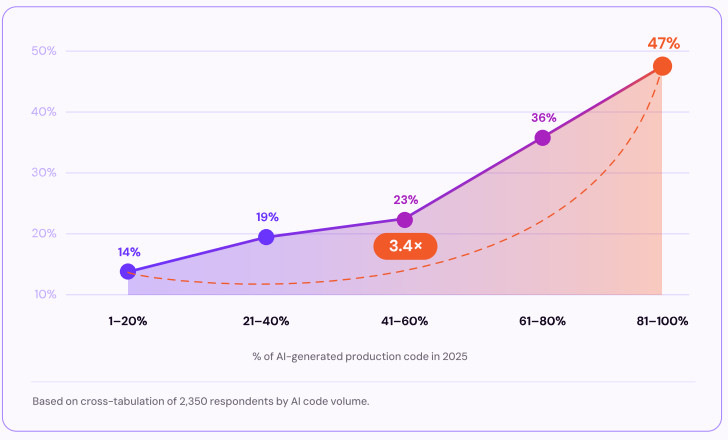
This risk scales directly with adoption: the same research found that organizations where 81-100% of code is AI-generated ship vulnerable code at 3.4 times the rate of those at 1-20% adoption: meaning the more deeply AI is embedded across the SDLC, the more this risk compounds rather than levels off.
To manage this, teams need continuous scanning and stricter validation for AI-assisted code. This includes applying static analysis, enforcing code reviews, and treating all AI-generated output as untrusted until verified.
How Checkmarx helps
Checkmarx helps teams continuously validate both human-written and AI-generated code using automated application security testing. Checkmarx One combines SAST, SCA, API security testing, and AI-powered remediation guidance to identify vulnerabilities introduced during development. Developers receive findings and recommended fixes directly within their workflows, helping ensure that AI-generated code meets security standards before it is committed or deployed.
Security Risks of Secrets Exposure in AI Workflows
AI tools can unintentionally expose sensitive data such as API keys, credentials, or internal configurations. This can happen through training data, prompt inputs, or generated outputs, especially when models have access to internal systems or logs.
Mitigation requires enforcing secrets detection across the entire pipeline, limiting what data AI systems can access, and monitoring interactions with models. Without these controls, sensitive information can leak and create risks that are difficult to detect and trace.
How Checkmarx helps
Checkmarx helps prevent accidental exposure of credentials and sensitive information through integrated secrets detection and code scanning capabilities. By continuously scanning source code, repositories, and development workflows for exposed keys, tokens, certificates, and other secrets, organizations can identify and remediate leaks before they are introduced into builds, deployments, or AI-enabled workflows.
Security Threats in AI Model Supply Chain
AI models, especially those sourced from third parties, can introduce supply chain risks such as hidden backdoors or adversarial behaviors. These issues may not be visible during normal testing but can be triggered under specific conditions.
Supply chain risk is already a leading breach vector independent of AI specifically: Checkmarx’s research found supply chain attacks account for 30% of breaches, a near-identical share to vulnerable APIs (32%) and open-source vulnerabilities (31%) — and AI model and component supply chains introduce a new, less-governed version of the same underlying problem.
To reduce this risk, organizations must verify model provenance, scan models for vulnerabilities, and validate their integrity before deployment. Treating models as critical assets, similar to third-party libraries, ensures they undergo the same level of scrutiny as any other component in the software supply chain.
How Checkmarx helps
Checkmarx helps organizations manage software supply chain risk through software composition analysis and dependency visibility capabilities. Teams can identify vulnerable open-source components, monitor third-party dependencies, enforce security policies, and gain visibility into software artifacts entering the development pipeline. They can also apply similar controls to AI-related dependencies and supporting infrastructure.
Governance Gaps in Agentic or Autonomous Workflows
Agentic AI systems can take actions with limited human intervention, such as creating code changes, modifying configurations, opening tickets, approving workflows, or triggering remediation processes. While this can improve efficiency, it also creates governance challenges when responsibilities, permissions, and decision boundaries are not clearly defined.
One major risk is excessive autonomy. An AI agent with broad access to development, deployment, or production systems may perform actions that have unintended operational or security consequences. Errors can propagate quickly when automated decisions are executed across multiple systems without appropriate review or approval controls.
Organizations also face accountability and auditability challenges. When AI agents make recommendations, initiate actions, or coordinate workflows, teams need clear records showing what decisions were made, why they were made, what data was used, and who approved or authorized the action. Without sufficient logging and traceability, investigations, compliance reviews, and incident response become significantly more difficult.
How Checkmarx helps
Checkmarx supports governance and oversight by providing centralized visibility into security findings, remediation activities, policy enforcement, and developer actions across the SDLC. Integrated reporting, auditability, risk prioritization, and workflow controls help organizations maintain accountability as AI agents become more involved in development and operational processes.
Where Security Risks Manifest in the SDLC
The following table summarizes how the above threats impact each of the SDLC lifecycle stages.
| Security Risk Category | Requirements & Design | Development & Coding | Testing & QA | Deployment & Maintenance |
| AI Threat Modeling and Design Risks | AI-specific threats may be overlooked during architecture and security planning. | Design assumptions may create security weaknesses during implementation. | AI attack scenarios may not be adequately tested or validated. | Unaddressed design flaws can persist and be exploited in production. |
| AI-Generated Code and Application Security Risks | Security requirements may be incomplete or poorly defined. | AI-generated code may introduce vulnerabilities, insecure patterns, or dependencies. | Testing may miss defects within AI-generated code paths. | Vulnerabilities may reach production and require ongoing remediation efforts. |
| Data Exposure and Secrets Management Risks | Sensitive data may be exposed through requirements or prompts. | Credentials, source code, or secrets may leak through AI usage. | Test data may unintentionally expose sensitive information. | Logs, outputs, or integrations may leak sensitive information. |
| AI Governance, Supply Chain, and Autonomous Agent Risks | Unverified models or excessive permissions may create governance risks. | Third-party AI tools and agents may introduce supply chain risks. | Hidden model behaviors or unsafe actions may evade detection. | Autonomous actions may require stronger oversight, controls, and auditing. |
Common AI Tools Used Across the SDLC
There are several types of AI tools for SDLC tasks.
AI Coding Assistants (Copilots)
AI coding assistants, often called copilots, help developers write code faster by generating code suggestions directly within development environments. These tools use large language models trained on programming languages, frameworks, documentation, and public code repositories to provide context-aware recommendations as developers work. Common capabilities include code completion, function generation, code explanation, refactoring suggestions, and documentation assistance.
Within the SDLC, coding assistants primarily support the development phase but also contribute to testing and maintenance activities. Developers use them to accelerate implementation, generate unit tests, explain unfamiliar code, draft documentation, and identify potential improvements. While copilots can significantly improve productivity, their output still requires human review to validate correctness, security, maintainability, and alignment with organizational standards.
Security impact:
- Can introduce insecure coding patterns because AI models are not inherently trained to follow secure coding best practices.
- May reproduce outdated, inefficient, or vulnerable coding practices present in public training data.
- Can generate hallucinated code, including references to non-existent libraries or components.
- May create intellectual property and licensing risks when generated code resembles content from proprietary or open-source repositories.
- Require human review and validation before use in production environments.
AI Coding Agents
AI coding agents extend beyond code suggestions by autonomously executing multi-step software engineering tasks. Unlike copilots that respond to individual prompts, coding agents can interpret objectives, plan actions, interact with repositories, run tests, modify files, and iterate toward completing a task. These systems often combine large language models with access to development tools, terminals, issue trackers, and version control systems.
Coding agents support multiple SDLC phases, including implementation, testing, maintenance, and remediation. Teams use them to implement features, fix bugs, generate tests, perform refactoring, resolve dependency issues, and prepare pull requests. As organizations adopt agentic workflows, coding agents increasingly act as engineering collaborators that can perform routine development work while operating within predefined governance, security, and approval controls.
Security impact:
- Expand the attack surface by introducing AI-driven workflows that can become targets for attackers.
- May be influenced by poisoned data or manipulated inputs that lead to insecure or malicious outputs.
- Increase the importance of governance controls because security risks can propagate through automated development activities.
- Require oversight and approval mechanisms to ensure generated changes are properly reviewed before implementation.
IDE-Integrated AI Assistants
IDE-integrated AI assistants embed AI capabilities directly into development environments such as Visual Studio Code, JetBrains IDEs, and other engineering tools. By operating within the developer’s workspace, these assistants can access project context, source code, open files, error messages, and development workflows. This allows them to provide highly relevant assistance without requiring developers to switch between tools.
Across the SDLC, IDE-integrated assistants help developers troubleshoot errors, understand codebases, generate implementations, navigate dependencies, and perform code analysis. Their integration into daily workflows reduces context switching and shortens feedback loops. By providing assistance where developers already work, these tools help improve productivity while supporting code quality, testing, documentation, and debugging activities.
Security impact:
- Enable vulnerabilities to be identified earlier by integrating security analysis directly into the developer workflow.
- Provide real-time feedback on both AI-generated and manually written code as developers work.
- Support shift-left security practices by helping detect issues before code reaches repositories.
- Help developers remediate vulnerabilities immediately through contextual recommendations.
- Reduce the likelihood that insecure code progresses through the SDLC unchecked.
Context Engines / Repository-Aware AI
Context engines and repository-aware AI systems improve the accuracy of AI outputs by grounding responses in organizational codebases, documentation, architecture diagrams, tickets, and other internal resources. Rather than relying solely on a model’s training data, these systems retrieve relevant information from repositories and provide it as context during interactions. This helps reduce hallucinations and ensures responses reflect the organization’s actual environment.
These tools support requirements analysis, development, testing, maintenance, and knowledge management activities throughout the SDLC. Engineers use repository-aware AI to understand complex systems, trace dependencies, analyze architectural decisions, answer project-specific questions, and identify relevant code or documentation. By incorporating organizational context, these systems help teams make better-informed decisions and improve the quality of AI-assisted workflows.
Security impact:
- Require governance controls to ensure organizational information is used and managed securely.
- Improve visibility across the SDLC by supporting a more holistic view of development and security activities.
- Help reduce security blind spots by incorporating broader organizational context into AI-assisted workflows.
- Support more accurate security analysis when integrated with multiple application security domains.
- Enable better-informed security decisions through access to relevant project and development information.
AI Code Review Tools
AI code review tools analyze code changes to identify quality issues, security vulnerabilities, performance concerns, and maintainability risks before software is merged or deployed. These tools apply machine learning, static analysis, and large language models to review pull requests and source code changes, often providing explanations and remediation recommendations alongside findings.
Within the SDLC, AI code review tools strengthen quality assurance and secure development practices. They help development teams detect issues earlier, reduce review bottlenecks, and improve consistency across engineering teams. Security teams also use these tools to identify vulnerable code patterns, insecure dependencies, and policy violations. By automating portions of the review process, AI code review solutions help accelerate delivery while maintaining software quality and security standards.
Security impact:
- Help identify vulnerabilities in both AI-generated and manually written code before deployment.
- Use intelligent scanning to detect security issues earlier in the development lifecycle.
- Accelerate security analysis by helping teams create and refine security queries more efficiently.
- Improve security coverage by making application security testing workflows more efficient.
- Provide actionable remediation guidance alongside identified vulnerabilities.
- Support developers in fixing issues faster while improving overall security posture and awareness.
How to Evaluate AI Tools for Secure Use in the SDLC
Selecting the right tools for securing an AI-driven SDLC requires focusing on solutions that operate early, act in real time, and integrate directly into how developers work. The goal is to prevent vulnerabilities before they enter the pipeline while keeping development fast and uninterrupted.
This evaluation matters more than it might seem: Checkmarx industry research found that 96% of developers already have AI-based security tooling available in their IDE, and 99.6% rate it effective. And yet only 18% apply security continuously as code is written.
Having the tooling isn’t the gap; operationalizing it consistently is.
- Accuracy and developer usefulness: Evaluate how well the tool understands codebases, generates relevant suggestions, and supports real development tasks. High-quality tools should produce accurate outputs, reduce manual effort, explain recommendations clearly, and integrate naturally into developer workflows without creating excessive review overhead.
- Security guardrails and policy controls: Look for tools that enforce organizational security policies and support secure-by-default development practices. This includes built-in security checks, policy enforcement, approval workflows, access controls, audit logging, and mechanisms to prevent unsafe or non-compliant code from being introduced into the development process.
- Data handling and secrets hygiene: Assess how the tool processes, stores, and protects sensitive information. Organizations should understand what data is sent to models, whether prompts or outputs are retained, and how customer data is isolated. Strong solutions provide secrets detection, data loss prevention controls, access restrictions, and safeguards that reduce the risk of exposing credentials, proprietary code, or sensitive business information.
- Visibility into generated code and dependencies: Teams need transparency into what AI systems produce and recommend. Effective tools provide traceability for generated code, identify referenced dependencies and packages, explain generated changes, and support review processes that allow developers to validate outputs before adoption. This visibility helps reduce supply chain risk and ensures that AI-generated artifacts can be audited and maintained over time.
For comprehensive guidance on evaluating security platforms and establishing operational controls across your pipeline, read our guide on AI Cybersecurity Solutions for the SDLC: An AppSec Implementation Guide.
Conclusion
AI is reshaping the software development life cycle by introducing intelligent assistance and automation across planning, design, development, testing, deployment, and operations. AI is not limited to code generation, becoming a foundational capability that helps teams analyze information, generate artifacts, identify risks, and accelerate decision-making throughout the lifecycle. Organizations that effectively integrate AI into their SDLC can improve productivity, shorten release cycles, and increase operational efficiency while maintaining software quality.
At the same time, increased speed introduces new security, governance, and compliance challenges. AI-generated code, autonomous agents, model supply chains, and sensitive data exposure create risks that traditional development controls were not designed to address. Successful adoption therefore requires security guardrails such as threat modeling, code review, policy enforcement, model governance, auditability, and continuous validation. The objective is not simply to build software faster; it is to build software that is both fast and secure, allowing organizations to realize the benefits of AI without introducing unacceptable risk.
Securing AI Assisted Coding with Checkmarx Developer Assist
Securing the AI SDLC requires application security tooling designed for the agentic coding era. Checkmarx Developer Assist is a standalone, agentic AI security assistant that lives in the IDE and fixes code as fast as GitHub Copilot generates it and developers approve it.
Developer Assist continuously scans human and AI-generated code for issues across SAST, SCA (drawing on a database of over 550,000 known malicious packages), IaC, containers, and secrets, then generates safe, explainable fixes in-line so vulnerabilities never reach the repository. Built for all popular AI-native IDEs, including Cursor, Windsurf, VS Code, and JetBrains, Developer Assist brings Checkmarx One intelligence directly to developers, shrinking remediation from hours to minutes without slowing delivery.
Key capabilities of Checkmarx Developer Assist:
-
Secure AI-generated and human code in real time: Detect vulnerabilities, misconfigurations, hard-coded secrets, and malicious packages as code is written, before commit.
Backed by a hybrid scanning engine reaching an F1 score of 0.64 – more than 3x the industry average of roughly 0.20 – so AI-generated and human code get the same validated level of scrutiny. - Inline, agentic remediation: Use Checkmarx agentic AI to propose and apply validated code changes, not just suggestions, directly in the IDE.
- Shorter fix cycles and lower remediation cost: Cut pre-commit fix cycles from hours to minutes and reduce remediation costs per issue, helping teams avoid expensive downstream rework.
- Guardrails for AI coding assistants: Work alongside copilots such as GitHub Copilot, Cursor, and Windsurf to provide security guardrails and safe refactoring for AI-generated changes.
- Frictionless rollout and adoption: Run locally in the IDE, send only minimal metadata (no source code), and be adopted independently of the full Checkmarx One platform as an easy on-ramp to agentic AppSec.