
Summary
CI/CD security protects both the software being built and the pipeline that builds and deploys it, from source code through production. Effective programs combine least-privilege access, secrets protection, hardened runners, artifact integrity, and automated testing such as SAST, SCA, IaC, container, API, and runtime security.
What is CI/CD Security?
CI/CD security is the practice of embedding automated security controls, policies, and checks into every stage of the software delivery pipeline, from source code management to production deployment. These controls include access management, secret scanning, dependency and container scanning, code analysis, artifact signing, and policy checks.
The goal is to detect risks before software reaches production while protecting the pipeline itself from compromise. Secure CI/CD pipelines also provide traceability, making it easier to verify what code was built, tested, approved, and deployed.
OWASP identified the following as the most important CI/CD security risks:
- Insufficient flow control mechanisms: Require reviews, branch protection, approval gates, and automated checks before changes reach production.
- Inadequate identity and access management: Enforce least privilege, MFA, separate identities, and regular access reviews for users, services, and pipelines.
- Dependency chain abuse: Pin dependencies, use trusted registries, scan packages, maintain SBOMs, and monitor unexpected dependency changes.
- Poisoned pipeline execution: Protect pipeline files, isolate untrusted builds, minimize job permissions, and validate inputs before execution.
- Insufficient pipeline-based access controls: Limit each job’s access to only the systems, credentials, and environments it specifically requires.
- Insufficient credential hygiene: Store secrets securely, use short-lived credentials, rotate exposed keys, and prevent secrets from appearing in logs.
- Insecure system configuration: Harden CI servers, runners, registries, and plugins; patch regularly and restrict administrative access.
- Ungoverned usage of third-party services: Approve, inventory, pin, and limit permissions for external CI tools, plugins, actions, and integrations.
- Improper artifact integrity validation: Sign artifacts, verify signatures before deployment, use immutable versions, and protect registries.
- Insufficient logging and visibility: Centralize logs, monitor pipeline activity, alert on suspicious events, and maintain full audit trails.
Top CI/CD security best practices include:
- Apply least-privilege access across the pipeline: Grant users, service accounts, runners, and jobs only the permissions required for their specific tasks.
- Protect source code repositories and branches: Use protected branches, pull requests, MFA, and monitoring to prevent unauthorized code or pipeline changes.
- Secure CI/CD secrets and credentials: Store secrets in dedicated secrets managers, use short-lived credentials, rotate them regularly, and mask them in logs.
- Continuously scan code, dependencies, and infrastructure: Integrate SAST, SCA, secrets scanning, and IaC scanning into pull requests and pipeline stages.
- Isolate and harden build runners: Use ephemeral, hardened runners with minimal packages, limited credentials, and restricted network access.
- Sign and verify build artifacts: Digitally sign artifacts, verify signatures before deployment, and use immutable digests instead of mutable tags.
- Monitor CI/CD activity and maintain audit logs: Centralize logs and alert on suspicious events such as pipeline changes, unusual credential use, or unexpected deployments.
How a CI/CD Pipeline Works and Where Attacks Enter
A CI/CD pipeline moves code from a source repository through build, test, packaging, and deployment stages. A code commit typically triggers automated jobs that compile the application, run tests, create artifacts or container images, and publish them to a registry. Deployment jobs then promote approved artifacts into staging or production environments.
Each stage introduces a potential attack path:
- An attacker who compromises a developer account or repository can insert malicious code before the build starts.
- Vulnerable third-party dependencies, build plugins, or base images can also introduce malicious code without requiring direct access to the application source.
- Build systems are high-value targets because runners often have access to source code, credentials, registries, and deployment environments. Malicious pipeline configuration or build scripts can steal secrets or modify artifacts.
- Self-hosted runners can create additional risk if untrusted jobs execute with excessive permissions or share state between builds.
- Attacks can also occur after the build. An attacker may replace artifacts in a registry, steal signing keys, or compromise deployment credentials to push unauthorized software.
Security controls therefore need to protect the full path from commit to production, including identities, dependencies, build infrastructure, artifacts, secrets, and deployment permissions.
OWASP Top 10 CI/CD Security Risks
OWASP identifies ten major security risks that commonly affect CI/CD environments, covering weaknesses across source control, pipeline execution, dependencies, credentials, artifacts, and deployment infrastructure.
CICD-SEC-1: Insufficient Flow Control Mechanisms
Insufficient flow control occurs when changes can move through the CI/CD pipeline without adequate review, approval, or validation. If a single developer or compromised account can modify code and automatically promote it into production, an attacker may be able to introduce malicious changes without encountering an independent security checkpoint.
Example: An attacker compromises a developer’s GitHub account, commits malicious code, and merges it into the production branch because branch protection and mandatory pull request reviews are not enabled. The pipeline automatically builds and deploys the change.
Mitigations:
- Require pull request reviews before merging sensitive branches.
- Implement branch protection and restrict direct pushes to production branches.
- Require approval gates before production deployments.
- Enforce separation of duties between development and production deployment.
- Require automated security and quality checks to pass before promotion.
- Protect pipeline configuration files with the same review requirements as application code.
CICD-SEC-2: Inadequate Identity and Access Management
Inadequate identity and access management occurs when users, service accounts, runners, or pipeline identities receive more access than necessary. Because CI/CD systems frequently have access to repositories, cloud infrastructure, registries, and production environments, compromising an overprivileged identity can give attackers extensive control.
Example: A CI service account has administrator privileges across the organization’s cloud environment even though it only needs permission to deploy one application. An attacker who steals its credentials can modify unrelated workloads and infrastructure.
Mitigations:
- Apply least-privilege permissions to developers, service accounts, runners, and pipelines.
- Use separate identities for different pipelines and environments.
- Require multi-factor authentication for human users.
- Regularly review and remove unused permissions.
- Restrict production deployment permissions to authorized identities.
- Prefer temporary, workload-based credentials over long-lived service account keys.
CICD-SEC-3: Dependency Chain Abuse
Dependency chain abuse targets the external packages, libraries, plugins, actions, base images, and other components that pipelines automatically retrieve. Attackers may compromise legitimate dependencies or publish malicious packages designed to impersonate trusted components.
Example: A developer accidentally references a package name that does not exist in the organization’s private registry. An attacker publishes a malicious package with the same name to a public repository, causing the build system to download and execute the attacker’s package.
Mitigations:
- Pin dependency versions and cryptographic hashes where possible.
- Use trusted and approved package repositories.
- Continuously scan open-source dependencies for known vulnerabilities and malicious packages.
- Generate and maintain software bills of materials (SBOMs).
- Restrict pipelines from downloading dependencies from arbitrary sources.
- Monitor dependency updates and investigate unexpected package changes.
CICD-SEC-4: Poisoned Pipeline Execution (PPE)
Poisoned Pipeline Execution occurs when attackers manipulate files, variables, scripts, or configuration consumed by a CI/CD pipeline so that malicious commands execute inside the build environment. Pipeline configuration is particularly sensitive because it often determines which commands runners execute and which credentials they can access.
Example: An attacker modifies a .github/workflows or Jenkins pipeline file so that the next build sends environment variables containing cloud credentials to an external server.
Mitigations:
- Require reviews for modifications to pipeline configuration.
- Prevent untrusted contributors from triggering privileged pipeline jobs.
- Isolate builds originating from forks and external pull requests.
- Minimize the secrets and permissions available to individual jobs.
- Run builds in isolated and ephemeral environments.
- Validate pipeline inputs before passing them to shells or other interpreters.
CICD-SEC-5: Insufficient Pipeline-Based Access Controls
Pipeline-Based Access Controls (PBAC) determine what resources a specific pipeline or pipeline stage can access. Weak PBAC allows jobs to interact with systems that are unrelated to their intended purpose, increasing the potential damage if the pipeline is compromised.
Example: A CI job used only for running unit tests can also access production cloud credentials and deployment APIs. Malicious code executed during the test stage could therefore compromise production.
Mitigations:
- Assign permissions according to the purpose of each pipeline and job.
- Separate build, testing, staging, and production credentials.
- Prevent CI jobs from accessing production unless explicitly required.
- Isolate sensitive deployment pipelines from general-purpose build pipelines.
- Restrict network connectivity from runners to only required systems.
- Regularly audit pipeline permissions and resource access.
CICD-SEC-6: Insufficient Credential Hygiene
CI/CD pipelines rely heavily on credentials such as API keys, cloud tokens, signing keys, registry passwords, and deployment secrets. Poor credential hygiene—including storing secrets in source code, using long-lived credentials, or exposing secrets through logs—can allow attackers to take control of connected systems.
Example: A developer places a cloud API key directly inside a pipeline YAML file. The repository later becomes public, allowing an attacker to obtain the credential and access the organization’s cloud environment.
Mitigations:
- Store secrets in dedicated secrets-management systems rather than source code.
- Use short-lived and dynamically generated credentials where possible.
- Rotate credentials regularly and immediately after suspected exposure.
- Prevent secrets from appearing in build logs.
- Scan repositories and pipeline configurations for exposed credentials.
- Scope each credential to the minimum permissions and resources required.
CICD-SEC-7: Insecure System Configuration
Insecure configuration affects CI servers, build runners, source repositories, artifact registries, and other infrastructure supporting the pipeline. Default settings, outdated software, exposed administrative interfaces, and weak network controls can all create opportunities for attackers.
Example: An internet-accessible Jenkins server runs an outdated version with a known vulnerability. An attacker exploits it to gain control of the build server and access pipeline credentials.
Mitigations:
- Harden CI/CD servers and runners according to vendor and industry guidance.
- Patch pipeline infrastructure and plugins promptly.
- Disable unused services, plugins, accounts, and interfaces.
- Restrict administrative interfaces using network controls.
- Use hardened, minimal runner and container images.
- Continuously scan CI/CD infrastructure for vulnerabilities and misconfigurations.
CICD-SEC-8: Ungoverned Usage of Third-Party Services
Modern pipelines frequently connect to external CI services, GitHub Actions, plugins, SaaS testing platforms, deployment tools, and other integrations. Each third-party service may receive access to repositories, secrets, artifacts, or infrastructure, creating an additional trust relationship that must be governed.
Example: A developer installs an unapproved GitHub Action that receives access to the repository’s CI token. The action is later compromised and begins sending repository data to an attacker.
Mitigations:
- Maintain an inventory of third-party services connected to CI/CD systems.
- Require security review before introducing new integrations.
- Allow only approved plugins, actions, and external services.
- Limit permissions granted to third-party integrations.
- Pin third-party CI actions and plugins to trusted versions or commit hashes.
- Periodically remove unused applications, integrations, and OAuth grants.
CICD-SEC-9: Improper Artifact Integrity Validation
Improper artifact integrity validation occurs when organizations cannot reliably verify that a container image, binary, package, or other artifact being deployed is the same artifact that passed through the approved build process. Attackers may replace or modify artifacts between build and deployment.
Example: An attacker gains write access to a container registry and replaces an approved application image with a malicious image using the same tag. The deployment pipeline retrieves the altered image and deploys it into production.
Mitigations:
- Digitally sign build artifacts and container images.
- Verify signatures before deployment.
- Use immutable artifact versions or cryptographic digests instead of mutable tags such as latest.
- Restrict write access to artifact and container registries.
- Generate provenance information linking artifacts to their source and build process.
- Prevent production deployments of artifacts that have not passed through the approved pipeline.
CICD-SEC-10: Insufficient Logging and Visibility
Insufficient logging and visibility make it difficult to detect malicious activity within repositories, CI servers, runners, registries, and deployment environments. Attackers may be able to modify pipelines, access secrets, or deploy malicious artifacts without generating actionable security alerts.
Example: An attacker obtains a deployment token and uses it to push an unauthorized release late at night. Because deployment activity is not centrally logged or monitored, the change remains unnoticed until suspicious behavior appears in production.
Mitigations:
- Log repository changes, pipeline executions, authentication events, and deployments.
- Record changes to pipeline configuration and security settings.
- Centralize CI/CD logs in a SIEM or other monitoring platform.
- Alert on unusual deployments, credential usage, permission changes, and failed authentication attempts.
- Maintain audit trails connecting commits, builds, artifacts, approvals, and deployments.
- Retain logs long enough to support incident response and forensic investigations.
Turn pipeline risk into review-ready fixes
Try AI-assisted vulnerability remediation for modern AppSec teams
Prioritize attackable risk, keep backlog current in Checkmarx One, and deliver review-ready suggested fixes with governed AI triage.
Resolve Risk as Fast as AI Delivers ItCI/CD Security Testing Methods and Where They Fit In the Pipeline
CI/CD security testing should be distributed across the software delivery lifecycle rather than performed only before release. Different testing methods are best suited to different pipeline stages, from validating source code and dependencies during development to testing deployed applications and production infrastructure.
Static Application Security Testing (SAST)
Static application security testing analyzes source code, bytecode, or compiled code without running the application. It identifies security weaknesses in the application’s implementation before they can reach production.
SAST can detect issues such as injection flaws, insecure data handling, weak cryptographic practices, and unsafe function usage. Because it works directly on code, it can often identify the file and line associated with a vulnerability. In CI/CD pipelines, this gives developers actionable security feedback while the code is still being developed and makes remediation easier than fixing the same issue after deployment.
Where it fits in the pipeline:
Run SAST during development and pull request or build stages. Fast scans can provide immediate feedback on changed code, while broader scans can run during scheduled or release builds.
Key considerations:
- Scan new and modified code early.
- Define severity thresholds for blocking builds.
- Tune rules to reduce false positives.
Checkmarx Fusion Findings Analysis Engine independently validates every finding before it reaches a developer, reducing false positives by 60%, reducing the manual triage that otherwise slows pipeline gates down. - Give developers enough context to reproduce and fix findings.
Software Composition Analysis (SCA)
Software composition analysis identifies open-source libraries, frameworks, packages, and other third-party components used by an application. It compares component versions against vulnerability databases to identify dependencies with known security issues.
SCA can also discover transitive dependencies that enter an application indirectly through other packages. Many tools additionally identify license risks and generate software bills of materials (SBOMs) that document included components. In CI/CD pipelines, SCA helps prevent vulnerable or unauthorized dependencies from progressing through builds and provides visibility into software supply chain risk.
Where it fits in the pipeline:
Run SCA when dependencies are added or updated, during pull requests, and as part of builds. Continue scanning released artifacts because new vulnerabilities may be disclosed after deployment.
Key considerations:
- Scan direct and transitive dependencies.
- Set policies based on vulnerability severity and exploitability.
- Keep dependency inventories and SBOMs current.
- Provide safe upgrade or remediation guidance.
Secrets Scanning
Secrets scanning detects credentials such as API keys, access tokens, private keys, passwords, and connection strings in source code and related files. Exposed credentials can provide attackers with direct access to cloud environments, databases, registries, and other sensitive systems.
Automated scanning helps identify secrets before they are merged into shared repositories, exposed through pipeline configuration, or packaged into artifacts. It can also examine repository history to find credentials committed in earlier versions of the code. Integrating secrets scanning throughout CI/CD therefore reduces both accidental credential exposure and the attack paths created by leaked secrets.
Where it fits in the pipeline:
Scan developer commits, pull requests, repositories, and build output. Pre-commit scanning can prevent secrets from being committed, while CI checks provide another control before code is merged or released.
Key considerations:
- Scan both current content and repository history.
- Block commits containing verified secrets where practical.
- Revoke and rotate exposed credentials rather than only deleting them.
- Tune detection rules for organization-specific credential formats.
Infrastructure as Code (IaC) Security Scanning
IaC security scanning analyzes Terraform, CloudFormation, Kubernetes manifests, and similar configuration files before infrastructure is provisioned. It identifies settings that could create security weaknesses, such as public storage, excessive permissions, exposed network services, or missing encryption.
Scanning infrastructure definitions early is important because the same insecure configuration can otherwise be reproduced consistently across multiple environments. Automated policies can also verify whether proposed infrastructure complies with organizational security and configuration requirements. In CI/CD pipelines, IaC scanning provides a security gate before infrastructure changes reach cloud, staging, or production environments.
Where it fits in the pipeline:
Run IaC scans when configuration is written, during pull requests, and before deployment or infrastructure provisioning. This allows teams to reject unsafe changes before they affect cloud environments.
Key considerations:
- Scan templates before applying them.
- Define policies for organization-specific security requirements.
- Prioritize findings that create reachable or high-impact exposure.
- Combine scanning with controls for detecting configuration drift.
Container Image Scanning
Container image scanning examines packaged container images for vulnerabilities and other security risks before they are deployed. Scanners typically inspect operating system packages, application dependencies, configuration, and sometimes embedded secrets or malware. This matters because application source code may be secure while its base image or installed packages contain exploitable vulnerabilities.
Image scanning also provides visibility into components introduced during the container build process rather than directly through application code. In CI/CD pipelines, it provides a security gate between building an image and promoting that image into staging or production environments.
Where it fits in the pipeline:
Scan images after they are built and before they are pushed or promoted to sensitive environments. Images stored in registries should also be rescanned as vulnerability information changes.
Key considerations:
- Scan both operating system and application packages.
- Use minimal and trusted base images.
- Establish policies for blocking critical vulnerabilities.
- Rescan stored images when vulnerability databases are updated.
Dynamic Application Security Testing (DAST)
Dynamic application security testing examines a running application by interacting with it through its exposed interfaces rather than analyzing its source code. DAST tools send requests and analyze application responses to identify vulnerabilities that become visible during execution. These can include injection flaws, authentication weaknesses, insecure server behavior, session problems, and configuration errors.
Because testing occurs against an operational application, DAST can detect problems involving interactions between application components and runtime configuration. In CI/CD pipelines, it complements static testing by identifying vulnerabilities that only become apparent once the application is deployed and running.
Where it fits in the pipeline:
Run DAST against deployed test or staging environments after the application is operational. Lightweight scans can run frequently, while deeper scans may be reserved for release candidates or scheduled testing.
Key considerations:
- Test an environment that closely represents production.
- Provide authentication when protected functionality must be tested.
- Avoid destructive tests against shared or production systems.
- Correlate findings with application routes and releases.
API Security Testing
API security testing evaluates application programming interfaces for vulnerabilities involving authentication, authorization, input validation, data exposure, and endpoint behavior. APIs often provide direct access to application data and business operations, making authorization failures particularly important to identify.
Testing can determine whether users can access objects or functions outside their assigned permissions and whether malformed inputs produce unsafe behavior. Automated tests can also verify security requirements across large numbers of endpoints as APIs change. In CI/CD pipelines, API security testing helps prevent vulnerable or incorrectly configured endpoints from being released to consumers.
Where it fits in the pipeline:
Run API tests against integration, test, or staging environments after APIs are deployed. API specifications can also support automated tests earlier in the pipeline.
Key considerations:
- Test authenticated and unauthenticated endpoints.
- Verify object- and function-level authorization.
- Test malformed, unexpected, and boundary inputs.
- Keep tests synchronized with API specifications and endpoint changes.
Interactive Application Security Testing (IAST)
Interactive application security testing analyzes application behavior from inside the running application while automated or manual tests exercise its functionality. IAST typically uses instrumentation to observe executed code, data flows, requests, database operations, and other runtime activity.
This internal visibility can provide detailed information about where a vulnerability occurs and which application behavior triggers it. Unlike purely external testing, IAST can connect observed security problems with specific code paths and runtime context. In CI/CD pipelines, this can give developers more precise remediation information while combining aspects of static and dynamic security analysis.
Where it fits in the pipeline:
Use IAST in integration and test environments while functional or automated security tests are running. Its effectiveness depends on test coverage because unexecuted application paths may not be analyzed.
Key considerations:
- Ensure tests exercise security-relevant application paths.
- Measure application coverage alongside findings.
- Account for performance overhead introduced by instrumentation.
- Use runtime context to help developers prioritize remediation.
Kubernetes and Cloud Configuration Scanning
Kubernetes and cloud configuration scanning evaluates infrastructure and workload settings for insecure configurations in deployed or deployable environments. Checks can identify excessive permissions, publicly exposed services, weak network controls, insecure workload settings, unencrypted resources, and violations of organizational policies.
Scanning configuration files before deployment prevents many problems from reaching live environments, but this alone does not detect changes made directly after deployment. Assessing live resources therefore provides an additional view of the actual security posture. In CI/CD security, combining pre-deployment and continuous configuration scanning helps teams prevent insecure changes and detect configuration drift.
Where it fits in the pipeline:
Scan manifests and configuration before deployment, then assess deployed cloud and Kubernetes resources after release. Continuous scanning helps detect manual changes and configuration drift that CI checks cannot see.
Key considerations:
- Check both configuration files and live environments.
- Enforce least privilege for workloads and cloud identities.
- Detect public exposure and overly broad network access.
- Monitor deployed resources for configuration drift.
Artifact and Supply Chain Integrity Verification
Artifact and supply chain integrity verification establishes that software being deployed came from an approved source and build process and has not been modified afterward. Controls such as cryptographic signing, hashes, provenance records, and attestations provide evidence about an artifact’s identity and origin. They can connect a released container image, binary, or package to its source code, dependencies, build environment, and approved pipeline execution.
Deployment systems can then verify this evidence instead of trusting an artifact based only on its filename or registry location. In CI/CD pipelines, integrity verification reduces the risk of attackers replacing approved artifacts or introducing software outside the authorized build process.
Where it fits in the pipeline:
Generate integrity metadata when artifacts are built and verify it when artifacts are promoted or deployed. Production deployment should reject artifacts that lack required signatures, provenance, or other trusted evidence.
Key considerations:
- Sign artifacts using protected signing identities or keys.
- Verify signatures and provenance before deployment.
- Reference immutable versions or cryptographic digests.
- Protect registries and build systems against unauthorized modification.
Runtime Security Testing and Monitoring
Runtime security testing and monitoring observe applications and infrastructure after deployment to detect threats that earlier pipeline controls may miss. Runtime controls can identify suspicious processes, unexpected network connections, privilege escalation, anomalous workload behavior, unauthorized file changes, and exploitation attempts.
This visibility is important because some vulnerabilities depend on production conditions, and new attack techniques or vulnerabilities may emerge after software is released. Runtime findings can also reveal weaknesses in assumptions made during build and pre-production security testing. Feeding this information back into development and CI/CD workflows helps teams address recurring problems in code, configuration, dependencies, or deployment policies.
Where it fits in the pipeline:
Apply runtime monitoring after deployment in staging and production, with findings feeding back into development and security workflows. Runtime signals can also trigger alerts, incident response actions, or automated containment.
Key considerations:
- Establish expected workload and application behavior.
- Monitor processes, network activity, identities, and configuration changes.
- Prioritize alerts using workload and business context.
- Connect runtime findings to the responsible code, artifact, and deployment.
Together, these controls create overlapping security gates across the CI/CD process. SAST, SCA, secrets scanning, and IaC scanning provide early feedback before builds are completed; container and artifact checks protect the packaging and release stages; DAST and API testing evaluate running applications before release; and runtime monitoring continues protecting workloads after deployment.
Best Practices for CI/CD Pipeline Security
Apply Least-Privilege Access Across the Pipeline
Every user, service account, build runner, and deployment job should have only the permissions required to perform its specific task. CI/CD systems often connect to source repositories, artifact registries, cloud platforms, secrets stores, and production environments, so overprivileged identities can significantly increase the impact of a compromised account or pipeline.
Separate permissions by environment and pipeline stage rather than relying on broadly privileged shared accounts. For example, a test job should not have access to production deployment credentials, and a build runner should not automatically receive administrator permissions in the cloud environment. Regularly review permissions and remove unused access to reduce the attack surface.
Protect Source Code Repositories and Branches
Source repositories are the starting point of most CI/CD pipelines, making them a critical security boundary. If an attacker can modify application code, pipeline definitions, or build scripts, they may be able to introduce malicious software before any later pipeline controls are applied.
Use protected branches, restrict direct pushes to sensitive branches, and require pull requests for important changes. Pipeline configuration files should receive the same protection as application code because modifying a workflow file can sometimes be more powerful than changing the application itself. Strong authentication, MFA, and continuous monitoring of repository activity should also be enforced.
Secure CI/CD Secrets and Credentials
CI/CD pipelines frequently handle sensitive credentials such as API keys, cloud access tokens, registry passwords, signing keys, and deployment credentials. Hardcoding these secrets in source code or pipeline configuration creates a high risk of accidental exposure through repositories, logs, artifacts, or compromised build environments.
Store credentials in a dedicated secrets-management system and inject them into pipeline jobs only when required. Prefer short-lived or dynamically generated credentials over static secrets, rotate sensitive credentials regularly, and ensure secrets are masked in logs. Each credential should also be scoped to the minimum resources and actions required by the specific job.
Continuously Scan Code, Dependencies, and Infrastructure
Security testing should run automatically throughout the CI/CD process rather than being performed only before production deployment. SAST can identify insecure code patterns, SCA can detect vulnerable open-source dependencies, secrets scanning can identify exposed credentials, and IaC scanning can catch unsafe cloud or Kubernetes configurations before they are deployed.
Integrating these checks directly into pull requests and pipeline stages gives developers feedback while the code is still fresh in their minds. Organizations should define risk-based security gates so critical vulnerabilities can block releases while lower-risk findings can be tracked and remediated without unnecessarily stopping development.
Isolate and Harden Build Runners
Build runners execute code supplied by developers and often have access to sensitive source code, credentials, registries, and internal systems. A compromised or malicious build can therefore use the runner as a stepping stone to attack other parts of the development environment or production infrastructure.
Use isolated, hardened, and preferably ephemeral runners that are destroyed after each job. Avoid sharing persistent state between unrelated builds, especially when running code from external contributors or forks. Runners should also have tightly restricted network access, minimal operating-system packages, limited credentials, and no unnecessary access to production systems.
Sign and Verify Build Artifacts
Organizations need to ensure that the software deployed to production is exactly the software produced by the approved build process. Without integrity verification, an attacker who gains access to an artifact registry or distribution system may be able to replace a legitimate package or container image with a malicious version.
Digitally sign binaries, packages, and container images after they are built, and verify those signatures before deployment. Use immutable artifact identifiers or cryptographic digests instead of mutable tags such as latest, and maintain provenance information that links each artifact back to its source commit, build process, and pipeline. This helps prevent tampered or unauthorized artifacts from reaching production.
Monitor CI/CD Activity and Maintain Audit Logs
CI/CD environments should generate detailed records of important events, including repository changes, pipeline executions, authentication attempts, permission changes, secret access, artifact publishing, and production deployments. Without sufficient visibility, attackers may be able to modify pipelines or deploy malicious software without being detected.
Centralize CI/CD logs and integrate them with security monitoring or SIEM systems so suspicious activity can be investigated quickly. Organizations should alert on events such as unexpected production deployments, changes to pipeline configuration, unusual credential usage, disabled security controls, and new privileged accounts. Complete audit trails also make it easier to trace an incident from a deployed artifact back to the responsible commit, build, approval, and identity.
Securing AI-Era CI/CD with Checkmarx One
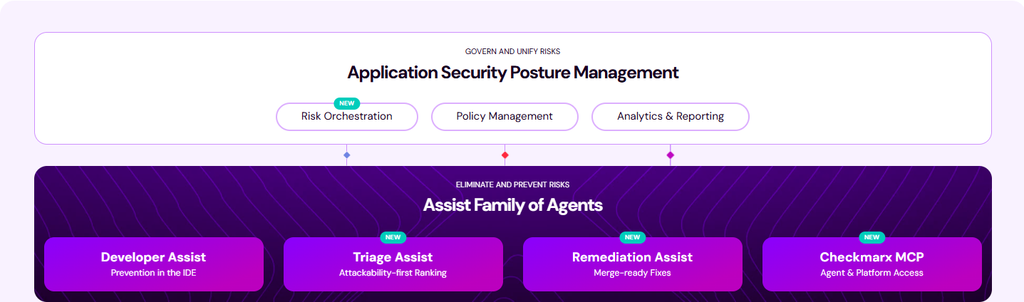
Checkmarx One brings SAST, SCA, Secrets detection, IaC scanning, Container security, and DAST together in a single platform, correlating findings across the pipeline instead of requiring separate tools at every stage.
Checkmarx SAST combines a deterministic rules engine with an AI-based engine in a single scan, reaching an F1 score of 0.64 against an industry average of roughly 0.20, with Checkmarx Fusion hybrid scanning extending that to 0.74.
The Findings Analysis Engine cuts false positives by 60% and improves fidelity 70%, directly addressing the noise that slows down pipeline gates.
For the pipeline stage specifically, Checkmarx Triage & Remediation Assist AI Agents operate where CI/CD security matters most: it classifies SAST and SCA findings by exploitability and policy context, then generates review-ready fix pull requests directly in supported GitHub repositories (without auto-merging), so remediation happens inside the same workflow the pipeline already uses, not as a separate ticket or dashboard.
Checkmarx integrates with Jenkins, TeamCity, GitHub, Azure DevOps, GitLab, Bitbucket Pipelines, CircleCI, Bamboo, and Codebuild, so security runs as a native step in the pipeline rather than a bolt-on tool. See the full list of CI/CD integrations.
Get Your Custom Checkmarx One Demo!
Get everything your enterprise needs to integrate AppSec across every stage of the SDLC and build a successful AppSec program.
Book a Custom DemoDiscover Checkmarx One
Developers can learn as they work, empowering them to use the workflows and CI/CD tools they are used to, and all without friction — aiding a better relationship between development, security, and operations teams, fostering true DevSecOps trust.
Learn more about our CI/CD security solutions by requesting a demo of Checkmarx One.